
Two models dominate how sites organize topical content: topic clusters and content silos. Most guides only cover clusters. That’s half the decision.
The wrong content hub architecture fragments your topical signal across disconnected pages. The right one compounds it – each new page strengthens every other page in the structure. Choosing between these models is one of the first decisions in any semantic SEO strategy, and most practitioners make it by default rather than by design.
This guide covers both architectures, the comparison between them, and when each one fits. It goes past strategy into technical implementation: URL structure, internal linking rules, schema reinforcement, and validation in Google Search Console.
What’s the Difference Between Topic Clusters and Content Silos?
Both models solve the same problem – organizing content so Google sees a topic, not a pile of loosely related pages. They solve it differently. The difference is in the linking topology, and that topology changes how Google’s crawler maps the relationships between your pages.
Topic Clusters: Hub-and-Spoke Linking
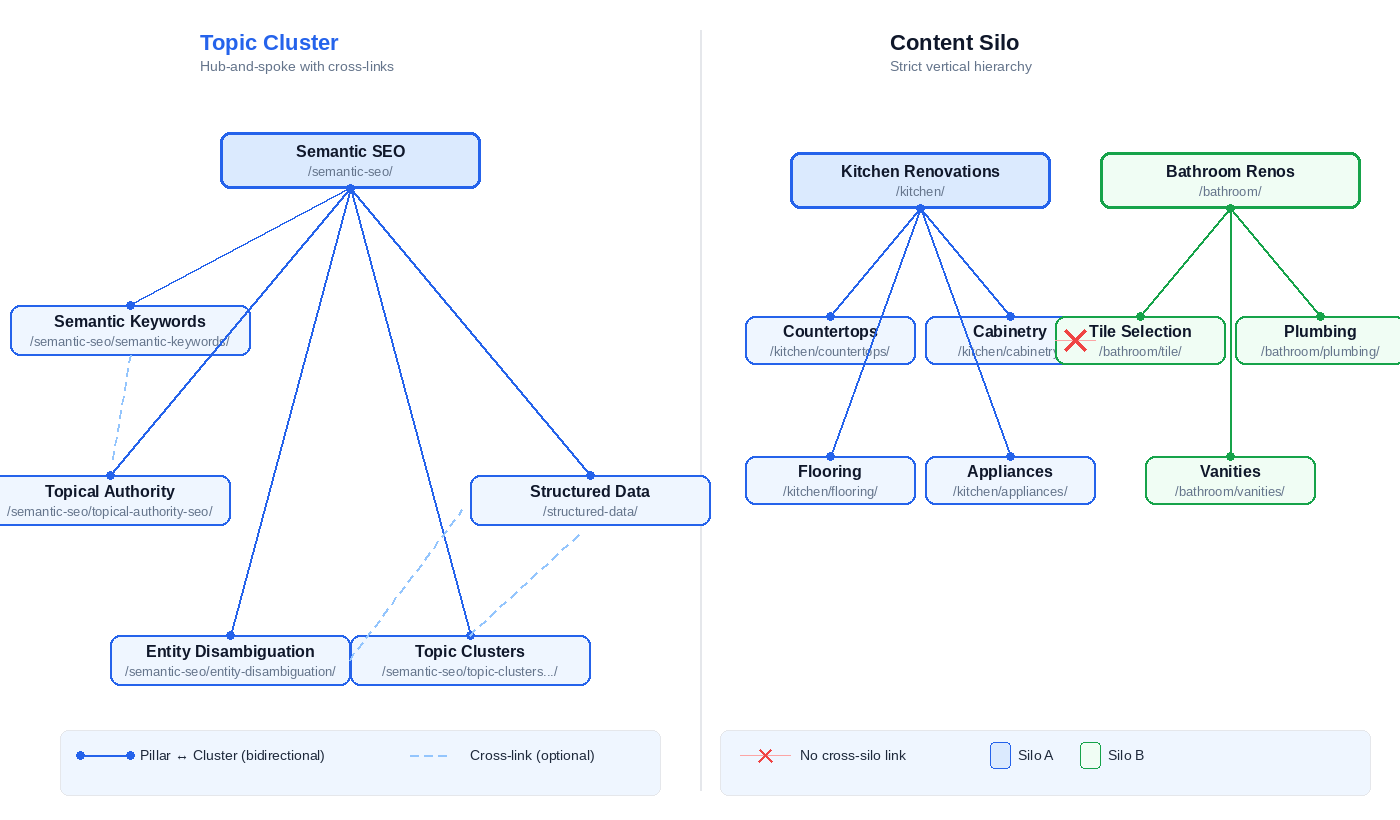
A topic cluster has three components. One pillar page covers the full scope of a topic at summary depth. Multiple cluster articles each cover a specific sub-topic with implementation-level detail. Internal links connect them bidirectionally – every cluster article links to the pillar, the pillar links out to every cluster article.
The linking is flat. There’s no strict hierarchy enforcing which pages can link to which. Cluster-to-cluster cross-links are permitted and encouraged when two sub-topics share a relationship. A cluster article about entity disambiguation can link directly to a cluster article about structured data if the reader benefits from that connection.
The topology looks like a wheel. The pillar is the hub. Cluster articles are spokes. But unlike a physical wheel, the spokes also connect to each other.
Content Silos: Strict Vertical Hierarchy
A content silo groups pages into categorical verticals. Each silo operates as an independent unit. Internal links flow within the silo – parent to child, child to parent, sibling to sibling within the same category. Cross-silo linking is minimized or avoided entirely.
The structure is hierarchical. A silo about “kitchen renovations” contains pages about countertops, cabinetry, flooring, and appliances. Those pages link to each other and to the silo’s parent page. They don’t link to pages in the “bathroom renovations” silo, even if the topics share overlapping concepts like tile selection or plumbing.
The logic: isolation concentrates topical relevance within each vertical. Every internal link stays on-topic. No link equity leaks to unrelated content.
How Google Reads Each Structure
Google discovers your site’s information architecture through internal links. According to Google’s documentation on how Search discovers and understands content, Google follows links between pages to find new content and to understand the relationships between pages on a site. Google’s docs don’t reference “topic clusters” or “content silos” – those are practitioner frameworks. But the link topology each model creates is exactly what Google’s crawler reads.
Clusters signal breadth through cross-linking density. When ten pages about related sub-topics all link to each other and to a central hub, Google sees a densely connected graph around one topic. The signal: this site covers semantic SEO from multiple angles, and every angle reinforces the others.
Silos signal depth through vertical isolation. When a category contains eight pages that link only within that category, Google sees a tightly scoped vertical with no topical dilution. The signal: this site covers kitchen renovations thoroughly, and nothing in the linking structure pulls attention elsewhere.
The right choice depends on your content, your topics, and whether your sub-topics benefit from cross-navigation or not.
When Should You Use Topic Clusters vs Content Silos?
It depends on three things: how related your sub-topics are, how large your site is, and what type of content you publish.
Decision Factors
Topic relatedness is the strongest signal. If your sub-topics benefit from cross-navigation – a reader learning about entity SEO also needs disambiguation, which also connects to structured data – clusters win. The cross-links between those pages reinforce each other because the topics share real entity relationships. If your content categories are genuinely distinct (recipes, travel guides, and personal finance on a lifestyle site), silos prevent one category from diluting the topical signal of another.
Site scale determines scope. A small-to-medium site covering one or two topic verticals fits the cluster model cleanly. One pillar, a handful of cluster articles, bidirectional links. A large site with multiple unrelated verticals needs silos at the category level – otherwise you’re cross-linking pages that have no topical connection, and that weakens the signal for all of them. The compounding effect that makes building topical authority work depends on keeping links within a coherent topic boundary.
Content type matters more than most guides acknowledge. Informational and educational content clusters naturally – the reader moves between related concepts and each page adds context to the others. Transactional and product content need more care. Linking your running shoes category to your marathon training blog strengthens both pages – they share entities like distance running and athletic footwear. Linking your running shoes category to your home office furniture blog does nothing for either. Product-to-informational links work when the entity relationship is real. Without that relationship, keep product taxonomies in their own silo.
The Hybrid Model
Most real implementations combine both. Silos at the vertical level, clusters within each silo.
Squin.org runs this way. Three pillar-level verticals – Semantic SEO, Structured Data, SEO Tools – each function as a silo with clear category boundaries. Inside each vertical, a topic cluster organizes the pillar page and its cluster articles with bidirectional linking. Cross-pillar links exist, but they’re deliberate and sparse. A structured data article links to the semantic SEO pillar only when the reader needs that context.
The rule: silo boundaries should map to genuinely distinct topic verticals. Clusters within each silo should share entity relationships. If two pages in the same cluster don’t share at least one entity, they probably belong in different clusters.
Choosing the model is the strategic decision. Planning what goes inside the cluster is the next one – and that’s where most practitioners start wrong, by grouping keywords instead of mapping entities.
How Do You Plan a Topic Cluster Around Entities, Not Keywords?
Most topic cluster guides start with keyword research. Open your favorite tool, export a list of related phrases, group them by similarity, assign each group to a page.
That process produces clusters that cannibalize.
Why Keyword-Based Clustering Breaks Down
Keyword research tools group by string similarity and search volume. “Schema markup tutorial” and “schema markup examples” look like two separate cluster pages in a keyword tool. They share a parent topic, different modifiers, different search volumes. But they describe the same content need – a page that teaches schema markup implementation should include working examples. Splitting them creates two thin pages competing for the same queries instead of one comprehensive page that ranks for both.
This happens across entire clusters. Keyword-based grouping asks “what phrases do people search?” The output is a list of strings organized by linguistic similarity. Entity-based topical mapping asks a different question: “what things does this topic require me to cover?” The output is a map of concepts organized by how they relate to each other.
The difference matters because of how Google processes your content. Google resolves the words on your page to entities – distinct, identifiable things in its Knowledge Graph, like organizations, concepts, or people. It still uses lexical retrieval for the initial matching phase, but layers entity resolution on top. That entity layer is what determines whether your cluster pages cover distinct concepts or compete for the same queries. Two keyword variations pointing to the same entity belong on one page. Two distinct entities – even if they share keywords – need separate pages. Keyword tools can’t make that distinction. An entity map can.
Building a Cluster from an Entity Map
Start with your core entity. That’s your pillar topic. Then map outward: what related entities define this topic? Each distinct entity – or distinct entity relationship – becomes a potential cluster page.
Squin.org’s semantic SEO cluster shows how this works in practice. The core entity is semantic SEO (the pillar). The related entities that define the topic: Knowledge Graph, topical authority, entity disambiguation, structured data, NLP models like BERT. Each of those is a distinct node in Google’s entity graph with its own attributes and relationships. Each became a cluster article.
That cluster wasn’t planned from a keyword export. It was planned from Knowledge Graph-based clustering – identifying which entities the topic requires and building a page for each one. The process for building that map is covered in our entity map guide (coming soon). The research methodology for identifying which entities matter – and which are just tangentially related terms – is covered in our guide to find and map semantic keywords.
The practical test for whether something deserves its own cluster page: does it represent a distinct entity that requires dedicated depth to cover properly? If you can cover it in a section of the pillar or another cluster article, it’s not a separate page. If it needs its own implementation walkthrough, code examples, or validation steps, it’s a cluster article.
Entity-based content hubs produce clusters where every page covers a unique concept and no two pages compete for the same queries. That’s the structural advantage over keyword grouping. But the plan only works if the implementation matches – URL structure, internal linking, and schema all need to reinforce the architecture you’ve designed.
How Do You Implement a Topic Cluster on Your Site?
Planning the cluster is strategy. Getting it onto your site is engineering. The decisions you make about URL structure, internal linking, and schema determine whether Google reads your cluster as a connected topical unit or a collection of unrelated pages.
URL Structure and Taxonomy
Two options for your semantic site structure: flat or nested.
Flat URLs put every article at the same depth: /blog/semantic-keywords/, /blog/topical-authority-seo/, /blog/entity-disambiguation-seo/. The cluster relationship exists only through internal links. Nothing in the URL signals which pillar a cluster article belongs to.
Nested URLs declare hierarchy directly: /semantic-seo/semantic-keywords/, /semantic-seo/topical-authority-seo/, /semantic-seo/entity-disambiguation-seo/. The pillar slug is in the path. Users can parse the structure from the URL alone. Google’s URL structure documentation doesn’t specify hierarchy as a ranking requirement – but nested paths reinforce your breadcrumb navigation and BreadcrumbList schema, giving Google a consistent structural signal that matches your linking architecture.
In WordPress, the implementation is straightforward. Create a category for each pillar with a slug matching the pillar page’s URL. Go to Settings → Permalinks and set your permalink structure to /%category%/%postname%/. Assign each cluster article to its pillar’s category. The CMS generates the nested URL automatically.
One detail: the pillar page and the category are separate objects in WordPress. The pillar is a Page with the slug /semantic-seo/. The category is a taxonomy term with the same slug. Cluster articles are Posts assigned to that category, which nests them under the pillar’s path. WordPress serves the Page by default when the pillar URL is requested, which is what you want. If the pillar URL serves the category archive instead of your Page, a slug collision is overriding the default priority – rename the category slug slightly (e.g., semantic-seo-articles) or use a plugin to remove the category base from post URLs.
One constraint: a WordPress post assigned to multiple categories produces unpredictable URL behavior. Each cluster article should belong to exactly one pillar category. If a page genuinely bridges two pillars, pick the primary one for the URL and use internal links for the secondary connection.
If you’re migrating an existing site from flat to nested URLs, the switch requires a 1:1 redirect map from every old URL to its new nested path, plus an internal link audit to update hardcoded URLs. After the switch, crawl the site and compare the redirect map against your internal links – check for redirect chains, loops, or cluster pages that still point to old flat URLs. Don’t change permalink structure on a live site without redirect coverage – the ranking volatility from broken URLs can take months to recover from. For new sites, start nested.
Internal Linking Rules
Three link directions define the cluster topology. Each has different rules.
Pillar → cluster. The pillar page links to every cluster article in the cluster. Anchor text should name the cluster article’s specific sub-topic – “how to find and map semantic keywords,” not “read more” or “click here.” The pillar page is a hub. Every outbound link tells Google what the cluster covers.
Cluster → pillar. Every cluster article links back to the pillar exactly once. Place it where the pillar topic naturally provides context – usually in the opening paragraph or the first section that references the broader topic. The page you’re reading right now links to the semantic SEO pillar in the opening. That’s the pattern. Not a CTA at the bottom. A contextual reference where the reader needs it.
Cluster → cluster (cross-links). Link between cluster articles when the two topics share an entity relationship and the reader benefits from the connection. An article about entity disambiguation links to an article about structured data because disambiguation uses about properties in schema. Not every cluster article needs to link to every sibling. Force a cross-link where no entity relationship exists and you dilute the signal for both pages.
Anchor text matters across all three directions. Use the cluster article’s target topic as anchor text. “Building topical authority” – not “semantic SEO.” Specific anchor text tells Google what the target page covers. Generic anchor text tells Google nothing.
What to avoid: linking to cluster articles in unrelated pillars without topical justification. Cross-pillar links aren’t forbidden – they’re just held to a higher standard. The link should exist because a reader on that page needs that information, not because you want to distribute link equity.
Schema That Reinforces Cluster Architecture
Internal links declare relationships implicitly. Schema markup declares them explicitly. Two schema types reinforce your cluster architecture directly.
BreadcrumbList tells Google your page’s position in the site hierarchy. For a cluster article nested under a pillar, the breadcrumb trail reads: Home → Pillar → Cluster Article. That matches your URL structure, your internal linking, and your category taxonomy. Google’s BreadcrumbList documentation specifies the required properties.
A BreadcrumbList for this page looks like this:
{
  "@context": "https://schema.org",
  "@type": "BreadcrumbList",
  "itemListElement": [
    {
      "@type": "ListItem",
      "position": 1,
      "name": "Semantic SEO",
      "item": "https://squin.org/semantic-seo/"
    },
    {
      "@type": "ListItem",
      "position": 2,
      "name": "Topic Clusters vs Content Silos",
      "item": "https://squin.org/semantic-seo/topic-clusters-vs-content-silos/"
    }
  ]
}
This example omits the homepage as position 1. Most CMS plugins (including Rank Math) include it. Both approaches are valid per Google’s documentation. The name values should match the H1 or main heading of each target page – swap these for your own titles.
The second reinforcement is Article schema with an about property pointing to a shared parent entity. When the pillar page and every cluster article declare about referencing the same Wikidata entity, Google gets an explicit signal that these pages cover one coherent topic. The entity connection exists in the markup, not just in the content.
A minimal Article schema with the about property – showing how a cluster article declares its parent entity:
{
  "@context": "https://schema.org",
  "@type": "Article",
  "@id": "https://squin.org/semantic-seo/topic-clusters-vs-content-silos/#article",
  "headline": "Topic Clusters vs Content Silos",
  "about": {
    "@type": "Thing",
    "@id": "http://www.wikidata.org/entity/Q180711",
    "name": "Search engine optimization",
    "sameAs": "https://en.wikipedia.org/wiki/Search_engine_optimization"
  }
}
The local @id on the Article lets other schema nodes on the page – your BreadcrumbList, FAQPage, or author references – point back to this article object by URI. The about block is what ties the cluster together. The pillar page uses the same about with the same Wikidata @id. So does every other cluster article in the group. That shared URI – http://www.wikidata.org/entity/Q180711 – is the machine-readable signal that these pages cover one coherent topic. If your pillar declares one entity and a cluster article declares a different one, Google sees two separate topics instead of a connected cluster.
The @type is Thing because search engine optimization doesn’t map to a more specific schema.org class. For entities that do – a Person, Organization, or Product – use the specific type instead.
Three layers now align: your URLs declare the hierarchy, your internal links create the topology, and your schema confirms both in machine-readable code. That alignment is what separates a topic cluster that Google treats as a topical unit from a set of pages that happen to link to each other.
Validating cluster performance requires signals more specific than rank tracking.
How Do You Validate That a Topic Cluster Is Working?
Rankings improving for your target keyword isn’t the signal. The signal is Google treating your cluster as a topical unit – associating your site with the broader concept, not just individual pages with individual queries.
Five checks tell you whether that’s happening.
GSC query cluster impressions. In Google Search Console, go to Performance → Search Results → click the “+” filter → select “Queries containing” → enter your pillar topic and key entity names as separate filters. For pattern-based matching, use “Custom (regex)” in the filter dropdown. To isolate cluster-specific gains from site-wide trends, add a second filter: Page → “Custom (regex)” → enter a pattern matching your cluster’s URL prefix (e.g., ^https://squin\.org/semantic-seo/.*). That limits the data to pages within the cluster. Export the results and compare date ranges to track impression expansion over time. The UI caps exports at 1,000 rows – for larger clusters, use the GSC API or BigQuery export. The signal you’re looking for: impressions appearing for queries you never explicitly targeted. If your cluster covers semantic SEO, topical authority, and entity disambiguation, and you start gaining impressions for “knowledge graph optimization” without publishing a page on that exact phrase – topical authority is compounding. Google is associating your site with the concept, not just the keywords you wrote about.
Impression expansion without new content. Related but distinct. If existing cluster pages start capturing new query variations without you publishing additional pages, your cluster architecture is working. The pages you already have are earning broader visibility because Google sees them as part of a comprehensive topical unit. Track this by comparing query counts per page over time in GSC. A page that matched 40 queries last month and matches 65 this month – with no content changes – is benefiting from the cluster’s collective signal.
Entity salience consistency. Run spot-checks on your cluster pages through Google’s Cloud Natural Language API. The pillar topic entity should appear with measurable salience across every cluster page, not just the pillar itself. The absolute score matters less than whether the entity appears at all. Your pillar topic doesn’t need to be the highest-salience entity on a cluster page – the cluster article’s own sub-topic should lead. But if a cluster article about entity disambiguation returns zero salience for “semantic SEO,” the content isn’t reinforcing the cluster connection. The fix is usually editorial – mention the parent topic in context at least once, early in the article. Not as keyword stuffing. As a natural reference that places the sub-topic within the pillar’s scope.
Crawl depth. Use a crawler to verify that every cluster page is reachable within two to three clicks from the pillar. Orphaned cluster pages – pages the pillar doesn’t link to, or pages buried behind pagination and archive templates – break the architecture. If Googlebot can’t follow the link path from pillar to cluster article, the structural signal doesn’t exist.
Rich result coverage. Check GSC’s Enhancement reports for the schema types you’ve deployed across the cluster: BreadcrumbList, Article, FAQPage. Valid markup across every cluster page confirms that Google is reading your structural declarations. Errors or missing types on specific pages indicate gaps where the machine-readable layer doesn’t match your linking architecture.
None of these checks require expensive tools. GSC is free. The NLP API offers 5,000 units per month on the free tier. A crawler like Screaming Frog’s free version handles sites up to 500 URLs.
Common Mistakes That Break Topic Clusters
Every mistake below shows up repeatedly in audits. All are avoidable.
1. Building clusters around keywords instead of entities. Keyword tools group “schema markup tutorial,” “schema markup guide,” and “schema markup examples” into three separate cluster pages. An entity map recognizes that all three describe the same content need – one page covering schema markup implementation with worked examples. Keyword-grouped clusters produce five pages competing for variations of the same query. Entity-grouped clusters produce five pages that each own a distinct concept. The cannibalization isn’t a content quality problem. It’s an architecture problem.
2. Pillar pages too thin to function as hubs. A 500-word pillar that links out to ten cluster articles doesn’t signal topical authority. It signals a table of contents with no substance. The pillar needs to cover the full scope of the topic at summary depth – enough that Google recognizes it as the structural center of the cluster. Cluster articles go deep on sub-topics. The pillar goes wide across the entire topic. If your pillar is thinner than your cluster articles, the architecture is inverted.
3. Missing cluster-to-cluster cross-links. Clusters where every page links to the pillar and back – but never to a sibling – create a star topology with no lateral connections. When two cluster topics share an entity relationship, a cross-link reinforces the topical signal for both pages. A cluster article on entity disambiguation should link to the structured data article if disambiguation uses about properties in schema. Without that cross-link, the relationship exists in the content but not in the link graph.
4. Cross-linking between unrelated clusters. The opposite problem. Linking your semantic SEO cluster articles to your social media marketing content – with no topical bridge between them – dilutes the signal for both clusters. Internal links within a cluster should stay within the topic. Cross to another cluster only when a genuine entity relationship exists and the reader benefits from following the link.
5. Schema declaring different about entities across pages that should share one. If your pillar’s Article schema declares "about": "Search engine optimization" and a cluster article declares "about": "Digital marketing", Google sees two different topics. Those pages aren’t part of the same cluster in the machine-readable layer. Cluster pages should share the parent entity in their about or mentions properties – using the same Wikidata URI across the entire cluster.
6. Set-and-forget architecture. Publishing five cluster articles, linking them to the pillar once, and never expanding. Topical authority compounds with consistent additions. A cluster that stopped growing eighteen months ago tells Google your coverage of the topic stopped too. New sub-topics emerge. Existing articles need updates.
Frequently Asked Questions
What are topic clusters in SEO?
A topic cluster is a group of interlinked pages organized around a central pillar page. The pillar covers a broad topic. Cluster articles each cover a specific sub-topic in depth. Internal links connect them bidirectionally. The structure signals to Google that your site covers the topic comprehensively – not just one keyword within it.
What is the difference between a topic cluster and a content silo?
A topic cluster uses hub-and-spoke linking – one pillar, multiple clusters, bidirectional links, and cross-links between related clusters. A content silo uses strict hierarchical separation – content grouped into categories with minimal cross-category linking. Clusters work best for tightly related topics. Silos work better for genuinely distinct content verticals.
How many cluster articles does a topic cluster need?
There’s no fixed number. The cluster should cover every distinct entity and sub-topic that defines the pillar topic. For a narrow topic, that might be 5–7 articles. For a broad one, 15–20. The test: if a sub-topic requires its own dedicated page to be covered at practitioner depth, it’s a cluster article. If it can be covered in a section of the pillar, it stays there.
Can a page belong to more than one topic cluster?
It can, but it shouldn’t be the norm. A page that sits in two clusters dilutes its topical signal for both. If a page genuinely bridges two topics – like a “structured data for semantic SEO” article bridging two pillars – make the primary cluster assignment explicit through URL structure and BreadcrumbList schema, and use the secondary cluster connection as a cross-link only.
Where This Fits
Topic clusters and content silos organize the link topology. The entity map underneath decides whether Google reads that topology as a coherent topic or a set of loosely connected pages. For the entity mapping process that drives cluster planning, see our [entity map guide] (coming soon). For the research methodology behind identifying which entities to cover, see the semantic keywords guide.