
Most “best SEO tool” lists are useless to practitioners. They rank Grammarly alongside WordLift as if they solve the same problem. They don’t. If a tool cannot extract an entity, map a relationship, or validate a node, it is not a semantic SEO tool.
Search “semantic SEO tools” right now. You’ll find lists padded with keyword research platforms, readability checkers, and backlink analyzers that have no entity, NLP, or structured data capability at all.
The reason this matters: Google’s systems no longer match keywords to pages. They identify entities, understand relationships between them, and use that graph of meaning to rank content. Your tools need to work at that same level.
This guide evaluates tools against four specific capabilities. Not feature lists. Not pricing tiers. Four things that matter:
- Entity extraction – can the tool identify entities using NLP?
- Topic and knowledge graph mapping – can it model relationships between concepts across your site?
- Schema automation and validation – can it generate, test, or audit structured data?
- NLP-based content optimization – does it score content against an entity or topic model, not just term frequency?
If a tool doesn’t do at least one of those four things, it’s not in this guide. If you need the foundations behind why these capabilities matter, start with our complete semantic SEO guide.
Here’s what made the cut and why.
60-Second Summary
Most SEO tools were built for keywords. Semantic SEO requires tools built for entities, topics, and structured data. Different problem, different toolset.
Four capabilities define a semantic SEO tool: entity extraction using NLP, topic and knowledge graph mapping, schema automation and validation, and NLP-scored content optimization. If a tool doesn’t do at least one of these, it’s not semantic.
The tools that actually perform entity work are a short list. InLinks, WordLift, and Kalicube Pro are the dedicated platforms. Google’s own Cloud NLP API and Knowledge Graph Search API are the primary data sources everything else builds on. The rest – Surfer SEO, Clearscope, Frase, MarketMuse – are content optimization and topic modeling tools. Useful. But not entity-native.
This guide categorizes every tool by what it actually does, maps them to your workflow, and links to dedicated reviews and implementation guides. If you only read one section, read “How Do You Build a Semantic SEO Toolstack?” – it maps tools to workflow stages with budget tiers from free to enterprise.
Before the tools, the framework that separates them.
Table of Contents
What Defines a Semantic SEO Tool in 2026?
A tool qualifies as “semantic” when it works with meaning, not just strings. That sounds abstract. Here’s the concrete version: it needs to do at least one of four things that keyword-based tools cannot.
Entity Research. The tool uses natural language processing to extract named entities from text – people, organizations, places, concepts – and distinguish between them. “Apple” the company and “apple” the fruit are different entities with different Knowledge Graph IDs. A semantic tool knows which one your content is about. A keyword tool sees the same string. The underlying technology matters here: tools in this category run on Google’s Cloud NLP API, proprietary NLP models, or open-source frameworks like spaCy. If the tool can’t tell you which entities it found and what model extracted them, it’s doing keyword matching with better marketing. For a full explanation of what entity SEO means in practice, see our entity SEO explainer.
Topic Architecture. The tool maps relationships between concepts across your site. It identifies topic clusters, finds content gaps, and models how entities connect to each other. The data source varies: some tools build proprietary topic models from SERP analysis, others use embedding-based similarity, and a few construct actual graph databases. The output should be a map of what your site covers and what it’s missing – not just a list of keywords to target.
Content Grading. Tools score your work against a model of what top-ranking pages cover. The critical question is which model the tool uses. TF-IDF variants measure term frequency against a corpus. This is the legacy approach. NLP-based models extract specific entities and topics. The current 2026 standard uses LLM-based embeddings to measure semantic similarity through vector distance. A score of 85 in one tool means something completely different from an 85 in another. These numbers are not interchangeable because the underlying architectures are not the same. Clearscope uses IBM Watson and Google’s NLP API. Surfer uses a proprietary NLP model. MarketMuse relies on a patented topic-modeling graph. You must know which signal you are chasing before you try to optimize for it.
Schema Automation. The tool generates, deploys, validates, or audits structured data markup – specifically JSON-LD against the schema.org vocabulary. This ranges from CMS plugins that auto-generate Article markup to crawlers that extract and validate structured data across thousands of pages. The API distinction matters: some tools call Google’s Rich Results Test API internally, others run their own validators against schema.org’s type hierarchy.
Here’s what doesn’t qualify. Rank trackers that report position changes. Backlink analyzers that measure link authority. Readability checkers that count syllables. These are useful SEO tools. They are not semantic SEO tools. The same applies to keyword research platforms unless they have a dedicated entity or NLP module – and most don’t.
Some tools span multiple categories. InLinks does entity research, topic architecture, and schema automation in a single platform. MarketMuse straddles topic architecture and content grading. The taxonomy is about capabilities, not products. Here’s how the tools in this guide map to each category:
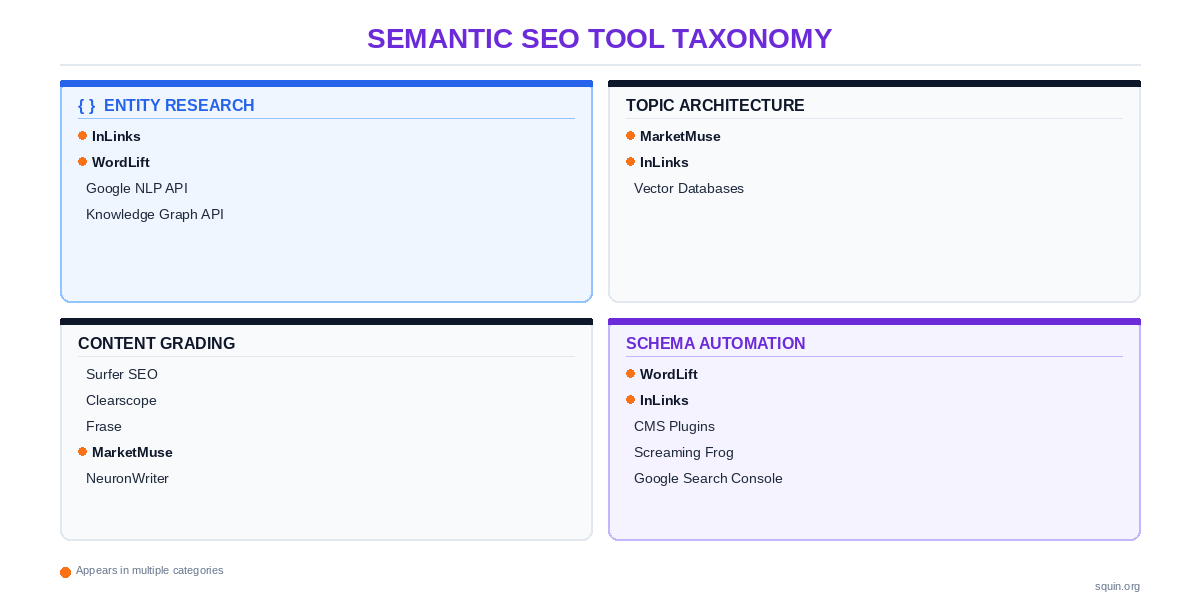
Tools appearing in multiple columns do multiple things. That’s the point. The rest of this guide walks through each column, starting with the most foundational capability – the one every other category depends on.
Which Tools Best Extract and Analyze Entities?
Entity extraction is where semantic SEO starts. Before you can map topic architecture, optimize content, or generate schema, you need to know which entities exist in your content and how they relate to each other.
Three options exist for this. Two are commercial platforms with GUIs. One is a pair of APIs from Google that give you the source data every other tool is trying to approximate.
InLinks – Proprietary NLP With Site-Level Entity Graphing
InLinks runs a proprietary NLP model to extract entities from your content. It does not use Google’s model or an open-source library. This is a custom system trained on a private knowledge graph of entity relationships. Because it operates independently of Google, the entities InLinks identifies may not always match what Google Cloud NLP sees. This gap is a feature. It provides a second opinion on your content’s topical depth. You use it to build an internal knowledge graph that informs both your linking structure and your schema.
What makes InLinks different from every other tool in this guide: it connects entity extraction directly to two outputs that other platforms handle separately. First, it automates internal linking based on entity co-occurrence across your pages. If two pages share the same entities, InLinks suggests (or injects) links between them. Second, it generates JSON-LD schema markup informed by the entities it extracts. The entity graph feeds the schema. One pipeline, not two.
The limitation you need to know: because InLinks uses a proprietary model, its entity extraction results won’t always match what Google extracts. You might run the same paragraph through InLinks and Google’s Cloud NLP API and get different entity lists. That doesn’t mean InLinks is wrong. It means the models differ. Smart practitioners cross-reference both outputs and look for alignment on the entities that matter most.
You implement InLinks by adding a JavaScript snippet to your site. A central dashboard manages the entity graph and generates internal link suggestions. This script automates link injection. It also deploys schema across your pages.
Read our full InLinks review for implementation details and pricing analysis.
WordLift – RDF Knowledge Graph for Your Domain
WordLift takes a fundamentally different approach. Instead of analyzing your content and suggesting optimizations, it builds an actual knowledge graph for your domain – an RDF-based graph database where entities have properties, types, and relationships to other entities.
The underlying technology: WordLift uses its own NLP for entity extraction and connects extracted entities to external knowledge bases, primarily Wikidata and DBpedia. When you annotate content in WordLift, it creates structured data linking your page’s entities to their canonical identifiers in these knowledge bases. The JSON-LD it generates includes sameAs references pointing to Wikidata URIs, which helps Google disambiguate your entities against its own Knowledge Graph.
The output is closer to what a linked data engineer would build than what an SEO tool typically produces. If you want a content optimization score, WordLift isn’t the tool. If you want your domain to publish machine-readable entity data that Google can unambiguously map to its Knowledge Graph, it is.
Best fit: publishers and content-heavy sites that need entity-level markup at scale and have the editorial workflow to support entity annotation during content creation.
Google’s NLP and Knowledge Graph APIs – The Source Data
Every tool above runs on some NLP model. These two APIs give you output from Google’s own models. That makes them the benchmark for evaluating whether any third-party tool’s entity extraction aligns with what Google actually sees.
Google Cloud Natural Language API performs entity extraction, sentiment analysis, syntax parsing, and content classification. You send it text. It returns a list of entities with types (PERSON, ORGANIZATION, LOCATION, EVENT, CONSUMER_GOOD, and others), salience scores indicating how central each entity is to the content, and Wikipedia URLs where it can match the entity to a known entry.
Google Knowledge Graph Search API lets you query Google’s Knowledge Graph directly. You send it an entity name. It returns matching entities with Knowledge Graph IDs (MIDs), descriptions, types, and detailed URLs. This is how you check whether Google has a Knowledge Graph entry for a specific entity – and how you disambiguate between entities that share a name.
A single curl call demonstrates how accessible this is:
curl "https://kgsearch.googleapis.com/v1/entities:search?query=JSON-LD&key=YOUR_API_KEY&limit=1"
The API returns a JSON response containing the entity’s @id, name, description, and detailedDescription field with a direct Wikipedia URL. You need no SDK. You need no library dependencies. It remains a standard REST API. As of 2026, the Knowledge Graph Search API is fully supported. The standard quota is 100,000 queries per day. You only need an active Google Cloud project and an API key to start querying.
The practical takeaway: if you’re evaluating any entity SEO tool, run the same content through Google’s NLP API and compare entity lists. If a tool claims to extract entities and its output doesn’t overlap with what Google’s model returns, you need to understand why before trusting it.
See our Google NLP API for SEO guide for full implementation workflows. Our Knowledge Graph API guide walks through entity lookup, disambiguation, and how to use MID identifiers in your schema markup.
Extracting entities from individual pages is the first step. The next question is how to use that entity data to map your entire site’s topical structure – and find the gaps.
How Do You Map Topical Architecture and Content Gaps?
Entity extraction tells you what a single page is about. Topic architecture tells you what your entire site is about – and what it’s missing.
The goal here is structural. You need to see which entities and subtopics your site covers, how they connect, and where the gaps are. A topic cluster (SEO content organization strategy that groups related web pages around a central “pillar” page) isn’t just a group of articles that share a keyword. It’s a set of pages that cover related entities and subtopics thoroughly enough that Google treats your site as an authority on the parent concept.
Three approaches exist for this. One is established, one is cross-functional, and one is emerging.
MarketMuse – Proprietary Topic Model, Not TF-IDF
MarketMuse builds a proprietary topic model trained on its own corpus of web content. It does not use Google’s NLP API. It avoids standard TF-IDF. While the full architecture remains private, the company holds patents for its semantic analysis engine. This model scores topical authority across your entire domain.
What you get: a topical authority score at the domain level. MarketMuse analyzes the top-ranking content for a topic, maps the subtopics and related concepts those pages cover, and scores your site’s coverage against that model. The output isn’t “you need more mentions of keyword X.” It’s “you cover subtopic A and B but have no content addressing subtopic C, D, or E.” That’s a content gap analysis based on topic completeness, not keyword volume.
MarketMuse also generates content briefs scored against this model. The briefs specify which subtopics and related entities a new page should cover to fill a gap in your topic architecture. This is where it overlaps with content grading tools – it straddles both categories. We cover the content scoring side in the next section.
The platform exposes its data through an API which means you can integrate topic authority scores into automated content workflows.
See our MarketMuse vs Frase comparison for a head-to-head on their topic modeling approaches.
InLinks for Topic Map Visualization
InLinks already appeared in entity extraction. It shows up again here because its topic mapping capability is a distinct feature from its NLP engine.
InLinks builds an entity-relationship graph across your entire site using its proprietary knowledge graph – not Google’s, not Wikidata’s, though it references both. It visualizes which entities your content covers, how pages connect through shared entities, and where your topic map has gaps. The output is a visual graph, not a spreadsheet. You can see clusters forming around core entities and spot isolated pages that aren’t connected to anything.
The practical value: you stop guessing which articles to write next. The entity graph shows you which relationships are thin or missing entirely. If your site covers “schema markup” and “JSON-LD” but has nothing connecting them to “Google’s Rich Results Test,” the graph surfaces that gap.
Vector Embeddings and Semantic Similarity – Where Cluster Mapping Is Heading
Topic clustering has traditionally relied on keyword co-occurrence and manually defined relationships. Vector databases change the underlying method entirely.
Here’s how it works. You convert each page on your site into a vector embedding – a numerical representation of its meaning generated by a language model. Then you measure the distance between embeddings. Pages that are semantically similar cluster together, even if they share zero keywords. Two articles about “entity disambiguation” and “Knowledge Panel accuracy” might have no overlapping terms but sit very close in vector space because they address the same underlying problem.
Tools like Pinecone, Weaviate, and Chroma aren’t SEO tools. They’re database infrastructure. But practitioners are starting to use them for content analysis: identifying semantic gaps, finding content that should be interlinked, and building topic clusters based on meaning rather than string matching.
This is emerging, not mainstream. You won’t find a “vector SEO tool” with a dashboard and a monthly subscription. You’ll find APIs and open-source libraries that require you to build your own pipeline. The payoff is precision that keyword-based clustering can’t match.
Our guide to vector databases for SEO covers implementation from scratch – including which embedding models to use and how to interpret similarity scores for content planning.
Architecture tells you what to build. The next question is how to measure whether what you’ve built actually covers the topic well enough – and that’s where content optimization platforms come in.
How Do Content Optimizers Score Semantic Relevance?
Content optimization tools are the most crowded category in this guide. Every competitor list leads with them. Surfer, Clearscope, Frase, MarketMuse – you’ve seen these names in every roundup for the last five years.
The problem: most reviews compare features and pricing without explaining what each tool actually measures. That matters because these tools don’t agree on what “optimized” means. They run different models, measure different signals, and produce scores that are not interchangeable. A score of 85 in Surfer and 85 in Clearscope reflect two different assessments of your content using two different definitions of relevance.
Here’s what’s running under the hood.
Surfer SEO vs Clearscope – What Each Model Actually Measures
Surfer SEO uses a proprietary model it calls “Surfer NLP.” In its default content editor mode, Surfer leans heavily on term frequency and word count correlations derived from top-ranking pages. It counts how often specific terms appear in competing content and scores your draft against those distributions. When you toggle NLP mode on, Surfer shifts to entity-level analysis – identifying named entities and topical concepts rather than just counting strings. These are two meaningfully different modes producing different scores from different models. Make sure you know which one you’re using.
Clearscope uses IBM Watson’s NLP for entity and topic extraction. Clearscope analyzes top-ranking content through Watson’s model, extracts the entities and topics those pages cover, and scores your content on how thoroughly you address the same semantic territory. The weighting is different from Surfer’s. Clearscope tends to reward topical breadth – covering related concepts – while Surfer’s default mode rewards term-level alignment with the existing SERP.
Neither tool is better in absolute terms. Surfer’s NLP mode gives you entity-aware scoring with granular control over which terms to target. Clearscope gives you a cleaner interface focused on topical coverage with less manual configuration. Your choice depends on whether you want to fine-tune term-level targeting or prioritize broader topical completeness.
Our Surfer SEO vs Clearscope comparison tests both tools on the same content set and compares their entity extraction outputs side by side.
Frase – SERP Analysis, Not Entity Extraction
Frase takes a different approach from both Surfer and Clearscope. Its core strength is SERP analysis: it scrapes the top-ranking pages for a query, extracts their headings, topics, and questions, and assembles that data into a research brief. AI-assisted drafting is built in.
The underlying model: Frase identifies topics and questions from SERP data using its own processing pipeline, not a dedicated NLP entity extraction model like Watson or Google’s Cloud NLP API. It tells you which topics the top results cover. It doesn’t tell you which named entities those pages contain or how salient those entities are.
That makes Frase mid-tier for semantic relevance. It’s strong for content research and fast for drafting. It’s not an entity tool. Best fit: content teams that need a research-to-draft pipeline in one interface and don’t need entity-level analysis.
For a detailed comparison of Frase’s topic-first approach against MarketMuse’s topic model, see our MarketMuse vs Frase analysis.
NeuronWriter – The Google NLP Integration Question
NeuronWriter’s stated differentiator is that it uses Google’s Cloud Natural Language API for content scoring. If true, that makes it the only content optimizer in this guide that ties its scoring directly to Google’s own entity extraction model. Every other tool in this section uses a proprietary or third-party NLP system.
NeuronWriter does not allow you to supply your own Google Cloud NLP API key. It uses a pooled connection with a set number of “Google NLP credits” allocated to each plan. This means you are relying on their caching layer and their specific implementation of the API. For practitioners who require a direct, unmediated connection to Google’s model, the only option is to use the Google Cloud NLP API directly via custom scripts or a dedicated API client.
SE Ranking and Dashword also provide content optimization modules. SE Ranking uses NLP-based scoring, but its primary architecture remains a rank-tracking and site-audit platform. Content is an add-on here, not the foundation. Dashword operates similarly to Clearscope in both interface and workflow. It lacks detailed public documentation about its underlying NLP model, which limits your ability to audit its specific scoring logic.
What Content Optimization Scores Actually Measure – A Technical Breakdown
Three scoring paradigms power every tool in this section. Understanding which one your tool uses changes how you interpret its output.
TF-IDF variants. The oldest approach. The tool analyzes top-ranking pages, counts term frequency across that corpus, and scores your content on how closely its term distribution matches. This is what most tools run in their default mode, including Surfer’s standard editor. TF-IDF tells you whether you’ve used the same words as the competition. It tells you nothing about whether you’ve covered the same entities, concepts, or subtopics. TF-IDF is well-understood, computationally cheap, and easy to game – just add more mentions of the target terms.
NLP entity extraction. The tool sends your content (and competitor content) through an NLP model – Google’s, IBM Watson’s, or a proprietary one – and compares the entity lists. This measures whether your content addresses the same named entities and concepts as top-ranking pages. It’s harder to game than TF-IDF because you can’t satisfy it by repeating strings. You need to actually cover the entities the model detects. Clearscope and NeuronWriter (if still using Google NLP) operate at this level.
LLM-based embeddings represent the current technical frontier in content optimization. Instead of matching keywords or counting entity frequency, these tools convert your content into high-dimensional vectors. They then measure semantic similarity through vector distance. This captures relationships that traditional NLP cannot-your content can be semantically relevant to a topic even if it shares zero specific terms or named entities with the competitor set. In 2026, this is no longer a theoretical “signal.” Major platforms have fully integrated embedding-based scoring. MarketMuse uses a patented fusion of knowledge graphs and vector embeddings. NeuronWriter now provides a dedicated “AI Score” that evaluates content specifically for its “understandability” by LLMs. Surfer SEO has transitioned to a “Next-Gen NLP” model that combines its traditional correlation data with vector-based semantic analysis.
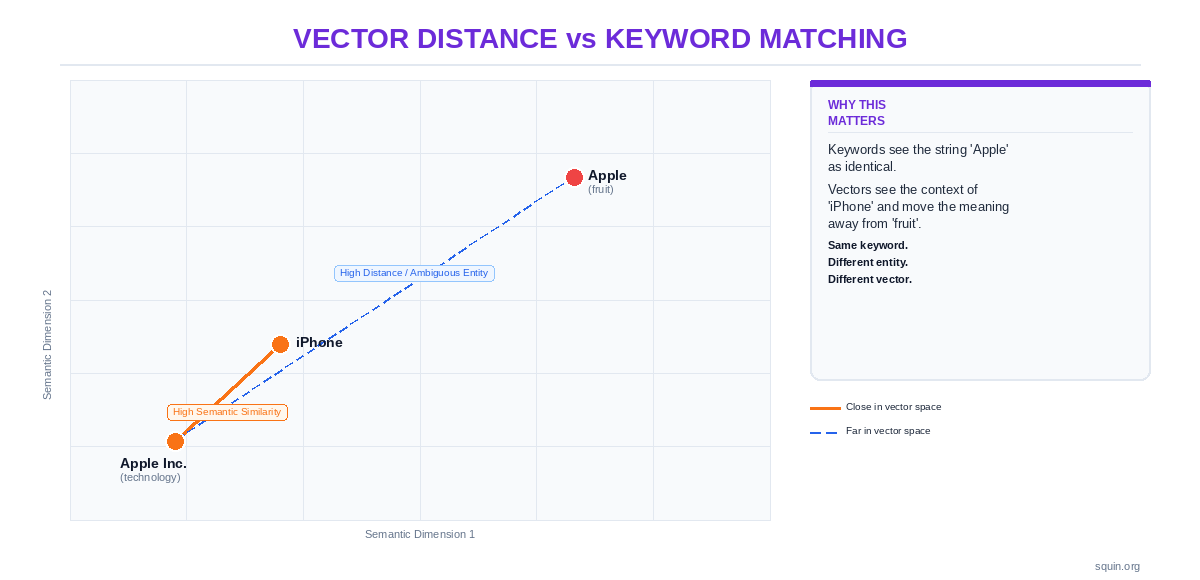
The practical takeaway: don’t chase scores. Use them to find what’s missing. If Clearscope shows you’re missing entities that every top-ranking page covers, add coverage for those entities. If Surfer’s NLP mode flags concepts you haven’t addressed, evaluate whether they belong in your content. Then write for the reader. The score is a diagnostic tool, not a target.
Content grading tells you how well a page covers its topic. The next question is structural: how do you make that content machine-readable through structured data – and which tools handle the generation, testing, and auditing?
How Do You Automate and Validate Structured Data?
Structured data is where semantic SEO becomes machine-readable. Everything in the previous sections – entity extraction, topic architecture, content optimization – improves how Google understands your content. Schema markup makes that understanding explicit. You’re telling Google directly: this page is about this entity, written by this person, published by this organization.
The tooling here splits into two workflows: generation (creating the markup) and validation (making sure it’s correct). Most practitioners need both. The tools that handle each are different.
For the full strategic picture on schema implementation, see our complete schema markup guide.
Schema Markup Generators – Manual, CMS, and AI-Assisted
Three approaches exist for generating JSON-LD. Each trades control for convenience.
Manual writing gives you complete control over every property and @id reference. You write JSON-LD directly against the schema.org type hierarchy. This is the right approach when you need nested entity relationships, custom sameAs links, or schema types your CMS plugin doesn’t support. The cost is time. Hand-coding JSON-LD for hundreds of pages doesn’t scale.
CMS plugins like Yoast, Rank Math, and Schema Pro generate markup based on your page settings. They handle Article, BreadcrumbList, and Organization types well. But they struggle with complex types that require manual property mapping. FAQPage, HowTo, and Product schema still require your structured input via blocks or custom fields. These plugins do not use NLP. They use template-based logic. The system maps your CMS fields to schema.org properties using predefined rules. It is field mapping, not entity extraction.
AI-assisted generation uses LLMs to draft JSON-LD from prompts or page content. This is fast. It’s also dangerous. LLMs produce syntactically valid JSON-LD that is semantically wrong. Here’s what that looks like:
{
  "@context": "https://schema.org",
  "@type": "Article",
  "author": {
    "@type": "Person",
    "name": "Squin Editorial",
    "expertise": "Semantic SEO"
  }
}
That passes a JSON syntax check. But expertise is not a valid schema.org property on the Person type. An LLM invented it because it seemed plausible. Google’s parser will ignore it. A practitioner who doesn’t check against Google’s structured data documentation will never know the property does nothing. Always validate AI-generated schema against the schema.org vocabulary and Google’s Rich Results Test before deploying.
Our JSON-LD tutorial covers implementation from first principles – including how to structure @id references for entity graphs.
Implementing Schema Types for Specific Entities
Different schema types demand different tooling. CMS plugins handle the simple ones. The complex types usually need manual work or a specialized generator.
Article and BreadcrumbList: any major CMS plugin generates these accurately. The property requirements are straightforward and map cleanly to standard CMS fields.
FAQPage, HowTo, Product, Organization, LocalBusiness, and Video: these types have property structures that don’t map neatly to default CMS fields. FAQPage needs explicit question-answer pairs. HowTo requires ordered steps with optional images and tools. Product needs Offer objects with price, currency, and availability. Organization needs sameAs arrays pointing to authoritative external profiles. Most CMS plugins either skip these types or handle them with limited customization.
The tools in this section generate and test markup. The implementation guides below show you what correct markup looks like for each type and how to validate it:
- FAQPage schema implementation guide
- Organization schema guide – including Knowledge Panel triggers
- HowTo schema implementation guide
- Product schema implementation guide
- LocalBusiness schema guide
- Video schema implementation guide
The distinction matters: this pillar covers generators and testers. The Structured Data pillar covers strategy and code. Both link to each other. Neither replaces the other.
Google’s Rich Results Test – What It Catches and What It Misses
Google’s Rich Results Test validates a single page’s structured data against Google’s supported schema types. You paste a URL or a code snippet. It parses the JSON-LD, flags syntax errors, identifies unsupported properties, and shows which rich result types the page qualifies for. The underlying technology is Google’s own parser – the same system that processes your structured data during indexing.
What it catches: malformed JSON, missing required properties, unsupported @type values, nesting errors.
What it misses: it doesn’t validate at scale. One URL per test. It doesn’t check whether your schema accurately represents the page content – only whether the markup is syntactically correct and uses types Google supports. It can’t test pages behind authentication or login walls. And it won’t tell you that expertise property from the AI-generated example above is invalid. It will simply ignore it.
Use it for spot-checking individual pages during development. Don’t treat it as your only validation layer.
Our Rich Results Test guide covers advanced testing workflows including edge cases for dynamic rendering and JavaScript-injected schema.
Screaming Frog for Crawl-Level Schema Audits
The Rich Results Test checks one page. Screaming Frog checks your entire site.
Screaming Frog SEO Spider crawls your domain and extracts structured data from every page it finds. You can audit which pages have schema markup, which types are deployed where, which pages are missing markup entirely, and which pages have validation errors. The underlying technology: Screaming Frog renders pages (including JavaScript-rendered content) and parses the JSON-LD, Microdata, and RDFa it finds in the rendered DOM.
This fills the gap between page-level testing and site-level monitoring. The Rich Results Test gives you depth on a single URL. Google Search Console gives you aggregate error reports. Screaming Frog gives you the crawl-level inventory that connects the two: every page, every schema type, every error, in one export.
Configuration note: structured data extraction is off by default. You need to enable it in Configuration > Spider > Extraction before crawling. Without this step, Screaming Frog crawls your site but ignores the schema entirely.
Our Screaming Frog structured data audit guide walks through configuration, extraction setup, and a complete audit workflow.
Monitoring Schema Health in Google Search Console
After you’ve generated and validated your markup, you need ongoing monitoring. Google Search Console‘s Enhancement reports handle this.
GSC detects the structured data types present across your property and reports their status: valid, valid with warnings, or errors. You can see which pages Google has processed, which schema types it found, and where problems exist. The data source: Google’s own indexing pipeline. This is what Google actually sees when it crawls your pages – not what a third-party validator parses.
The limitation: there’s a delay. GSC reports on the last crawl, not the current state of your markup. If you fix an error today, the report may not reflect that fix for days or weeks until Google recrawls the affected pages. You can request revalidation after fixes to speed this up.
See our guide to validating structured data in Google Search Console for a step-by-step monitoring setup.
Generating and validating schema makes your content machine-readable. But there’s a layer above page-level markup: managing how Google recognizes your brand, your authors, and your organization as entities in its Knowledge Graph. That’s a different problem – and it requires different tools.
Which Tools Manage Entity Authority and Knowledge Panels?
Every tool covered so far works at the page or site level. Entity authority operates one level above that. It’s about how Google recognizes your brand, your authors, and your organization as distinct entities in its Knowledge Graph – and whether that recognition is strong enough to trigger a Knowledge Panel.
This is the smallest tool category in this guide. It’s also the one no competitor covers. Most “semantic SEO tool” lists skip entity authority entirely because the tooling is niche and the workflow is partly manual. But if Google can’t disambiguate your entity from every other entity with a similar name, none of your schema markup, content optimization, or topic architecture delivers its full value.
Two approaches exist. One is a dedicated platform. The other is a free, manual workflow that connects directly to Google’s data source.
Kalicube Pro – Reverse-Engineering Knowledge Panel Signals
Kalicube Pro does one thing no other tool attempts: it tracks and analyzes the signals Google uses to generate Knowledge Panels.
The underlying technology is a proprietary system that monitors your brand’s entity footprint across the data sources Google’s Knowledge Graph draws from. That includes Wikidata, Wikipedia, your official website, social profiles, and authoritative third-party mentions. Kalicube maps which signals are present, which are missing, and which are inconsistent. It then provides a workflow for strengthening or triggering a Knowledge Panel by filling those gaps.
This is not an NLP tool. It doesn’t extract entities from content. It doesn’t score your pages. What it does is treat your brand as an entity and audit Google’s confidence in that entity’s existence, identity, and attributes. The data source is Google’s Knowledge Graph itself – Kalicube tracks what Google shows in the Knowledge Panel and reverse-engineers what inputs drive those outputs.
The fit is narrow: brands that want a Knowledge Panel, organizations working on entity disambiguation (when Google confuses your brand with another entity of the same name), and practitioners building author or personal brand entities for E-E-A-T signals. If you’re not working on any of those, you don’t need this tool.
Kalicube Pro exposes its data through a dashboard that tracks your entity’s history and provides specific optimization recommendations. It also offers a proprietary API for programmatic access. This API is currently available to exclusive enterprise partners and agencies rather than as a self-serve public utility. You use it to integrate entity tracking, digital footprint audits, and Knowledge Graph visibility scores into custom reporting or automated brand-management workflows.
Read our full Kalicube Pro review for a detailed feature breakdown and use case analysis.
Wikidata Editing and Entity Reconciliation – The Free Workflow
Wikidata is a free, open knowledge base that serves as a primary data source for Google’s Knowledge Graph. If your entity has a Wikidata item with accurate claims and reliable references, Google has a structured, machine-readable record of who or what you are. If it doesn’t, you’re relying on Google to figure it out from unstructured web data.
This isn’t a tool. It’s a manual workflow. But it directly affects whether Google recognizes your entity – and it costs nothing.
The basic process: search Wikidata for your entity. If an item exists, verify that the claims (properties and values) are accurate and well-sourced. If no item exists, create one. Add claims with references that point to authoritative sources – your official website, government registries, press coverage from recognized publications. Add sameAs-equivalent properties (P856 for official website, P2002 for Twitter/X handle, P2013 for Facebook ID) that connect your Wikidata item to your verified online presence.
Your JSON-LD on-site should mirror this. When you declare an Organization or Person entity in your schema markup, the sameAs array should include your Wikidata URI:
{
  "@context": "https://schema.org",
  "@type": "Organization",
  "@id": "https://example.com/#organization",
  "name": "Example Corp",
  "url": "https://example.com",
  "sameAs": [
    "https://www.wikidata.org/wiki/Q123456789",
    "https://www.linkedin.com/company/example-corp",
    "https://x.com/examplecorp"
  ]
}
That creates a bidirectional signal. Wikidata points to your site. Your site points to Wikidata. Google can reconcile both and increase its confidence that your entity is real, distinct, and accurately described.
The caveat: Wikidata has editorial policies enforced by a community of volunteer editors. Items must meet notability guidelines. Claims must be verifiable with reliable, independent sources. Don’t create a Wikidata item for an entity that has no third-party coverage. Don’t add unsourced claims. Edits that look like spam get reverted and can get your editing privileges restricted.
Entity disambiguation is the core problem both Kalicube and Wikidata workflows solve. See our entity disambiguation guide for the full picture on how Google resolves ambiguous entities and what you can do to help.
Entity authority tools are niche. Content optimizers are common. Schema validators sit in between. The question practitioners ask next is practical: how do you combine these tools into a workflow that covers the full pipeline without redundancy or wasted spend?
How Do You Build a Semantic SEO Toolstack?
You don’t need every tool in this guide. You need the right tool at each stage of your workflow, with no gaps and no redundancy.
Semantic SEO follows a six-stage pipeline. Every stage requires a different capability. The mistake most practitioners make is buying tools that overlap on stages 3 and 4 (content optimization and schema generation) while leaving stages 1, 2, and 6 (entity discovery, topic mapping, and monitoring) completely uncovered. A $200/month content optimizer doesn’t help if you’ve never run your content through an entity extraction model to see what Google actually finds.
Here’s the full pipeline, what each stage requires, and which tools fill each slot.
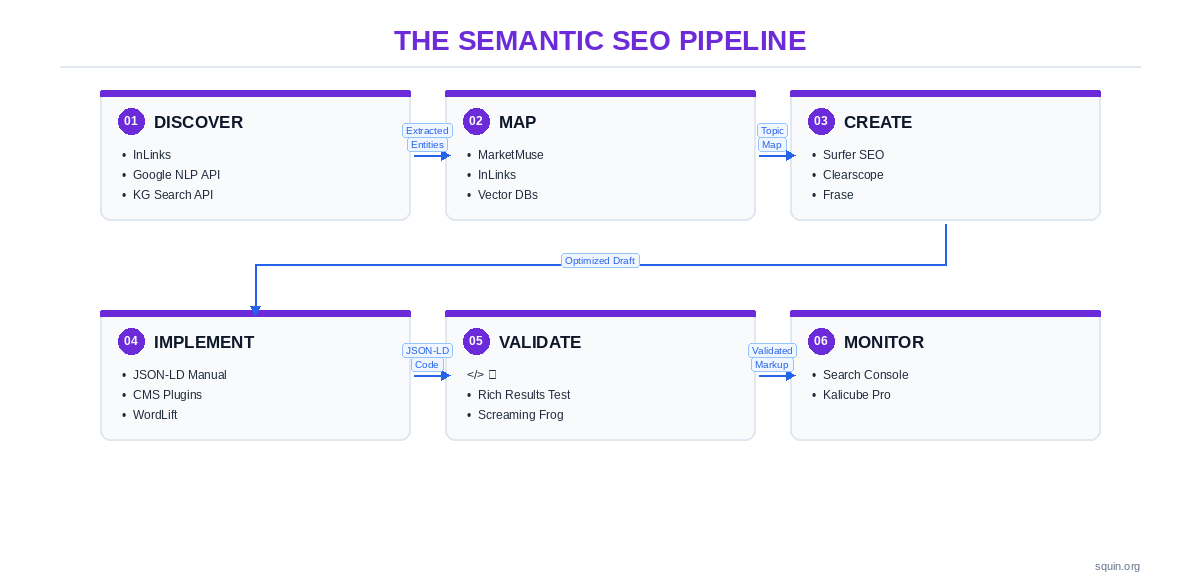
The Six-Stage Workflow – Which Tool Goes Where
Stage 1: Discover. Extract entities from your content and your competitors’ content. Identify which entities Google associates with your target topics. Tools: InLinks (proprietary NLP), Google Cloud NLP API (Google’s model), Knowledge Graph Search API (Google’s entity database).
Stage 2: Map. Build your topic architecture. Identify content gaps, cluster relationships, and missing entity coverage at the site level. Tools: MarketMuse (proprietary topic model), InLinks (entity-relationship graph), vector databases (embedding-based similarity).
Stage 3: Create. Write content scored against an NLP or topic model. Ensure entity coverage and topical completeness before publishing. Tools: Surfer SEO (proprietary NLP), Clearscope (IBM Watson NLP), Frase (SERP-derived topics), NeuronWriter (Google NLP API).
Stage 4: Implement. Generate and deploy structured data markup. Tools: manual JSON-LD, CMS plugins (Yoast, Rank Math), WordLift (RDF knowledge graph with automated JSON-LD), InLinks (entity-informed schema generation).
Stage 5: Validate. Test your structured data for errors before and after deployment. Tools: Google Rich Results Test (single page), Screaming Frog (crawl-level audit).
Stage 6: Monitor. Track schema health and entity recognition over time. Tools: Google Search Console (structured data enhancement reports), Kalicube Pro (Knowledge Panel and entity signal tracking).
Two stacks that cover every stage:
Lean stack (solo practitioner, minimal budget). Google NLP API free tier for entity discovery. Manual topic mapping using spreadsheets and the Knowledge Graph Search API for entity research. Frase or NeuronWriter for content optimization. Hand-coded JSON-LD for schema. Rich Results Test for validation. Google Search Console for monitoring. Estimated monthly cost: $0–50.
Full stack (agency or in-house team). InLinks for entity discovery and topic mapping. MarketMuse for content gap analysis and briefs. Surfer SEO for content optimization scoring. WordLift or InLinks for automated schema generation. Screaming Frog (paid license) for crawl-level schema audits. Google Search Console plus Kalicube Pro for monitoring and entity authority tracking. Estimated monthly cost: $500–1,200+.
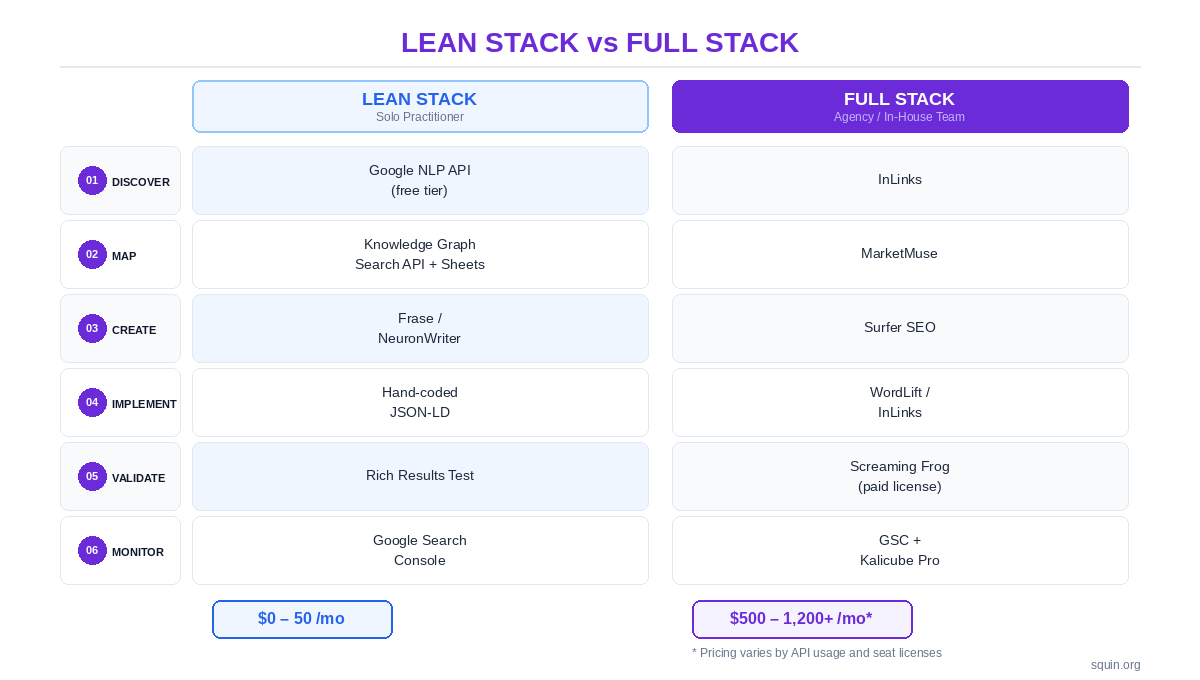
The lean stack covers every stage. The full stack automates what the lean stack does manually. Neither stack has a gap. That’s the point. A $1,000/month toolstack with no entity discovery and no schema validation is worse than a free stack that covers the full pipeline.
Budget Tiers – Free, Mid-Range, and Enterprise
Free. Google Cloud NLP API (5,000 requests/month on the free tier). Knowledge Graph Search API. Google Rich Results Test. Schema.org documentation. Screaming Frog SEO Spider (free version, up to 500 URLs). Google Search Console.
This covers more ground than most practitioners realize. Google’s own APIs give you the most authoritative entity extraction and knowledge graph data available – from the same company that runs the search engine. The Rich Results Test uses Google’s own parser. GSC reports what Google’s indexer actually found. The free tier is not a compromise. For low-volume sites, it’s the most accurate stack possible because every tool draws from Google’s own data.
Mid-range ($50–200/month). Surfer SEO, Frase, NeuronWriter, Clearscope. These add GUI-based content optimization on top of the free validation and monitoring tools. The value is speed and workflow integration – you get content scoring inside an editor instead of running API calls manually.
Enterprise ($300+/month). InLinks, MarketMuse, WordLift, Kalicube Pro. These add automation, scale, and specialized capabilities. InLinks automates entity extraction, internal linking, and schema generation in one pipeline. MarketMuse models topic authority at the domain level. WordLift builds a persistent knowledge graph. Kalicube Pro tracks entity recognition signals that no other tool monitors. The value is doing at scale what the lean stack does manually.
Knowing which tools to use is half the problem. The other half is avoiding the mistakes that waste your budget and produce misleading data – and those mistakes are more common than you’d expect.
What Are the Common Pitfalls in Semantic Tool Selection?
The tools in this guide work. The mistakes below make them useless. Every one of these is something we see practitioners do repeatedly – and every one is avoidable.
Don’t Treat Content Optimization Scores as the Target
A Surfer score of 90 means your content matches a term-frequency model built from the current SERP. It doesn’t mean your content is good. It doesn’t mean you’ve covered the right entities. It doesn’t mean Google will rank you. Content optimization scores are diagnostic tools. They show you what’s missing. They are not targets to chase. Write for the reader, use the score to check your blind spots, and move on.
Using Keyword Research Tools for Entity Research
Ahrefs and Semrush are excellent at what they do – keyword volume, difficulty scores, backlink analysis, SERP tracking – use them for that. They are not entity tools. They don’t extract named entities from content. They don’t map entity relationships. They don’t tell you whether Google recognizes “Apple” in your content as the company or the fruit. Keyword volume and entity salience measure completely different things. Don’t confuse the tools.
Deploying AI-Generated Schema Without Validation
LLMs produce JSON-LD that looks correct and passes a syntax check. It often uses invented properties, wrong @type values, or deprecated markup that Google’s parser silently ignores. That expertise property on a Person type? Not in the schema.org vocabulary. That HowTo with a difficulty field? Hallucinated. Always run AI-generated schema through Google’s Rich Results Test and verify every property against schema.org documentation.
Overlooking Google’s Free NLP and Knowledge Graph APIs
The Knowledge Graph Search API and Cloud Natural Language API are the most direct window into how Google processes entities. They’re free at low volume. They return Google’s own model output. Most practitioners don’t know these APIs exist, and they spend money on commercial tools that approximate what Google gives away.
Ignoring Wikidata as an Entity Authority Signal
Wikidata is a primary data source for Google’s Knowledge Graph. It’s not an SEO platform. It doesn’t have a content editor or a scoring dashboard. But if your brand entity isn’t in Wikidata with accurate claims and reliable references, you’re missing a signal that directly feeds the system deciding whether you get a Knowledge Panel.
Buying “Entity SEO” Tools Without Testing Extraction
Run the same 500-word paragraph through your candidate tool, through InLinks, and through Google’s Cloud NLP API. Compare the entity lists. If your candidate tool returns a list of keywords while the other two return named entities with types and salience scores, it’s not doing entity extraction. It’s doing keyword analysis with better marketing copy.
Limiting Schema Audits to Single-URL Testing
The Rich Results Test checks one URL at a time. That’s fine for development. It’s useless for auditing a 500-page site. Screaming Frog crawls your entire domain and extracts structured data from every page in one pass. Site-level inconsistencies – pages missing markup, conflicting Organization entities, schema types deployed on the wrong templates – only surface at crawl scale.
These pitfalls come up often enough that they generate their own search queries. Here are the most common questions practitioners ask about semantic SEO tools – answered directly.
Frequently Asked Questions
What is NLP in SEO?
NLP – natural language processing – is how search engines extract meaning from text. Google’s systems use NLP to identify entities, topics, sentiment, and relationships in your content. This goes beyond keyword matching. Google doesn’t just see the word “Apple” – it determines whether your content is about the company, the fruit, or the record label. Tools like Google’s Cloud NLP API let you see exactly which entities Google’s model extracts from your pages and how salient each one is. For the full picture on how this connects to search strategy, see our semantic SEO guide.
Which AI tool is best for SEO?
That depends on which workflow stage you’re solving. For entity extraction: InLinks (proprietary NLP) or Google’s Cloud NLP API (Google’s own model). For content optimization: Surfer SEO or Clearscope, depending on whether you want term-level control or topical breadth scoring. For schema generation: hand-coded JSON-LD validated against the Rich Results Test is still the most reliable approach. There is no single “best AI tool for SEO.” There’s the right tool for each stage. The toolstack section above maps specific tools to each stage with budget tiers.
What’s the difference between a semantic SEO tool and a regular SEO tool?
A regular SEO tool measures keywords, rankings, backlinks, and technical crawl health. A semantic SEO tool works with entities, topic relationships, structured data, or NLP models. The distinction is functional, not branding. Semrush and Ahrefs are adding features that touch semantic territory, but their core architecture is keyword-based. InLinks, WordLift, and Kalicube Pro are built around entities from the ground up. The taxonomy at the top of this guide defines the four capabilities that qualify a tool as semantic: entity research, topic architecture, content grading, and schema automation.
Do you need schema markup tools if you write JSON-LD by hand?
You still need validation and audit tools. Hand-coded JSON-LD gives you complete control over types, properties, and @id references. But you need the Rich Results Test to catch syntax errors and unsupported properties. You need Screaming Frog to audit schema consistency across your entire site. You need Google Search Console to monitor what Google’s indexer actually detects. Generators become necessary at scale – hand-coding JSON-LD for 500 product pages isn’t practical. A CMS plugin or InLinks handles repetitive schema types faster. Our JSON-LD tutorial covers when to hand-code and when to automate.
How do semantic SEO tools help with E-E-A-T?
Entity tools make your E-E-A-T signals machine-readable. When you add Person schema with sameAs links to an author’s Wikipedia page, LinkedIn profile, and Wikidata entry, you’re giving Google structured evidence that the author is a real, recognized entity. Organization schema does the same for your brand. Kalicube Pro goes further – it tracks whether Google has recognized your brand entity in the Knowledge Graph and identifies which signals are missing. The connection between entities and trust signals is direct: Google can’t evaluate expertise it can’t identify. See our guide on E-E-A-T and entity SEO for the full implementation strategy.
What are the best free semantic SEO tools?
Google’s own tools cover every stage of the workflow at zero cost. The Cloud NLP API free tier handles entity extraction – 5,000 requests per month. The Knowledge Graph Search API handles entity lookup and disambiguation. The Rich Results Test validates schema markup. Google Search Console monitors structured data health across your property. Screaming Frog’s free version crawls up to 500 URLs with structured data extraction. That’s a complete pipeline from entity discovery to schema monitoring. The budget tiers section above maps out the full free stack.
Complete Semantic SEO Tool Directory
Every tool, comparison, and implementation guide referenced in this pillar has a dedicated article. The directory below is organized by the four-capability taxonomy from the top of this guide – not alphabetically, not by price.
Articles marked “Coming soon” are in production. This directory updates as each guide publishes.
Entity Research and NLP
InLinks Review – Deep dive into InLinks’ proprietary NLP engine, site-level entity graphing, internal linking automation, and JSON-LD generation. Covers what it extracts, how its output compares to Google’s NLP API, and where it fits in your workflow.
Knowledge Graph API Guide – Coming soon Implementation guide for querying Google’s Knowledge Graph Search API directly. Covers entity lookup, disambiguation using MID identifiers, and how to use API responses to inform your schema markup.
Content Grading and Optimization
Surfer SEO vs Clearscope – Head-to-head comparison of two content optimizers with different scoring models. Tests both tools on the same content set and compares entity extraction outputs, scoring methodology, and practical output quality.
MarketMuse vs Frase – Coming soon Topic modeling versus SERP analysis: two approaches to content optimization. Compares MarketMuse’s proprietary topic authority model against Frase’s SERP-derived topic extraction. Covers which approach fits which content workflow.
Schema Automation and Validation
How to Use Google’s Rich Results Test – Advanced testing workflows for Google’s primary schema validation tool. Covers edge cases for JavaScript-rendered markup, dynamic content, and common false positives. Goes beyond the basics into practitioner-level testing patterns.
Screaming Frog for Structured Data Audits – Crawl-level schema auditing from configuration to error resolution. Covers enabling structured data extraction, interpreting extraction reports, and building a repeatable audit workflow for sites with hundreds or thousands of pages.
Entity Authority and Knowledge Panels
Kalicube Pro Review – Coming soon The only dedicated Knowledge Panel optimization platform. Full feature breakdown covering entity signal tracking, data source monitoring, and the workflow for triggering or improving a Knowledge Panel.
Advanced and Emerging
Vector Databases for SEO – Coming soon Using embeddings and semantic similarity for content analysis and gap detection. Covers vector database fundamentals, which embedding models to use, and how to build a content clustering pipeline from scratch.
For the strategic foundations behind these tools, see our semantic SEO guide and schema markup guide.