
Google deprecated HowTo rich results entirely in 2023 – mobile in August, desktop in September. The SERP feature no longer exists. That changes the value proposition, but it doesn’t eliminate the schema type’s usefulness.
HowTo markup still tells machines that your page contains step-by-step instructions. The benefit shifted from visible rich results to semantic structure: AI Overviews, voice assistants, and any system that needs to parse instructional content with confidence. The implementation remains straightforward. The question is whether structured data for machine comprehension justifies the effort when there’s no direct SERP visibility.
This guide covers the full HowTo implementation: every property, working JSON-LD examples, validation workflow, and the mistakes that break it. For the broader structured data context, see our schema markup guide.
What Is HowTo Schema – and Is It Still Worth Implementing?
HowTo is a schema.org type designed for sequential how-to instructions. You use it to mark up content that walks someone through a process: installing software, assembling furniture, configuring a server. The schema captures the steps themselves, plus optional properties for time estimates, required materials, tools, and costs.
Google’s HowTo structured data guidelines still document the type, but the rich result feature is gone. Google announced the mobile deprecation in August 2023, then quietly removed desktop HowTo rich results the following month. The Rich Results Test no longer generates HowTo previews. Google Search Console removed the HowTo enhancement report and search appearance filter.
So is implementation still worth it? The answer depends on what you’re optimizing for.
AI Overviews and answer engines create the primary value now. Structured steps provide high-confidence retrieval for LLMs. When Google’s generative features pull content to answer “how do I…” queries, pages with explicit step markup give the system unambiguous structure to work with. The visibility isn’t a SERP feature – it’s citation potential in AI-generated answers.
Video tutorials benefit from the integration. HowTo schema supports VideoObject nesting. If you’re producing video content with step-by-step instructions, the schema connects your written steps to video segments. This structured relationship tells Google the written steps and video describe the same process.
Voice assistants parse structured instructions. Google Assistant and similar systems can read HowTo markup to deliver step-by-step guidance. The markup provides machine-readable structure that voice interfaces consume directly.
Future-proofing has some value. Google could reinstate HowTo rich results. Sites with existing markup would be immediately eligible. The implementation cost is low enough that maintaining the markup for potential future benefit makes sense for sites already producing instructional content.
When should you skip it? If development resources are limited and your priority is visible SERP features, spend time on schema types that still generate rich results – Product, Recipe, FAQPage (for eligible sites). HowTo markup isn’t wasted, but the direct search visibility benefit no longer exists.
The decision framework: assess whether your content type benefits from AI retrieval, voice assistant compatibility, or video integration. For sites where those matter, implementation is straightforward. The next question is which schema type actually matches your content.
HowTo vs FAQPage: When to Use Which
HowTo and FAQPage schema solve different problems. The confusion between them is common because both appear on instructional content. The distinction is structural, not topical.
HowTo marks up sequential processes. The order matters. “How to change a tire” requires removing lug nuts before lifting the car – reverse those steps and you’ve created a dangerous situation. Each step depends on the previous one completing successfully.
FAQPage marks up discrete question-answer pairs. The order doesn’t matter. “What size tire do I need?” and “How often should I rotate tires?” are standalone questions. Rearranging them changes nothing about the content’s usefulness.
The test is simple: can the items be reordered without breaking the content?
No → HowTo. The sequence is the point.
Yes → FAQPage, or possibly neither schema applies.
One edge case causes consistent confusion. If the output is food, use Recipe schema – not HowTo. “How to make chocolate cake” sounds like a HowTo, but Recipe has specialized properties that HowTo lacks: nutrition, recipeYield, cookTime, recipeIngredient. Google’s Rich Results Test will accept HowTo markup on a recipe page, but you’re leaving functionality on the table. Recipe schema exists precisely because cooking instructions need more structure than generic processes.
What about pages with both types of content? A tutorial that walks through installation steps and then answers common troubleshooting questions contains both sequential and discrete content. Use both schemas. They coexist without conflict. The HowTo block marks up your step-by-step section. The FAQPage block marks up your Q&A section. Google parses them independently.
One important caveat on FAQPage: Google restricted its rich results more severely than HowTo in the same August 2023 update. FAQPage rich results now appear primarily for well-known government and health websites. For most sites, FAQPage markup still helps machines understand your content structure, but the visible SERP feature rarely displays. See our FAQPage schema guide for current eligibility details.
The decision between these types shouldn’t take long. Sequential process with dependent steps → HowTo. Standalone questions with independent answers → FAQPage. Food → Recipe. Mixed content → use multiple schemas.
The next question is which properties HowTo supports – and which ones matter for machine comprehension.
HowTo Properties: The Complete Reference
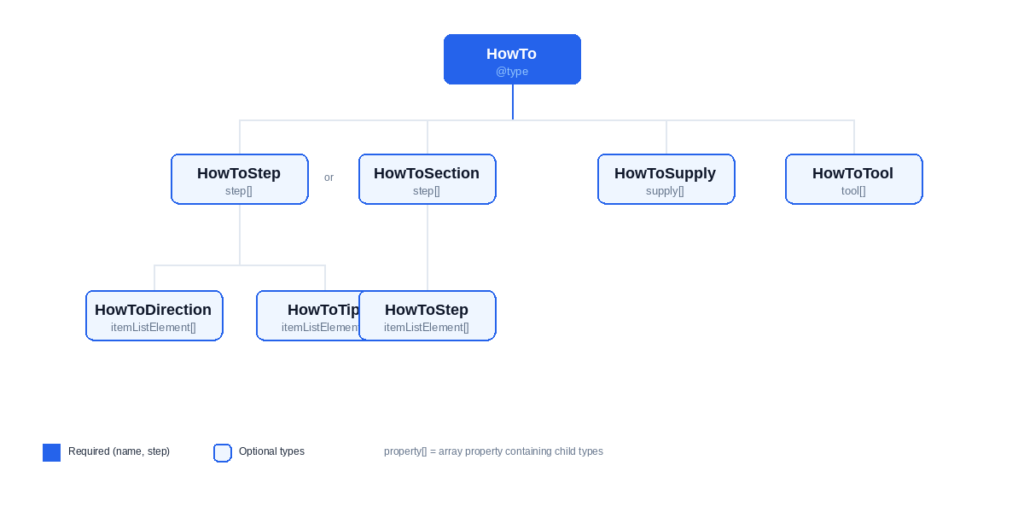
The schema.org/HowTo type has two required properties and a dozen recommended ones. Knowing which properties provide semantic value determines where you spend implementation time.
Required and Recommended Properties
Google’s HowTo structured data documentation specifies what’s mandatory versus optional. The required properties are minimal. The recommended properties add the detail that makes the markup semantically complete.
| Property | Type | Required | Semantic Value |
|---|---|---|---|
name | Text | Yes | Identifies the process |
step | HowToStep[] | Yes | Defines the sequence |
image | ImageObject or URL | No | Visual context for AI/Discover |
totalTime | Duration | No | Duration metadata |
estimatedCost | MonetaryAmount or Text | No | Cost metadata |
supply | HowToSupply[] | No | Materials list |
tool | HowToTool[] | No | Equipment list |
description | Text | No | Process summary |
The image property remains valuable for Google Images and Discover visibility even without HowTo rich results. The supply and tool arrays provide structured data that voice assistants and AI systems can parse – useful for any machine that needs to understand what a process requires.
HowToStep Schema
The step property takes an array of HowToStep objects. Each object represents one instruction in your sequence. You can structure these simply or with considerable complexity depending on what your content requires.
The simplest approach uses the text property:
{
  "@type": "HowToStep",
  "text": "Remove the old air filter from its housing."
}
For steps that need both a title and detailed instruction, use name and text together:
{
  "@type": "HowToStep",
  "name": "Remove the old filter",
  "text": "Locate the air filter housing under the hood. Release the clips holding it closed. Lift out the old filter and set it aside.",
  "url": "https://example.com/guide#step-1",
  "image": "https://example.com/images/step-1-filter-removal.jpg"
}
The url property links to an anchor on your page where that step appears. The image property adds a per-step visual. Both are optional but add semantic depth that machines can parse.
For steps with internal structure, HowToDirection and HowToTip provide finer granularity. These aren’t interchangeable.
HowToDirection marks required instructions within a step. The user must do this.
HowToTip marks optional advice. Helpful but not mandatory.
{
  "@type": "HowToStep",
  "name": "Install the new filter",
  "itemListElement": [
    {
      "@type": "HowToDirection",
      "text": "Place the new filter into the housing with the airflow arrow pointing toward the engine."
    },
    {
      "@type": "HowToTip",
      "text": "Check the filter edges for a tight seal. Gaps allow unfiltered air into the engine."
    }
  ]
}
When you use itemListElement for sub-steps, omit the text property on the parent HowToStep. Including both creates ambiguity about which content represents the step instruction.
HowToSection for Multi-Phase Processes
Some processes have natural phases. A software deployment guide might have Planning, Implementation, and Verification stages. HowToSection groups steps under named phases.
The structure nests HowToSection objects inside the step array, with each section containing its own itemListElement of HowToStep objects:
{
  "@type": "HowTo",
  "name": "How to Deploy a Web Application",
  "step": [
    {
      "@type": "HowToSection",
      "name": "Preparation",
      "itemListElement": [
        {
          "@type": "HowToStep",
          "text": "Back up the current production database."
        },
        {
          "@type": "HowToStep",
          "text": "Run the test suite against the staging environment."
        }
      ]
    },
    {
      "@type": "HowToSection",
      "name": "Deployment",
      "itemListElement": [
        {
          "@type": "HowToStep",
          "text": "Push the tagged release to the production branch."
        }
      ]
    }
  ]
}
Use HowToSection when phases exist in your content. Don’t create artificial groupings just to use the feature – Google’s guidelines emphasize that markup must reflect visible page content.
HowToSupply and HowToTool
HowToSupply marks consumable materials. Things you use up. HowToTool marks reusable equipment. Things you use but keep.
Both types share a similar property structure:
{
  "@type": "HowToSupply",
  "name": "Wood screws",
  "requiredQuantity": {
    "@type": "QuantitativeValue",
    "value": "8",
    "unitText": "pieces"
  },
  "estimatedCost": {
    "@type": "MonetaryAmount",
    "currency": "USD",
    "value": "4.99"
  }
}
{
  "@type": "HowToTool",
  "name": "Phillips head screwdriver",
  "image": "https://example.com/images/screwdriver.jpg"
}
For e-commerce or affiliate contexts, you can nest a Product entity inside HowToSupply. This connects the material to a purchasable item:
{
  "@type": "HowToSupply",
  "name": "Arduino Uno R3",
  "requiredQuantity": "1",
  "item": {
    "@type": "Product",
    "name": "Arduino Uno R3 Microcontroller Board",
    "url": "https://store.example.com/arduino-uno-r3",
    "sameAs": "https://www.wikidata.org/wiki/Q2860849"
  }
}
This pattern adds semantic depth. The supply isn’t just a string – it’s a specific product with its own identity and purchase path.
Time and Cost Properties
Three time properties exist: totalTime, prepTime, and performTime. All use ISO 8601 duration format. Not “30 minutes.” PT30M.
| Duration | ISO 8601 Format |
|---|---|
| 15 minutes | PT15M |
| 30 minutes | PT30M |
| 45 minutes | PT45M |
| 1 hour | PT1H |
| 1.5 hours | PT1H30M |
| 2 hours | PT2H |
| 2 hours 15 minutes | PT2H15M |
| 1 day | P1D |
The format follows a pattern: P for period, T for time, then the values. PT1H30M means “period of time: 1 hour 30 minutes.” P1D means “period: 1 day.” Days don’t need the T separator because they’re date units, not time units.
The estimatedCost property requires MonetaryAmount nesting:
{
  "@type": "HowTo",
  "name": "How to Build a Raised Garden Bed",
  "totalTime": "PT2H30M",
  "estimatedCost": {
    "@type": "MonetaryAmount",
    "currency": "USD",
    "value": "150"
  }
}
Don’t use a plain string like “$150” – validators accept it, but you lose the structured currency data that machines can process reliably.
These properties combine in the examples below.
Working JSON-LD Examples
Each HowTo JSON-LD example below is validated and ready to test. Wrap each example in <script type="application/ld+json"> and </script> tags before adding to your page’s <head> or <body>. Copy them into the Schema Markup Validator to confirm they parse correctly, then adapt the structure for your content.
The examples progress from minimal implementation to full graph integration. Start with the pattern that matches your content’s complexity.
Basic HowTo Markup
The simplest valid HowTo needs only name and step. This example shows a five-step password reset process with no images, materials, or time estimates:
{
  "@context": "https://schema.org",
  "@type": "HowTo",
  "name": "How to Reset Your Password",
  "description": "Step-by-step instructions for resetting your account password when you've forgotten it or need to update it for security reasons.",
  "step": [
    {
      "@type": "HowToStep",
      "name": "Go to the login page",
      "text": "Navigate to the login page and click the 'Forgot Password' link below the password field."
    },
    {
      "@type": "HowToStep",
      "name": "Enter your email",
      "text": "Type the email address associated with your account and click 'Send Reset Link'."
    },
    {
      "@type": "HowToStep",
      "name": "Check your inbox",
      "text": "Open your email and look for the password reset message. Check your spam folder if it doesn't appear within 5 minutes."
    },
    {
      "@type": "HowToStep",
      "name": "Click the reset link",
      "text": "Click the reset link in the email. It expires after 24 hours."
    },
    {
      "@type": "HowToStep",
      "name": "Create a new password",
      "text": "Enter your new password twice to confirm it. Use at least 12 characters with a mix of letters, numbers, and symbols."
    }
  ]
}
This markup validates against the schema.org vocabulary and provides machine-readable step structure for AI systems and voice assistants.
HowTo with Images, Time, and Materials
Adding image, totalTime, supply, and tool properties creates richer semantic understanding. This example marks up a pour-over coffee guide:
{
  "@context": "https://schema.org",
  "@type": "HowTo",
  "name": "How to Make Pour-Over Coffee",
  "description": "Brew a clean, flavorful cup of coffee using the pour-over method with a Hario V60 dripper.",
  "image": "https://example.com/images/pour-over-coffee-final.jpg",
  "totalTime": "PT5M",
  "prepTime": "PT2M",
  "performTime": "PT3M",
  "supply": [
    {
      "@type": "HowToSupply",
      "name": "Medium-fine ground coffee",
      "requiredQuantity": {
        "@type": "QuantitativeValue",
        "value": "22",
        "unitText": "grams"
      }
    },
    {
      "@type": "HowToSupply",
      "name": "Filtered water",
      "requiredQuantity": {
        "@type": "QuantitativeValue",
        "value": "350",
        "unitText": "grams"
      }
    },
    {
      "@type": "HowToSupply",
      "name": "Paper filter"
    }
  ],
  "tool": [
    {
      "@type": "HowToTool",
      "name": "Hario V60 dripper"
    },
    {
      "@type": "HowToTool",
      "name": "Gooseneck kettle"
    },
    {
      "@type": "HowToTool",
      "name": "Kitchen scale"
    }
  ],
  "step": [
    {
      "@type": "HowToStep",
      "name": "Heat the water",
      "text": "Bring water to 205°F (96°C). If you don't have a thermometer, let boiling water rest for 30 seconds.",
      "image": "https://example.com/images/step-1-heat-water.jpg"
    },
    {
      "@type": "HowToStep",
      "name": "Rinse the filter",
      "text": "Place the paper filter in the dripper and rinse it with hot water. This removes paper taste and preheats the dripper. Discard the rinse water.",
      "image": "https://example.com/images/step-2-rinse-filter.jpg"
    },
    {
      "@type": "HowToStep",
      "name": "Add coffee and bloom",
      "text": "Add 22g of ground coffee to the filter. Pour 44g of water in a circular motion to saturate all grounds. Wait 30 seconds for the bloom.",
      "image": "https://example.com/images/step-3-bloom.jpg"
    },
    {
      "@type": "HowToStep",
      "name": "Pour in stages",
      "text": "Pour water in slow, concentric circles. Add 100g at a time, letting the water level drop before adding more. Total pour time should be around 3 minutes.",
      "image": "https://example.com/images/step-4-pour.jpg"
    },
    {
      "@type": "HowToStep",
      "name": "Serve immediately",
      "text": "Remove the dripper once dripping stops. The total brew weight should be around 320g. Serve immediately for best flavor."
    }
  ]
}
The prepTime and performTime properties break out preparation from active work. Per-step images add visual context that Google Images and Discover can index.
Advanced: HowToSection with Video and Graph Integration
Complex processes benefit from HowToSection grouping. This example adds video integration, cost estimates, and proper @id references that connect the HowTo to other entities on the page:
{
  "@context": "https://schema.org",
  "@type": "HowTo",
  "@id": "https://example.com/guides/dev-environment-setup#howto",
  "name": "How to Set Up a Local Development Environment",
  "description": "Configure a complete local development environment for web development with Node.js, Git, and VS Code.",
  "image": "https://example.com/images/dev-setup-complete.jpg",
  "totalTime": "PT45M",
  "estimatedCost": {
    "@type": "MonetaryAmount",
    "currency": "USD",
    "value": "0"
  },
  "mainEntityOfPage": {
    "@id": "https://example.com/guides/dev-environment-setup#webpage"
  },
  "video": {
    "@type": "VideoObject",
    "name": "Local Development Environment Setup Tutorial",
    "description": "Video walkthrough of setting up Node.js, Git, and VS Code for web development.",
    "thumbnailUrl": "https://example.com/video/dev-setup-thumbnail.jpg",
    "contentUrl": "https://example.com/video/dev-setup.mp4",
    "uploadDate": "2025-01-15",
    "duration": "PT12M30S"
  },
  "step": [
    {
      "@type": "HowToSection",
      "name": "Install Core Tools",
      "itemListElement": [
        {
          "@type": "HowToStep",
          "name": "Install Node.js",
          "text": "Download Node.js LTS from nodejs.org. Run the installer and accept the default settings. Verify installation by opening a terminal and running 'node --version'.",
          "url": "https://example.com/guides/dev-environment-setup#install-node"
        },
        {
          "@type": "HowToStep",
          "name": "Install Git",
          "text": "Download Git from git-scm.com. During installation, select 'Use Visual Studio Code as Git's default editor' if you plan to use VS Code. Verify with 'git --version'.",
          "url": "https://example.com/guides/dev-environment-setup#install-git"
        },
        {
          "@type": "HowToStep",
          "name": "Install VS Code",
          "text": "Download Visual Studio Code from code.visualstudio.com. Run the installer and check 'Add to PATH' during setup.",
          "url": "https://example.com/guides/dev-environment-setup#install-vscode"
        }
      ]
    },
    {
      "@type": "HowToSection",
      "name": "Configure Git",
      "itemListElement": [
        {
          "@type": "HowToStep",
          "name": "Set your identity",
          "text": "Open a terminal and run: git config --global user.name 'Your Name' and git config --global user.email '[email protected]'. These appear in your commit history.",
          "url": "https://example.com/guides/dev-environment-setup#git-identity"
        },
        {
          "@type": "HowToStep",
          "name": "Generate SSH keys",
          "text": "Run 'ssh-keygen -t ed25519 -C [email protected]' and press Enter to accept the default file location. Add a passphrase for security.",
          "url": "https://example.com/guides/dev-environment-setup#ssh-keys"
        }
      ]
    },
    {
      "@type": "HowToSection",
      "name": "Verify Setup",
      "itemListElement": [
        {
          "@type": "HowToStep",
          "name": "Test the full workflow",
          "text": "Create a test directory with 'mkdir test-project && cd test-project'. Initialize Git with 'git init'. Create a package.json with 'npm init -y'. Open the folder in VS Code with 'code .'.",
          "url": "https://example.com/guides/dev-environment-setup#verify"
        }
      ]
    }
  ]
}
The @id property gives this HowTo a unique identifier within the page graph. The mainEntityOfPage reference connects it to a WebPage entity you’d define elsewhere in your JSON-LD. This pattern prevents schema islands – isolated blocks that don’t connect to anything else.
The video property nests a complete VideoObject. When Google indexes both the HowTo and the video, it understands they describe the same process. The video’s duration uses the same ISO 8601 format as the HowTo’s totalTime.
For the complete pattern on linking schema entities via @id references across your page graph, see our JSON-LD tutorial.
Now validate it.
How to Validate HowTo Markup
Google deprecated HowTo rich results, but validation still matters. Machines parse your markup regardless of whether Google displays a SERP feature. Use the Schema Markup Validator at validator.schema.org.
The Schema Markup Validator checks full vocabulary compliance against schema.org. It catches:
- Invalid or misspelled property names
- Wrong value types (string where object expected)
- Missing required properties (
nameandstepfor HowTo) - Malformed ISO 8601 duration values
- Incorrect nesting of HowToStep and HowToSection objects
Google’s Rich Results Test no longer provides HowTo-specific feedback. The tool removed HowTo support after the September 2023 deprecation. It may still parse HowTo as generic structured data, but it won’t generate a preview or HowTo-specific warnings.
After deployment, monitor in Google Search Console. The Enhancements → Unparsable structured data report shows pages where Google encountered parsing errors. Check this after any template changes that affect your JSON-LD output. The HowTo-specific enhancement report and search appearance filter no longer exist – Google removed them when it deprecated the feature.
One final point: valid markup doesn’t guarantee any specific behavior. Google parses it. What Google does with that parsed data depends on their systems. You control the markup quality. They control what happens next.
Knowing what breaks HowTo markup matters as much as knowing how to validate it.
Common HowTo Schema Mistakes
These errors appear repeatedly in audits. Each one either breaks validation or creates semantic confusion.
1. Wrong time format
Validators reject human-readable durations. ISO 8601 format is required.
Wrong:
"totalTime": "30 minutes"
Correct:
"totalTime": "PT30M"
2. Steps don’t match visible content
Your JSON-LD declares 8 steps. The page shows 6. Google’s structured data guidelines are explicit: markup must describe content visible on the page. Mismatched step counts violate their spam policy and can result in manual action.
3. Missing step array brackets
Even a single step requires array syntax.
Wrong:
"step": { "@type": "HowToStep", "text": "Do the thing." }
Correct:
"step": [{ "@type": "HowToStep", "text": "Do the thing." }]
The Schema Markup Validator catches this. Fix it before deployment.
4. HowToDirection for optional advice
HowToDirection marks required instructions. HowToTip marks optional suggestions. Confusing them misrepresents your content to machines that parse the difference.
If users can skip it without breaking the process, it’s a tip. If skipping it causes failure, it’s a direction.
5. Images below minimum dimensions
While HowTo rich results no longer display in SERPs, high-quality images remain critical for Google Images and Discover visibility. Google’s general structured data guidelines require images to be at least 1200 pixels wide with standard aspect ratios (16×9, 4×3, or 1×1). If your steps are visual, include properly sized images on each HowToStep using the image property so machines can parse the visual context of each instruction.
6. Expecting rich results
This error persists. HowTo rich results were fully deprecated in September 2023 – mobile and desktop. The markup now serves semantic purposes only: AI retrieval, voice assistants, and machine comprehension. If you’re implementing HowTo schema expecting visible SERP features, recalibrate your expectations.
7. estimatedCost as plain string
Wrong:
"estimatedCost": "$50"
Correct:
"estimatedCost": {
  "@type": "MonetaryAmount",
  "currency": "USD",
  "value": "50"
}
The plain string passes validation but loses machine-readable structure. Currency codes and numeric values let systems process cost data reliably.
8. Using HowTo for recipes
“How to Make Chocolate Cake” sounds like a HowTo. It isn’t. Recipe schema exists specifically for food preparation. It includes properties HowTo lacks: recipeIngredient, nutrition, recipeYield, cookTime. Using HowTo for cooking content forfeits those capabilities and misses Recipe rich result eligibility entirely.
These errors covered, the FAQ addresses remaining questions.
Frequently Asked Questions
What is HowTo schema?
HowTo schema is structured data markup that describes step-by-step instructions to search engines and other machines. It uses the schema.org/HowTo type to define the process name, individual steps, required materials, tools, and time estimates in a machine-readable format.
Does HowTo schema still work in 2026?
HowTo schema still works as valid structured data, but Google no longer displays HowTo rich results. Google deprecated HowTo rich results on mobile in August 2023 and on desktop in September 2023. The markup now provides semantic value for AI systems, voice assistants, and other machines that parse structured content.
What’s the difference between HowTo and FAQPage schema?
HowTo marks up sequential processes where order matters – “how to change a tire.” FAQPage marks up standalone question-answer pairs where order doesn’t matter – “what size tire do I need?” Use HowTo for step-by-step instructions, FAQPage for discrete questions.
How many steps should HowTo schema have?
Google doesn’t specify a minimum or maximum step count. Your HowTo schema should have exactly as many steps as your visible content shows. The markup must reflect the actual page content – adding or removing steps to hit a target number violates structured data guidelines.
Can I use HowTo and FAQPage on the same page?
Yes. If your page contains both step-by-step instructions and discrete Q&A content, you can implement both HowTo and FAQPage schema. Each schema block marks up its respective content section.