
Schema markup is structured data you add to your HTML so search engines understand your content as defined entities and relationships – not just words on a page.
Without it, Google sees “Apple” as a text string. With it, Google knows you mean Apple Inc., the technology company headquartered in Cupertino with a specific stock ticker and a Wikipedia entry. That distinction matters. It’s what makes you eligible for rich results: review stars, FAQ dropdowns, product pricing, how-to steps directly in the SERP. No schema, no rich features.
Here’s what a basic implementation looks like:
JSON-LD:
{
  "@context": "https://schema.org",
  "@type": "Article",
  "headline": "Schema Markup: The Complete Guide",
  "author": {
    "@type": "Organization",
    "name": "squin.org",
    "url": "https://squin.org"
  },
  "datePublished": "2026-03-01T08:00:00+00:00"
}
That block tells Google exactly what this page is, who wrote it, and when. No inference required.
And this goes beyond traditional search. Structured data now feeds AI Overviews and answer engines, acting as a machine-readable source of truth that large language models use to ground their responses. Schema markup is not a legacy tactic. It’s becoming the baseline.
This guide covers how structured data works, which schema types to implement, how to validate your markup, and where structured data fits in AI search. Every section links to a dedicated implementation guide where you’ll find the full code and walkthrough.
Here’s the short version first.
60-Second Summary
Schema markup is structured data written in the Schema.org vocabulary and implemented as JSON-LD – a script block that sits in your HTML, separate from your visible content.
Google uses schema as a discovery and eligibility signal. It won’t move you from position 10 to position 5. But it determines whether your result gets a plain blue link or a rich result with stars, pricing, FAQs, or step-by-step instructions.
JSON-LD is the only format worth your time. Google recommends it. Microdata and RDFa still work, but JSON-LD is easier to implement, maintain, and debug.
The types that matter most: Article, Product, FAQPage, HowTo, Organization, LocalBusiness, and BreadcrumbList. Start there.
Validate before publishing with Google’s Rich Results Test. Monitor after publishing in Google Search Console’s Enhancements reports.
Structured data now feeds AI Overviews and answer engines. LLMs use your schema to ground responses and reduce hallucination. This makes schema more important in 2026, not less.
Got specific questions? Jump to the FAQ section.
Now, the full picture – starting with what schema markup actually is and why three terms that sound interchangeable are not.
Table of Contents
What Is Schema Markup?
Three terms. People use them interchangeably. They shouldn’t.
Structured data is the broad concept. It’s any data organized in a predefined format that machines can read without guessing. A spreadsheet is structured data. A database table is structured data. In the context of search, it means machine-readable code embedded in your HTML that describes what your content is about.
Schema.org is the vocabulary. It defines the types – Organization, Product, Article, Person – and the properties each type can have: name, url, author, datePublished. Think of it as the dictionary that both you and Google agree to use. Google’s documentation refers to all of this under the umbrella term “structured data” documentation.
Schema markup is what you actually write. It’s structured data that uses the Schema.org vocabulary, embedded in your page’s code as JSON-LD.
The simplest way to think about it: HTML tells a browser how to display your content. Schema markup tells a search engine what your content means. This is the foundational principle behind semantic SEO – making your content’s meaning explicit to machines, not just humans.
How Schema.org Became the Standard
Before 2011, search engines each had their own preferred structured data formats. Google supported Microdata. Yahoo used RDFa. There was no shared vocabulary, and implementing structured data meant making format choices for each engine.
In June 2011, Google, Bing, Yahoo, and Yandex launched Schema.org as a joint project – one vocabulary that all four engines would support. That collaboration eliminated the guesswork. You write Schema.org markup once, and every major search engine (plus a growing number of AI systems) can read it.
Schema.org is now maintained as an open community project. Anyone can propose new types and properties. The vocabulary has grown to over 800 types (as of March 2026), covering everything from medical conditions to software applications. But only a fraction of those types trigger rich results in Google. That gap matters, and we’ll cover it in the section on how structured data works.
For a full breakdown of how the Schema.org vocabulary is organized and how to navigate it, see our Schema.org guide.
Structured Data vs. Schema Markup vs. Rich Results
These three terms describe different layers of the same system:
Structured data is the format – the machine-readable code itself, regardless of which vocabulary it uses.
Schema markup is structured data that specifically uses the Schema.org vocabulary. All schema markup is structured data. Not all structured data is schema markup.
Rich results are the output – the enhanced search features (review stars, FAQ accordions, recipe cards, product pricing) that Google generates when it reads your schema markup and decides to display it. Rich results are not guaranteed. They’re what you become eligible for.
Getting these distinctions right matters because it changes how you think about implementation. You’re not “adding rich results to your page.” You’re adding schema markup that makes your page eligible for rich results – and Google decides whether to show them.
That raises the obvious next question: what does schema markup actually do for your SEO, and how much of the claimed impact is real?
Does Schema Markup Help SEO?
Short answer: schema markup is not a ranking signal. It’s an eligibility signal.
Google has stated this clearly. Structured data does not directly influence where you rank. According to Google’s General Structured Data Guidelines, even a manual action for spammy schema only removes your eligibility for rich results and “doesn’t affect how the page ranks in Google web search.” Adding JSON-LD to a page won’t move you from position 10 to position 5. That’s not what it does.
What it does: determine whether position 5 gets a plain blue link or a rich result with review stars, product pricing, FAQ dropdowns, or step-by-step instructions. That distinction changes everything about how users interact with your listing.
Schema also helps Google understand what your page is about, not just what it says. When you declare that your page describes “Apple Inc.” as an Organization with a specific url, logo, and sameAs pointing to your Wikipedia entry, you’re removing ambiguity. Google doesn’t have to infer. You’ve told it directly.
And there’s a risk side. Schema can hurt your site if you implement it wrong. Marking up content that isn’t visible on the page, using a schema type that doesn’t match the page’s actual content, or adding fake reviews – these violate Google’s structured data spam policies and can trigger manual actions. Valid, accurate schema carries no penalty risk.
Rich Results and Click-Through Rates
Rich results take up more visual space in the SERP. More space means more attention. More attention means higher click-through rates.
The specific features depend on your schema type. Product markup can display pricing, availability, and star ratings directly in the result. FAQPage markup adds expandable question-and-answer accordions beneath your listing. HowTo markup shows numbered steps, sometimes with images. Review markup adds aggregate star ratings.
Google’s Search Central documentation confirms that structured data enables these enhanced presentations; for example, a case study on Rakuten Recipe showed a 2.7-fold increase in traffic after implementing rich results. The logic is straightforward even without a specific number: a result showing four gold stars, a price, and “In Stock” communicates more than a plain title and description. Users click what gives them confidence.
Not every rich result is available to every site. Google restricts some types – according to a 2023 update from the Google Search Central Blog, FAQ rich results are now limited to “well-known, authoritative government and health websites,” while How-To results have been deprecated on mobile devices. Check the Google Search Gallery for current eligibility before you invest implementation time.
Schema, Entities, and the Knowledge Graph
Schema markup does something beyond rich results that most guides skip: it helps Google match your content to entities in the Knowledge Graph.
When you add Organization schema with properties like name, url, logo, and sameAs pointing to your Wikipedia page and official social profiles, you’re telling Google that your page is about a specific, known entity – not just a string of text that happens to include your brand name. This is entity disambiguation. It connects your content to a node in Google’s knowledge base.
This connects to entity SEO – the practice of establishing your brand or topic as a recognized entity in Google’s Knowledge Graph. Organization and Person schema are the most direct structured data tools for that purpose. When Google confidently matches your site to a Knowledge Graph entity, it opens up eligibility for Knowledge Panels, brand-specific search features, and stronger entity associations across your content.
The takeaway: schema markup’s SEO value operates on two levels. The visible level is rich results – enhanced SERP features that improve click-through rates. The structural level is entity resolution – helping Google understand what you are, not just what you wrote.
Both levels depend on one thing: correct technical implementation. That starts with understanding how Google actually processes your structured data.
How Does Structured Data Work?
You add a JSON-LD block to your page. At some point later, a rich result appears – or doesn’t. Here’s what happens in between.
The pipeline works like this. Googlebot fetches your page. If the page uses client-side JavaScript, Googlebot sends it to its rendering service (Web Rendering Service), which executes the JavaScript and produces a fully rendered DOM. Googlebot then parses any structured data it finds in the rendered page – whether that markup was in the initial HTML or injected by JavaScript. It validates what it finds against Google’s supported types and their required properties. If everything checks out and Google decides the rich result is appropriate for that query, the enhanced feature appears in the SERP.
Several things can break this chain. The page might not be indexed. The schema might have validation errors. Google might choose not to display a rich result for that query, even if the markup is valid. Or the type you implemented might not be one Google supports for rich results at all – which is more common than you’d think.
Three structured data formats exist. Only one matters in practice.
Why JSON-LD Won
JSON-LD is a script block you drop into your <head> or <body>. It’s completely decoupled from your HTML. Microdata uses HTML attributes (, itemtype, itemprop) woven directly into your markup. RDFa does the same with a different attribute set (vocab, typeof, property).
Here’s the same data in both formats. The difference is obvious:
JSON-LD:
{
  "@context": "https://schema.org",
  "@type": "Organization",
  "name": "squin.org",
  "url": "https://squin.org"
}
Microdata:
<div  itemtype="https://schema.org/Organization">
  <span itemprop="name">squin.org</span>
  <a itemprop="url" href="https://squin.org">squin.org</a>
</div>
JSON-LD lives in a <script> tag. You can add it, edit it, or remove it without touching your HTML templates. Microdata is tangled into your markup – change the HTML structure and you risk breaking your structured data.
Google recommends JSON-LD as its preferred format. Every implementation in this guide and across our cluster articles uses JSON-LD exclusively. If you’re starting fresh, there’s no reason to consider the alternatives.
Our JSON-LD tutorial walks through the full syntax, nesting rules, and working examples for every major schema type.
Schema.org Types vs. Google’s Supported Types
This is where most practitioners waste time.
Schema.org defines over 800 types, covering everything from medical conditions to cemeteries. However, Google’s Search Gallery only lists about 30 specific types that are eligible for visual rich results. While Google can read the other 700+ types to improve its internal “understanding” of your entities, they will not trigger any enhanced listing or special treatment in the search results.
The Google Search Gallery is the definitive list. If a type isn’t there, implementing it won’t generate a rich result. It might still provide entity-level signals – and there’s a case for that – but if you’re prioritizing based on SERP impact, the Search Gallery is your filter.
We map the full Schema.org type hierarchy and show which types Google actually supports in our Schema.org type hierarchy guide.
The next question is practical: of the types Google does support, which ones should you implement first?
Which Schema Types Should You Implement?
Not all of them. Not even close.
Schema.org has hundreds of types. Google supports roughly 30 for rich results. Your job isn’t to implement everything available. It’s to identify which types create measurable SERP visibility for your specific pages.
Use this framework to prioritize:
1. Does Google support this type for rich results? Check the Search Gallery. If the type isn’t listed, it won’t generate an enhanced SERP feature.
2. Does your page contain the required content? Every supported type has required properties. Product schema requires a name. If your page doesn’t have the content those properties describe, don’t force the markup.
3. What’s the SERP visibility gain? A product page with pricing, stars, and availability in the result earns more clicks than a plain blue link. A blog post with Article schema gets less visual enhancement. Prioritize the types where the gap between “with schema” and “without schema” is largest.
Start with the types below. Each gets a dedicated guide in our structured data series.
Organization and LocalBusiness
Organization schema declares your brand as a named entity. You define your name, url, logo, and – critically – your sameAs array pointing to your Wikipedia page, Wikidata entry, and official social profiles. This is how you help Google match your site to a Knowledge Graph entity, which opens the door to Knowledge Panel eligibility.
If you have a physical location, LocalBusiness schema adds address, opening hours, geo coordinates, and contact information. This reinforces your Google Business Profile data with on-site structured data, giving Google two matching signals instead of one.
Our Organization schema guide covers the full implementation, including the properties that influence Knowledge Panel eligibility. A dedicated LocalBusiness schema guide is coming soon.
Product and Offer
Product schema is where structured data has the most visible SERP impact. Pricing, availability, review ratings, and shipping details – all displayed directly in the search result before the user clicks.
The implementation involves nesting. A Product contains an Offer (or AggregateOffer for multiple sellers), which holds the price, priceCurrency, and availability properties. If you have reviews, AggregateRating nests inside the Product with ratingValue and reviewCount.
For ecommerce sites, Product schema also connects to Google Merchant Center. Google can pull structured data from your pages to populate merchant listings, even without a feed – though a feed is still recommended for large catalogs.
See our product schema implementation guide for the full markup, including multi-variant products and offer arrays.
FAQPage and HowTo
FAQPage schema adds expandable question-and-answer accordions directly beneath your search result. When it works, it can double your listing’s visual footprint. HowTo schema displays numbered steps, estimated time, and sometimes images for instructional content.
One important caveat: Google restricted FAQPage rich results in August 2023, limiting them to well-known government and health websites. Check the Search Gallery for current eligibility before investing implementation time on FAQPage.
HowTo rich results remain more broadly available, though Google can choose not to display them for any given query.
Our FAQPage schema guide covers current eligibility rules and implementation. The HowTo schema guide walks through step markup, image requirements, and validation.
Article, BreadcrumbList, and Foundational Types
Some schema types don’t win rich results with flashy visual features. They’re still worth implementing because they give Google explicit structural signals about your content.
Article (and its subtype BlogPosting) declares the headline, author, date published, and date modified. While Google’s documentation notes that structured data is not a strict requirement for Top Stories eligibility, they strongly recommend it to ensure your content is correctly understood and formatted within those news-related features.
BreadcrumbList tells Google your site’s hierarchy. Instead of displaying your raw URL in the search result, Google can show a clean breadcrumb trail: squin.org › Structured Data › JSON-LD Tutorial. It’s a small visibility improvement, but it makes every result look more navigable.
VideoObject is essential for any page with embedded video. It enables video rich results – thumbnails, duration, and upload date displayed in both standard search and the Video tab. Our video schema guide is coming soon.
These foundational types should be on every applicable page. They’re low effort, low risk, and they fill in signals that Google would otherwise have to infer.
Reverse-Engineering Competitor Schema
Before you build, look at what’s already winning in your SERPs.
Take a competitor’s top-ranking URL and run it through Google’s Rich Results Test. The tool will show you every schema type on the page and every property they’ve declared. You can also use browser extensions – the Schema Builder extension or the Structured Data Testing Tool extension both extract JSON-LD from any page you’re viewing.
What to look for: which types they implement that you don’t. Which optional properties they include beyond the required set. And which rich results they’re actually winning in the SERP for your target queries.
This isn’t about copying their markup. It’s about identifying which schema investments are paying off in your vertical. If every top-ranking product page includes AggregateRating and shippingDetails and yours doesn’t, that’s a gap worth closing.
You know which types to implement. The next step is getting the code on your pages.
How to Add Schema Markup to Your Site
Four approaches. Each fits a different stack and a different team structure. Pick the one that matches your constraints.
Manual JSON-LD Implementation
Hand-coded JSON-LD gives you full control. You write the <script type="application/ld+json"> block, define every type and property, and place it directly in your page’s HTML – either in the <head> or anywhere in the <body>. Both work. Google parses structured data from either location.
This is the best approach when you need custom schema that goes beyond what plugins auto-generate. Nested types, multi-entity graphs with @id references, conditional properties – hand-coding handles all of it. The tradeoff is obvious: you need to know JSON-LD syntax, and you need to validate every block before deploying.
For the full syntax and implementation walkthrough, start with our JSON-LD implementation tutorial.
Schema Generators and CMS Plugins
If you’re not writing JSON-LD by hand, tools can get you started.
Generators build schema from form inputs. Google’s Structured Data Markup Helper lets you tag elements on a page and outputs the code. Third-party generators also produce clean JSON-LD for common types. These work well for one-off pages or when you need a starting template to customize.
CMS plugins automate schema at scale. WordPress plugins like Yoast SEO and Rank Math add Article, Organization, BreadcrumbList, and other foundational types automatically based on your content settings. That baseline coverage is valuable. But auto-generated schema still needs manual review. Plugins don’t know your business context – they can’t decide that a page should use Product instead of Article, or that your FAQ section deserves FAQPage markup.
Treat plugins as a floor, not a ceiling. They handle the defaults. You handle the strategy.
We compare schema-related features across major tools in our Best Semantic SEO Tools guide.
Implementation via Google Tag Manager
For enterprise sites or teams where direct template access sits behind a development queue, Google Tag Manager is a practical workaround.
The method: create a Custom HTML tag in GTM containing your <script type="application/ld+json"> block. Set it to fire on specific page templates, URL patterns, or custom triggers. You can deploy, update, and remove schema without a code release.
The tradeoff is rendering dependency. GTM injects schema via JavaScript. If Googlebot doesn’t fully render the page – or if script execution order delays the injection – the structured data may not get parsed. GTM-injected schema also won’t appear in your page’s source HTML. It only exists in the rendered DOM, which complicates debugging.
Best practice: always test GTM-injected schema using the Rich Results Test in URL mode, which renders the page like Googlebot does. The Code Snippet mode won’t execute your GTM container and will show nothing.
Schema in JavaScript Frameworks
Single-page applications built with React, Next.js, or Vue create a specific problem. These frameworks render content client-side by default. That means your JSON-LD might not exist in the initial HTML response – it only appears after JavaScript executes and the component tree hydrates.
Googlebot can render JavaScript. But it does so through a rendering queue, which introduces a delay between crawling and rendering. According to Google’s JavaScript SEO documentation, pages are queued for rendering once resources are available, meaning there is a “two-wave” process where Google first sees only your raw HTML. If your structured data depends entirely on client-side execution, there’s a window where Googlebot might crawl the page and find no schema at all.
The solutions involve server-side rendering (SSR), static site generation (SSG), or hybrid approaches that inject JSON-LD into the initial HTML payload before hydration. Each framework handles this differently.
Our guide to JSON-LD for React, Next.js, and Vue covers server-side rendering strategies and Googlebot compatibility testing for each framework.
Schema is on your pages. The next step is making sure it’s actually valid – and staying valid after you deploy.
How to Validate and Monitor Structured Data
Validation is two stages, not one. Testing before you publish catches syntax errors. Monitoring after you publish catches everything else – broken markup from template changes, schema drift, types that pass validation but never generate rich results.
Most guides stop at stage one. That’s how broken schema stays broken for months.
For a broader look at the tools that support structured data workflows – from validation to auditing to competitive analysis – see our semantic SEO tools roundup.
Testing Before You Publish
Two tools. They test different things.
Google’s Rich Results Test checks whether your structured data qualifies for specific rich result features. It renders the page (important for GTM-injected or JavaScript-dependent schema), parses the JSON-LD, and tells you which rich result types are detected, which have errors, and which have warnings. If you’re implementing schema for SERP visibility, this is the tool that matters.
The Schema Markup Validator checks syntax against the full Schema.org specification. It catches malformed JSON, incorrect property types, and properties used on the wrong schema type. It doesn’t care whether Google supports the type for rich results – it validates against the vocabulary itself.
Use both. The Schema Markup Validator confirms your code is structurally correct. The Rich Results Test confirms Google can actually use it.
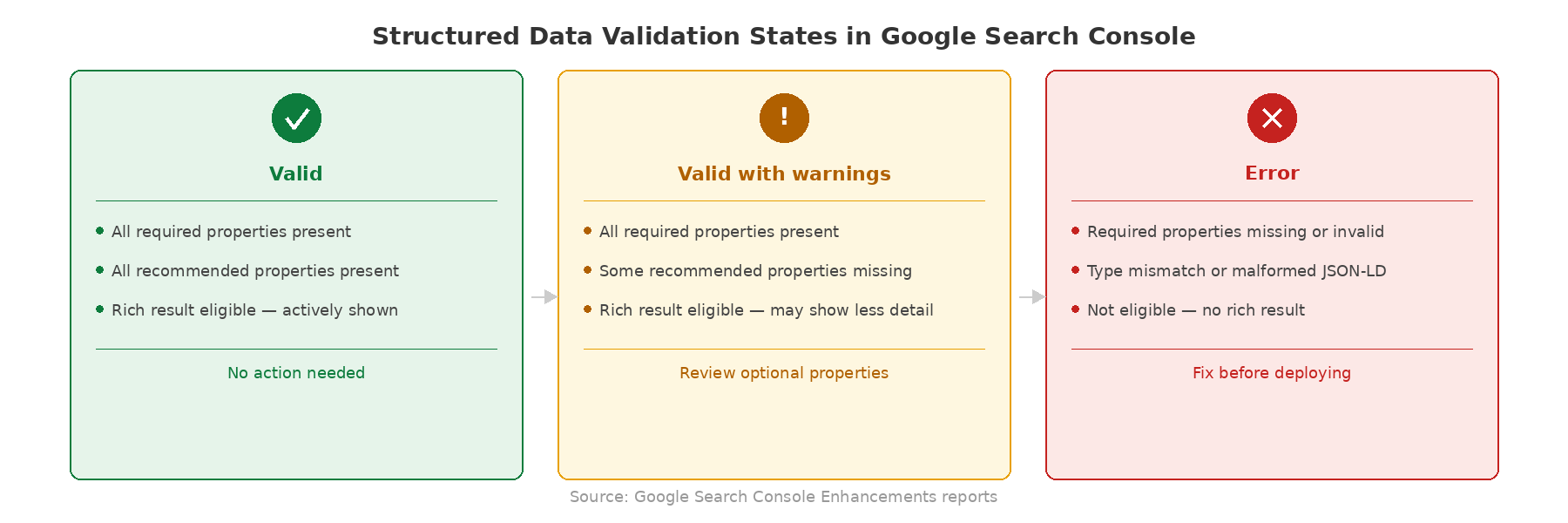
One critical distinction: warnings are not errors. The Rich Results Test separates them clearly. Errors mean the markup won’t qualify for a rich result. Warnings mean optional properties are missing – your markup still works, but adding those properties would improve it. Don’t panic over warnings. Do fix errors.
Our Rich Results Test guide covers the full tool walkthrough, including how to interpret warnings vs. errors and what to do when results are ambiguous.
Monitoring Structured Data in Search Console
Pre-publish testing tells you the markup is valid right now. Google Search Console tells you whether it stays valid over time.
The Enhancements reports in GSC track every structured data type Google detects across your site. Each type gets its own report – Product, FAQ, Article, Breadcrumb – showing how many pages have valid markup, how many have errors, and how many are “valid with warnings.”
“Valid with warnings” is the status that confuses people. It means your markup works and qualifies for rich results, but recommended (not required) properties are missing. Google still processes it. You still get the feature. But adding the missing properties could improve how the result displays.
The other common confusion: your markup validates, but no rich result appears. This happens for real reasons. The page might not be indexed yet. Google might not consider the rich result appropriate for the queries your page ranks for. The type might be restricted to specific site categories. Or Google might simply choose not to show it – rich results are not guaranteed, even with perfect markup.
Track rich result impressions in GSC’s Performance report by filtering for search appearance type. This shows you whether your schema is generating visible results, not just passing validation.
For the complete monitoring workflow, see our guide to validating structured data in Google Search Console.
Running a Structured Data Audit
Validation checks one page. An audit checks your entire site.
You need a structured data audit when something changes at scale: a site migration, a CMS update, a template redesign, or a switch in schema plugins. Any of these can silently break markup across hundreds of pages. The errors won’t show up until Googlebot recrawls those pages and GSC reports start flagging issues – which can take weeks.
Audits work at two levels. Template-level audits check whether each page template produces correct, consistent schema. If your product template generates valid Product schema for one product, it should work for all of them. Page-level audits catch the exceptions – pages where dynamic content creates edge cases the template doesn’t handle.
Crawl-based tools make this practical at scale. Screaming Frog for structured data audits lets you extract and validate JSON-LD across an entire crawl, flagging missing properties, type mismatches, and pages with no schema at all.
Our schema markup audit checklist gives you the full process – from pre-audit scoping to template-level validation to the GSC reports you should check after every major site change.
Validation and monitoring keep your existing schema healthy. But structured data’s role is expanding beyond traditional rich results – and that shift changes why schema matters in the first place.
Schema Markup and AI Search
Is schema markup dead? No. The opposite is happening.
As Google shifts toward AI-generated answers – AI Overviews, conversational search, and answer-engine interfaces – structured data becomes more important, not less. The mechanism is different from traditional rich results, but the principle is the same: machines make better use of content they can read explicitly rather than infer.
How Structured Data Feeds AI Overviews
When Google generates an AI Overview, it retrieves content from pages it has crawled, then uses that content to produce a synthesized answer. The system needs to trust the information it pulls in. This is where structured data plays a role that goes beyond SERP features.
LLMs hallucinate. They generate plausible-sounding information that isn’t grounded in actual sources. Retrieval-augmented generation (RAG) reduces this problem by anchoring the model’s output in retrieved documents. When one of those retrieved documents contains structured data – a Product with an explicit price, an Article with a declared author and datePublished, a HowTo with defined steps – the system has machine-readable facts to ground its response.
Your JSON-LD doesn’t just describe your page to a search crawler anymore. It provides a source of truth that an AI system can reference with confidence. A product price stated in prose requires inference. A product price declared in structured data is explicit, unambiguous, and verifiable.
Google has not published a detailed technical explanation of exactly how structured data influences AI Overview generation or citation selection. But the logic follows directly from how RAG systems work: structured inputs are more reliable than unstructured ones. Pages that provide machine-readable facts are better grounding sources than pages that require the model to extract those facts from paragraphs of prose.
There’s also Speakable schema – a type designed to identify sections of content suitable for text-to-speech playback by voice assistants like Google Assistant. Its adoption is limited, but it represents the same principle: explicitly marking content for machine consumption in a specific context.
We break down the full relationship – including what’s confirmed and what’s inferred – in our guide to AI Overviews and structured data.
Why Structured Data Becomes More Important, Not Less
Traditional blue links are losing share to AI-generated answers. This is not a prediction. It’s visible in the SERPs right now for informational queries across every vertical.
When the SERP was ten blue links, your content competed on titles and meta descriptions. When the SERP became rich results, your content competed on structured features – stars, prices, FAQs. Now, as the SERP becomes AI-generated answers with cited sources, your content competes on whether a machine can parse it with enough confidence to cite it.
Each step in that progression rewards explicit structure over implicit meaning. Structured data is how you make your content citable by machines, not just readable by humans.
This extends beyond Google. Bing’s Copilot, Perplexity, and other answer engines all retrieve and process web content. They all benefit from pages that declare their entities and relationships in machine-readable formats. Schema.org is the shared vocabulary across all of them.
Structured data is one layer of a broader semantic SEO strategy – see our complete guide for the full framework. But it’s the layer that translates your content into the format machines are built to consume.
That strategic context matters. But none of it helps if your implementation is broken. The most common schema mistakes are also the most avoidable.
Common Schema Markup Mistakes
Every mistake below comes from Google’s structured data guidelines or from documented behavior that practitioners encounter repeatedly. Avoid these and you’ll save yourself hours of debugging.
- Marking up content that isn’t visible on the page. Google’s policy is explicit: structured data must describe content the user can actually see. If your JSON-LD declares a product price, that price needs to exist in the visible page content. If your
FAQPageschema contains questions and answers, those questions and answers need to be on the page. Hidden schema – markup for content that only exists in the JSON-LD – violates Google’s spam policies and can trigger a manual action. - Using the wrong type for the page. Product schema belongs on product pages, not category pages. Article schema belongs on articles, not your homepage.
HowToschema belongs on instructional content, not a page that merely mentions a process. The type must match the page’s primary purpose. Google’s documentation for each type specifies what kind of page it applies to. Read that before you implement. - Missing required properties. Every Google-supported schema type has required properties and recommended properties. Miss a required property and your markup won’t qualify for the rich result at all. Miss a recommended property and the markup still works, but the result may display with less detail. The Rich Results Test distinguishes between errors (required) and warnings (recommended). Check the type-specific documentation in the Search Gallery for the full property list.
- Nesting errors. Schema types have parent-child relationships. A
Reviewshould nest inside aProduct, not sit as a standalone type on a product page. AnOffernests inside aProduct, not alongside it. When these relationships are wrong, the Rich Results Test may still parse the individual types but fail to connect them – meaning your review stars don’t attach to the product, or your pricing floats without context. Use@idreferences to keep entity relationships explicit when your graph spans multiple types. - Schema drift. This is the 2026 version of broken schema. Drift happens when your visible content changes but your JSON-LD doesn’t. A product price updates in the CMS, but the hardcoded JSON-LD still shows last month’s price. An author leaves the company, but the Article schema still references them. Dynamic CMS content and AI-generated page updates make drift more common now. The fix is structural: generate your JSON-LD from the same data source that populates your visible content. If your schema is hardcoded while your content is dynamic, drift is inevitable. Audit for mismatches regularly, especially on pages with frequently changing pricing, availability, or authorship.
- Set-and-forget deployment. Schema drift is one symptom of a broader problem: treating schema as a one-time implementation. Template changes break markup silently. CMS updates override custom JSON-LD. Plugin updates change default schema output. A page that validated perfectly six months ago might have three errors today. Schema requires ongoing monitoring – that’s why the How to Validate and Monitor Structured Data exists.
- Using deprecated types or properties. Schema.org evolves; properties are frequently renamed, and Google regularly retires underused features to declutter the SERP. While the 2023 restriction on FAQ results was a major shift, Google has since moved further: in late 2024, they officially deprecated the Sitelinks Search Box and significantly reduced the visibility of How-To rich results. If you implemented a type two years ago and haven’t checked back, your markup might reference properties that no longer trigger any visual enhancement. Review Google’s Search Central changelog and the Schema.org release history periodically to ensure your technical SEO remains functional.
Seven mistakes. All avoidable. The fastest way to check whether any of them apply to your site is to run through the common questions practitioners ask – starting with the ones below.
Frequently Asked Questions
We’ve applied FAQPage schema to this section – the same markup we recommend you use on your own FAQ content. Here is how the JSON-LD for this FAQ section starts:
{
  "@context": "https://schema.org",
  "@type": "FAQPage",
  "mainEntity": [
    {
      "@type": "Question",
      "name": "How important is schema markup for SEO?",
      "acceptedAnswer": {
        "@type": "Answer",
        "text": "Schema markup is a discovery and eligibility signal..."
      }
    }
  ]
}
How important is schema markup for SEO?
Schema markup is a discovery and eligibility signal. It won’t directly move your ranking position, but it determines whether your result displays rich features – review stars, FAQ accordions, product pricing – that measurably increase click-through rates and SERP visibility. For any query where rich results appear, sites without schema are at a concrete disadvantage.
Is schema markup dead?
No. Google continues to maintain and expand its structured data support. AI Overviews rely on well-structured content for grounding – using your explicit, machine-readable data to reduce hallucination and select citations. Schema is becoming the baseline for search visibility, not a bonus.
Can schema markup hurt my website?
Yes, if you implement it incorrectly. Marking up content that isn’t visible on the page, using misleading schema types, or allowing schema drift to create mismatches between your JSON-LD and your actual content can trigger manual actions. Valid, accurate markup that reflects your visible content carries no risk.
Is schema markup off-page SEO?
No. Schema markup is on-page. It’s code you add directly to your page’s HTML as a JSON-LD script block. It’s part of your on-site technical SEO implementation, alongside title tags, meta descriptions, and page structure.
Do I need schema markup on every page?
No. Prioritize pages where a relevant Google-supported type exists and where rich result visibility would have business impact. Foundational types like BreadcrumbList and Organization can run site-wide. Schema types with specific rich results – Product, HowTo, FAQPage – should go on pages that contain the matching content.
What is the best format for schema markup?
JSON-LD. Google explicitly recommends it. It sits in a <script> tag separate from your HTML, which makes it easier to add, edit, debug, and maintain than inline alternatives like Microdata or RDFa.
Where to Go From Here
Every section above introduced a sub-topic and linked to its dedicated guide. Here is the full directory, organized by where you are in the process. Articles marked [Coming – Phase X] are planned and in production – the topic map is complete even where the articles are not yet live.
Learn the Fundamentals
Implement by Type
- Organization Schema: Get a Knowledge Panel
- Product Schema: Implementation Guide
- FAQPage Schema: Implementation Guide
- HowTo Schema: Implementation Guide
- LocalBusiness Schema: Implementation Guide [Coming – Phase 5]
- Video Schema: Implementation Guide [Coming – Phase 5]
Validate and Audit
- How to Use Google’s Rich Results Test
- Validate Structured Data in GSC
- Screaming Frog for structured data audits
- The Complete Schema Markup Audit Checklist [Coming – Phase 4]
Advanced and Forward-Looking
- JSON-LD for SPAs: React, Next.js, Vue [Coming – Phase 4]
- AI Overviews and Structured Data [Coming – Phase 4]
Several additional guides are in development: Kalicube Pro review, and a competitive schema analysis workflow.