
Product schema is what unlocks pricing, availability, and ratings in Google’s search results – both product snippets and merchant listings. If you need the fundamentals of structured data, start with our schema markup guide. For JSON-LD syntax, see the JSON-LD tutorial.
This guide covers implementation. The properties that actually matter for rich result eligibility. The code that works when you paste it into the Rich Results Test. The mistakes that break eligibility and how to avoid them. You’ll get complete JSON-LD examples for single products, variants, and full @graph architecture.
What Does Google Do With Product Schema?
Google uses Product schema to generate two distinct rich result types that most guides mistakenly conflate.
Product Snippets are the basic enhanced results – price, availability, and star ratings displayed beneath your standard search listing. These are rich snippets that require minimal markup: a name property plus at least one of review, aggregateRating, or offers. That’s the floor. Meet it and your product pages become eligible for enhanced display in standard web results.
Merchant listings rich results are different. These connect to Google Shopping and appear in the Shopping tab, product carousels, and comparison features. The property requirements are stricter. You need offers with price, priceCurrency, and availability. You also need product identifiers – GTIN, MPN, or SKU. Without identifiers, Google can’t match your product to its catalog or compare it across sellers.
The distinction matters because you might pass validation for product snippets while failing to qualify for merchant listings. Both come from Product schema. They trigger under different conditions.
Google’s Product structured data documentation covers the core type. The merchant listing documentation specifies the additional requirements for Shopping visibility. Read both.
Price Drop badges are a third feature worth knowing. When Google has historical price data for your product and detects a decrease, it may display a “Price Drop” badge in search results. This triggers automatically from your Offer > price property – you don’t add special markup. But it only works if you’ve been publishing Product schema consistently so Google has baseline data to compare against.
The practical takeaway: product snippets are the baseline. Merchant listings are the full implementation. Price Drop is a bonus that rewards consistency.
Property requirements break down like this:
- Product snippets need
nameplus one of:review,aggregateRating, oroffers - Merchant listings add to that baseline:
price,priceCurrency,availability, and at least one identifier (GTIN, MPN, or SKU) - Price Drop requires no special properties – just historical price data from consistent schema publishing over time
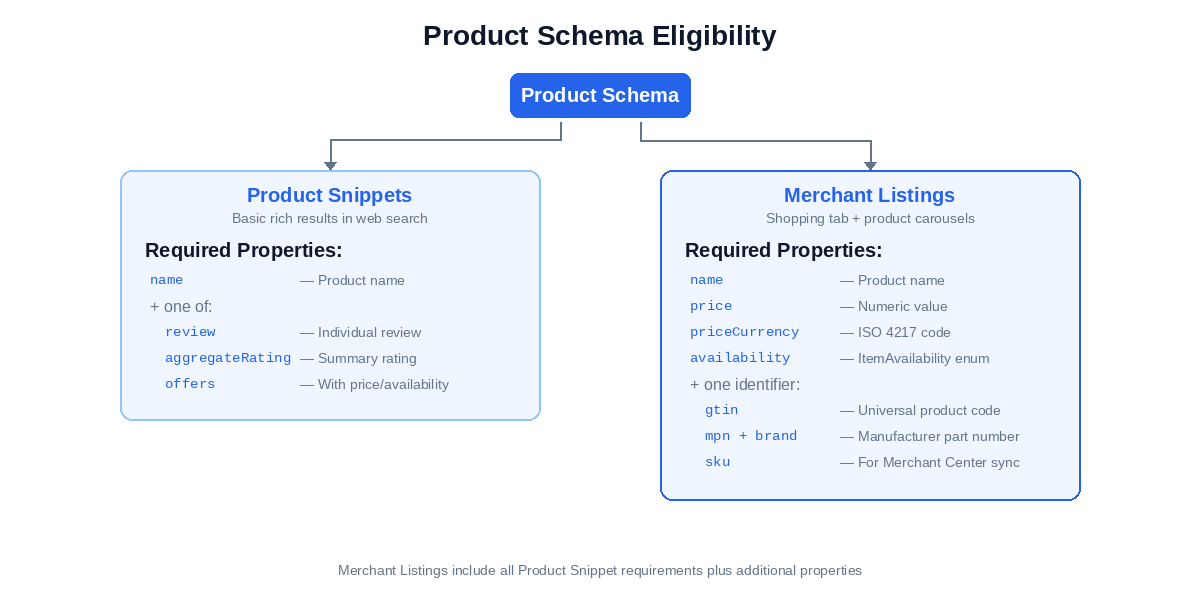
Every property covered in the next section maps to one of these eligibility thresholds. Know which one you’re targeting before you implement.
Building Product Schema – Properties That Matter
Four property clusters determine whether your Product schema qualifies for rich results. Offer handles pricing and availability. Identifiers enable product matching. AggregateRating adds star ratings. Shipping and returns signal commerce transparency. Most implementations get the first one partially right and skip the rest.
Offer Schema Properties
The Offer type nests inside Product via the offers property. This is where you declare price, currency, and availability – the properties that make your product actionable in search results.
Two properties are functionally required for merchant listings: price and priceCurrency. Without them, the Rich Results Test throws a critical error when validating for merchant listing eligibility.
Three more properties are critical for full eligibility:
availabilitytells Google whether the product is in stock. Use theItemAvailabilityenumeration values:https://schema.org/InStock,https://schema.org/OutOfStock,https://schema.org/PreOrder,https://schema.org/BackOrder,https://schema.org/Discontinued,https://schema.org/InStoreOnly,https://schema.org/LimitedAvailability,https://schema.org/OnlineOnly,https://schema.org/SoldOut. Anything else fails validation.priceValidUntilsets an expiration date for the price. Google recommends this for merchant listings. Format:YYYY-MM-DD.urlpoints to the page where the offer is valid – typically the product page URL itself
For products with price ranges or multiple sellers, use AggregateOffer instead of Offer. This lets you specify lowPrice and highPrice rather than a single price value:
{
  "@context": "https://schema.org",
  "@type": "Product",
  "name": "Wireless Bluetooth Headphones",
  "image": "https://example.com/photos/headphones.jpg",
  "brand": {
    "@type": "Brand",
    "name": "AudioTech"
  },
  "offers": {
    "@type": "AggregateOffer",
    "lowPrice": 129.99,
    "highPrice": 179.99,
    "priceCurrency": "USD",
    "offerCount": 4,
    "availability": "https://schema.org/InStock"
  }
}
Use AggregateOffer when multiple sellers offer the same product at different prices, or when a single product has variant-based pricing you want to summarize.
For a standard single-price product, a basic Offer looks like this:
{
  "@context": "https://schema.org",
  "@type": "Product",
  "name": "Classic Cotton T-Shirt",
  "image": "https://example.com/photos/tshirt.jpg",
  "description": "100% cotton crew neck t-shirt",
  "brand": {
    "@type": "Brand",
    "name": "Example Apparel"
  },
  "offers": {
    "@type": "Offer",
    "url": "https://example.com/products/classic-tshirt",
    "price": 29.99,
    "priceCurrency": "USD",
    "availability": "https://schema.org/InStock",
    "priceValidUntil": "2026-12-31"
  }
}
That’s the baseline. The Rich Results Test will show “Product Snippet” as eligible. Merchant listings require more.
GTIN, MPN, and SKU Structured Data
Product identifiers enable Google to match your product across sellers and connect it to the Shopping catalog. Without them, you’re limited to basic product snippets.
The Global Trade Item Number (GTIN) is the universal standard. Google recommends using the generic gtin property – their systems automatically detect the format based on digit count:
gtinaccepts any format and auto-detects based on length (8, 12, 13, or 14 digits)gtin12for UPC codes (12 digits, primarily North America)gtin13for EAN codes (13 digits, international standard)gtin8for short-form codes on small productsgtin14for case/carton identifiers
mpn (Manufacturer Part Number) works when no GTIN exists. Pair it with brand – Google uses the combination for matching.
sku is your internal identifier. Google uses SKU to match on-page Product schema to your Merchant Center feed. If you’re running Shopping campaigns without GTINs, this connection matters.
{
  "@type": "Product",
  "name": "Wireless Bluetooth Headphones",
  "gtin": "0012345678905",
  "mpn": "WBH-2000-BLK",
  "sku": "HEADPHONES-WBH2000",
  "brand": {
    "@type": "Brand",
    "name": "AudioTech"
  }
}
Product snippets work without identifiers. Merchant listing eligibility – Shopping tab visibility, cross-seller comparison, price matching – requires at least one. The priority: GTIN if you have it, MPN + brand if you don’t, SKU if you’re syncing with Merchant Center.
AggregateRating JSON-LD
AggregateRating summarizes multiple customer reviews into a single rating display. Individual Review objects represent specific reviews. Most product pages use AggregateRating.
Required properties: ratingValue plus either reviewCount or ratingCount. The distinction matters. reviewCount is the number of reviews with written text. ratingCount is the total number of ratings, including those without text. If you have 500 star ratings but only 120 written reviews, use both properties.
{
  "@type": "Product",
  "name": "Ceramic Coffee Mug",
  "aggregateRating": {
    "@type": "AggregateRating",
    "ratingValue": 4.6,
    "bestRating": 5,
    "worstRating": 1,
    "reviewCount": 120,
    "ratingCount": 523
  }
}
Third-party review widgets create a specific problem. Yotpo, Trustpilot, Judge.me, Stamped, and similar platforms inject their own Product schema with AggregateRating. If you also hardcode AggregateRating in your JSON-LD, Google parses both blocks, which can result in conflicting indexed data. Check what your widget outputs before adding your own markup. One or the other. Not both.
Google’s policy is explicit: reviews must be about the specific product. Ratings about shipping speed, seller service, or your company generally don’t qualify. Product schema reviews describe the product itself.
Shipping and Return Policies
shippingDetails and hasMerchantReturnPolicy have become increasingly important for merchant listing visibility. Google wants transparent commerce data. These properties provide it.
Both nest inside the Offer object:
{
  "@type": "Offer",
  "price": 49.99,
  "priceCurrency": "USD",
  "availability": "https://schema.org/InStock",
  "shippingDetails": {
    "@type": "OfferShippingDetails",
    "shippingRate": {
      "@type": "MonetaryAmount",
      "value": 5.99,
      "currency": "USD"
    },
    "shippingDestination": {
      "@type": "DefinedRegion",
      "addressCountry": "US"
    },
    "deliveryTime": {
      "@type": "ShippingDeliveryTime",
      "handlingTime": {
        "@type": "QuantitativeValue",
        "minValue": 1,
        "maxValue": 2,
        "unitCode": "DAY"
      },
      "transitTime": {
        "@type": "QuantitativeValue",
        "minValue": 3,
        "maxValue": 5,
        "unitCode": "DAY"
      }
    }
  },
  "hasMerchantReturnPolicy": {
    "@type": "MerchantReturnPolicy",
    "returnPolicyCategory": "https://schema.org/MerchantReturnFiniteReturnWindow",
    "merchantReturnDays": 30,
    "returnMethod": "https://schema.org/ReturnByMail"
  }
}
These properties are recommended, not required. But pages with complete shipping and return data may receive preferential treatment in merchant listing results. Google prioritizes transparency.
Single products with full Offer properties cover most use cases. Products with size and color variants need a different structure entirely.
How Do You Handle ProductGroup Schema Variants?
Products with size, color, or material options need a different structure than single-SKU items. The ProductGroup type handles this – a parent entity that contains multiple Product variants, each with its own pricing and availability.
The pattern works like this: ProductGroup declares the shared identity with an @id. Individual Product entities nest inside via hasVariant. Each child Product uses isVariantOf to reference the parent’s @id. Bidirectional linking via @id references creates a proper graph structure.
Use variesBy on the ProductGroup to declare which attributes differ across variants. Schema.org defines specific property URLs for common dimensions: https://schema.org/size, https://schema.org/color, https://schema.org/material, https://schema.org/pattern.
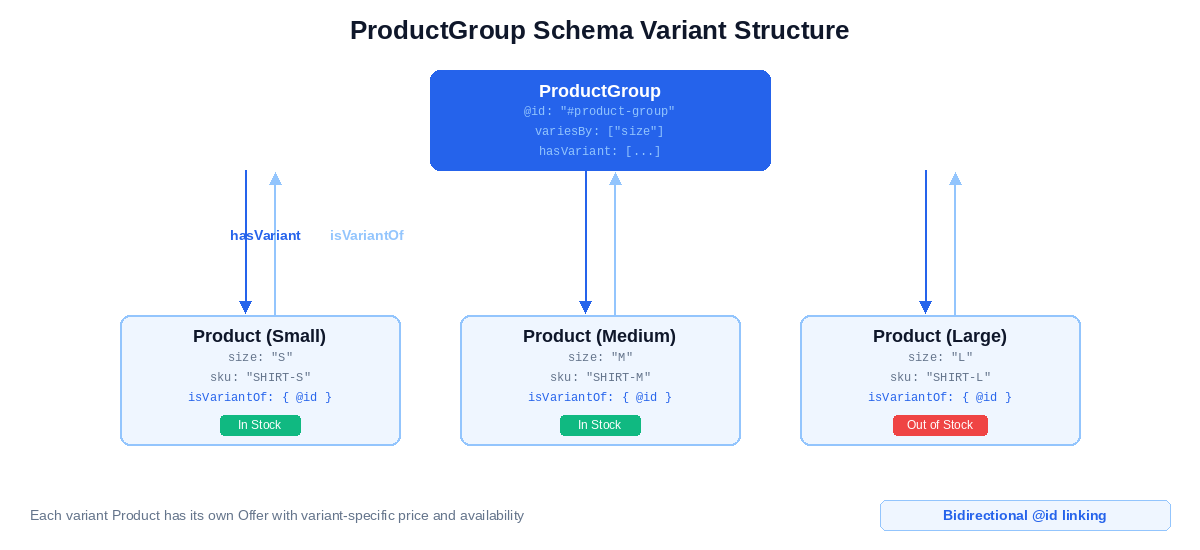
The critical detail most implementations miss: each variant Product needs its own Offer object with variant-specific price and availability. A size Large might be out of stock while Medium is available. A color variant might cost more. The Offer data must reflect each variant’s actual state.
{
  "@context": "https://schema.org",
  "@type": "ProductGroup",
  "@id": "https://example.com/products/classic-tshirt/#product-group",
  "name": "Classic Cotton T-Shirt",
  "description": "100% cotton crew neck t-shirt available in multiple sizes",
  "brand": {
    "@type": "Brand",
    "name": "Example Apparel"
  },
  "variesBy": [
    "https://schema.org/size"
  ],
  "hasVariant": [
    {
      "@type": "Product",
      "name": "Classic Cotton T-Shirt - Small",
      "size": "S",
      "sku": "TSHIRT-COTTON-S",
      "image": "https://example.com/photos/tshirt-small.jpg",
      "isVariantOf": {
        "@id": "https://example.com/products/classic-tshirt/#product-group"
      },
      "offers": {
        "@type": "Offer",
        "price": 29.99,
        "priceCurrency": "USD",
        "availability": "https://schema.org/InStock"
      }
    },
    {
      "@type": "Product",
      "name": "Classic Cotton T-Shirt - Medium",
      "size": "M",
      "sku": "TSHIRT-COTTON-M",
      "image": "https://example.com/photos/tshirt-medium.jpg",
      "isVariantOf": {
        "@id": "https://example.com/products/classic-tshirt/#product-group"
      },
      "offers": {
        "@type": "Offer",
        "price": 29.99,
        "priceCurrency": "USD",
        "availability": "https://schema.org/InStock"
      }
    },
    {
      "@type": "Product",
      "name": "Classic Cotton T-Shirt - Large",
      "size": "L",
      "sku": "TSHIRT-COTTON-L",
      "image": "https://example.com/photos/tshirt-large.jpg",
      "isVariantOf": {
        "@id": "https://example.com/products/classic-tshirt/#product-group"
      },
      "offers": {
        "@type": "Offer",
        "price": 29.99,
        "priceCurrency": "USD",
        "availability": "https://schema.org/OutOfStock"
      }
    }
  ]
}
An alternative exists for simpler cases. When variants share identical pricing and you don’t need per-variant availability tracking, you can use a single Product with multiple Offer objects – one per variant. Less verbose. But you lose granular stock status, and Google can’t match individual variants to specific searches.
ProductGroup is the right choice when:
- Variants have different prices (size-based pricing, premium colors)
- You need per-variant availability status
- Each variant has its own GTIN or SKU in your inventory system
- You want Google to surface specific variants in search results
The verbose approach pays off. Google can show “Size M – In Stock” directly in results while indicating that Large is unavailable.
These examples show isolated schema blocks. Production implementations typically embed Product schema within a larger entity graph – connected to your Organization, BreadcrumbList, and other page-level markup.
What Does Complete Product Schema Look Like?
Three implementation levels. Each adds complexity and eligibility. Pick the one that matches your needs.
Basic Product Schema
Minimum viable implementation. Passes validation, qualifies for product snippets.
{
  "@context": "https://schema.org",
  "@type": "Product",
  "name": "Wireless Bluetooth Headphones",
  "image": "https://example.com/photos/headphones.jpg",
  "description": "Over-ear wireless headphones with active noise cancellation and 30-hour battery life.",
  "brand": {
    "@type": "Brand",
    "name": "AudioTech"
  },
  "offers": {
    "@type": "Offer",
    "url": "https://example.com/products/wireless-headphones",
    "price": 149.99,
    "priceCurrency": "USD",
    "availability": "https://schema.org/InStock"
  }
}
This qualifies for product snippets. Price and availability will display in search results. Merchant listings require more.
Product with Full Properties
Complete implementation targeting merchant listing eligibility. Includes identifiers, ratings, and shipping.
{
  "@context": "https://schema.org",
  "@type": "Product",
  "name": "Wireless Bluetooth Headphones",
  "image": "https://example.com/photos/headphones.jpg",
  "description": "Over-ear wireless headphones with active noise cancellation and 30-hour battery life.",
  "brand": {
    "@type": "Brand",
    "name": "AudioTech"
  },
  "gtin": "0012345678905",
  "sku": "AT-WBH-2000",
  "aggregateRating": {
    "@type": "AggregateRating",
    "ratingValue": 4.7,
    "bestRating": 5,
    "reviewCount": 284
  },
  "offers": {
    "@type": "Offer",
    "url": "https://example.com/products/wireless-headphones",
    "price": 149.99,
    "priceCurrency": "USD",
    "availability": "https://schema.org/InStock",
    "priceValidUntil": "2026-12-31",
    "shippingDetails": {
      "@type": "OfferShippingDetails",
      "shippingRate": {
        "@type": "MonetaryAmount",
        "value": 0,
        "currency": "USD"
      },
      "shippingDestination": {
        "@type": "DefinedRegion",
        "addressCountry": "US"
      }
    },
    "hasMerchantReturnPolicy": {
      "@type": "MerchantReturnPolicy",
      "returnPolicyCategory": "https://schema.org/MerchantReturnFiniteReturnWindow",
      "merchantReturnDays": 30
    }
  }
}
This level hits all merchant listing requirements: identifiers, ratings, shipping, returns.
Product Within @graph Architecture
Production implementations connect Product to other entities on the page. The @graph array contains multiple typed objects that reference each other via @id.
{
  "@context": "https://schema.org",
  "@graph": [
    {
      "@type": "Organization",
      "@id": "https://example.com/#organization",
      "name": "Example Store",
      "url": "https://example.com",
      "logo": "https://example.com/logo.png"
    },
    {
      "@type": "BreadcrumbList",
      "@id": "https://example.com/products/wireless-headphones/#breadcrumb",
      "itemListElement": [
        {
          "@type": "ListItem",
          "position": 1,
          "name": "Home",
          "item": "https://example.com/"
        },
        {
          "@type": "ListItem",
          "position": 2,
          "name": "Electronics",
          "item": "https://example.com/electronics/"
        },
        {
          "@type": "ListItem",
          "position": 3,
          "name": "Wireless Headphones"
        }
      ]
    },
    {
      "@type": "Product",
      "@id": "https://example.com/products/wireless-headphones/#product",
      "name": "Wireless Bluetooth Headphones",
      "image": "https://example.com/photos/headphones.jpg",
      "description": "Over-ear wireless headphones with active noise cancellation.",
      "brand": {
        "@id": "https://example.com/#organization"
      },
      "gtin": "0012345678905",
      "sku": "AT-WBH-2000",
      "offers": {
        "@type": "Offer",
        "price": 149.99,
        "priceCurrency": "USD",
        "availability": "https://schema.org/InStock"
      }
    }
  ]
}
The Product’s brand property references the Organization via @id instead of duplicating the data. This is the architecture CMS plugins typically don’t generate automatically. For full Organization implementation details, see the Organization schema guide (coming soon).
How Do You Validate and Troubleshoot Product Schema?
The Rich Results Test is your primary validation tool. Run every Product schema through it before deployment.
Two modes exist. Code Snippet mode tests raw JSON-LD you paste directly – useful during development. URL mode fetches a live page and renders it like Googlebot would – essential for JavaScript-rendered schema. If your site injects schema via JavaScript, URL mode is the only test that reflects reality.
The test results show three things: detected structured data types, eligible rich result features, and any errors or warnings. You want “Product” detected with “Product snippets” or “Merchant listings” shown as eligible. That’s success.
Errors vs. warnings matter. Errors block rich result eligibility. Warnings don’t. “Valid with warnings” means your schema works – the warnings indicate optional improvements that could enhance the result. Don’t panic over warnings. Fix errors first.
Common error messages and what to do:
“Missing field ‘offers'” or “Either ‘offers’, ‘review’, or ‘aggregateRating’ should be specified” – Product schema needs at least one of these three properties to qualify for any rich result. Add an Offer with price and availability, or add AggregateRating. Ideally both.
“Invalid value in field ‘availability'” – You used a value that doesn’t match the ItemAvailability enumeration. “In Stock” with a space fails. “available” fails. Use exactly https://schema.org/InStock. The enumeration values are case-sensitive.
“Missing field ‘priceValidUntil'” – This is a warning, not an error. Your schema still works. But adding a future date in YYYY-MM-DD format improves merchant listing eligibility. Worth fixing.
“Missing field ‘image'” – Warning. Product snippets can display without images, but Google recommends them. Add an image URL.
After deployment, validation doesn’t stop. Google Search Console’s Enhancement reports track structured data health across your entire site – showing which pages have valid Product markup, which have errors, and how coverage changes over time. For ongoing monitoring setup, see monitoring structured data in Search Console (coming soon).
What Are the Common Product Schema Mistakes?
Seven mistakes appear repeatedly in Product schema audits. Most pass validation. All of them weaken or break rich result eligibility.
Product schema on category pages. Google explicitly warns against this in their structured data documentation. Category pages list multiple products. Each product page should have its own Product schema – don’t try to mark up 50 products in one schema block. This also applies to ProductGroup. It’s for one product with variants (a shirt in multiple sizes), not a collection of different products in a category.
Schema/content mismatch. The price in your JSON-LD must match the visible price on the page. Same for availability. Google compares them. If your schema says $49.99 but the page shows $39.99, you risk losing eligibility. Dynamic pricing creates this problem when the schema is static but the displayed price changes based on user location or login state. Keep them synchronized – if your CMS supports template variables, generate these values dynamically rather than hardcoding.
Duplicate AggregateRating from review widgets. Yotpo, Trustpilot, Stamped, Judge.me – these platforms inject their own Product schema with AggregateRating. If you also hardcode AggregateRating in your JSON-LD, Google parses both blocks, which can result in conflicting indexed data. Audit what your widget outputs before adding your own. One source of truth. Not two.
Self-submitted or fabricated reviews. AggregateRating and Review must reflect genuine customer feedback. Google’s spam policies are explicit: reviews must come from real customers about the actual product, not the seller or shipping experience. Violations result in manual actions that remove all rich result eligibility.
Missing identifiers for merchant listings. Product snippets work without GTIN, MPN, or SKU. Full merchant listing eligibility – Shopping tab placement, cross-seller matching, price comparison features – requires at least one identifier. No GTIN? Use MPN combined with brand. Syncing with Merchant Center? SKU becomes critical.
Wrong availability values. ItemAvailability is an enumeration. Exact values only. “In Stock” with a space fails. “available” fails. “yes” fails. Use https://schema.org/InStock, https://schema.org/OutOfStock, https://schema.org/PreOrder, https://schema.org/BackOrder, https://schema.org/Discontinued. Case-sensitive, no spaces.
Orphaned Product schema. Product markup without connection to your Organization entity weakens the entity signal. Use @id references to connect Product’s brand property to your site’s Organization. The @graph architecture shown earlier handles this automatically – isolated Product blocks don’t.
Most of these mistakes pass the Rich Results Test. They fail in production.
Frequently Asked Questions
What is a product group schema?
ProductGroup represents a single product that comes in multiple variants – different sizes, colors, or configurations. It contains individual Product entities via hasVariant, each with its own pricing and availability. Use it when you have one product with options, not when you have a category of different products.
Does Product schema replace a Merchant Center feed?
No. Product schema enables rich results in organic search. Merchant Center feeds power Shopping ads and free product listings. They serve different purposes and can work together. Large catalogs typically need both: schema on product pages for organic visibility, feeds for Shopping. Google uses SKU to match your on-page schema to your feed data.
Can I use Product schema for digital products?
It depends on the product type. Ebooks, templates, and digital downloads: yes, use Product schema. Software applications and mobile apps: use SoftwareApplication instead. Online courses: use Course schema. Google has specific schema types for these categories that provide richer results than generic Product markup.
What’s the difference between Product and IndividualProduct?
IndividualProduct is a subtype of Product for one-of-a-kind items – a specific used car, an original artwork, a vintage collectible. Most e-commerce uses Product. Use IndividualProduct when there’s literally only one item and it won’t be restocked.
What happens when my price changes?
Update the schema when the price changes. Dynamic pricing requires dynamic schema – regenerate the JSON-LD on page load or use a system that keeps them synchronized. Google may also use historical price data to trigger “Price Drop” badges when it detects a decrease.
Where This Fits
Product schema is one layer of a complete structured data implementation. Product pages with FAQ sections can combine Product and FAQPage markup – see the FAQPage schema guide for implementation details.
For connecting your Product entities to your brand via @id references, see the Organization schema guide.
For the full picture on how structured data connects to entity SEO, see our schema markup guide.