
Organization schema tells Google your brand exists as a distinct entity. Not just a name on a page. A thing with an identity, official channels, and a place in the Knowledge Graph.
This is the markup that connects your site to your Wikipedia page, your Wikidata entry, and your verified social profiles. When Google’s systems encounter your Organization schema, they can match your domain to a known entity node rather than treating it as an anonymous website.
If you need the fundamentals of structured data or JSON-LD syntax, start there. This guide assumes you’re ready to implement.
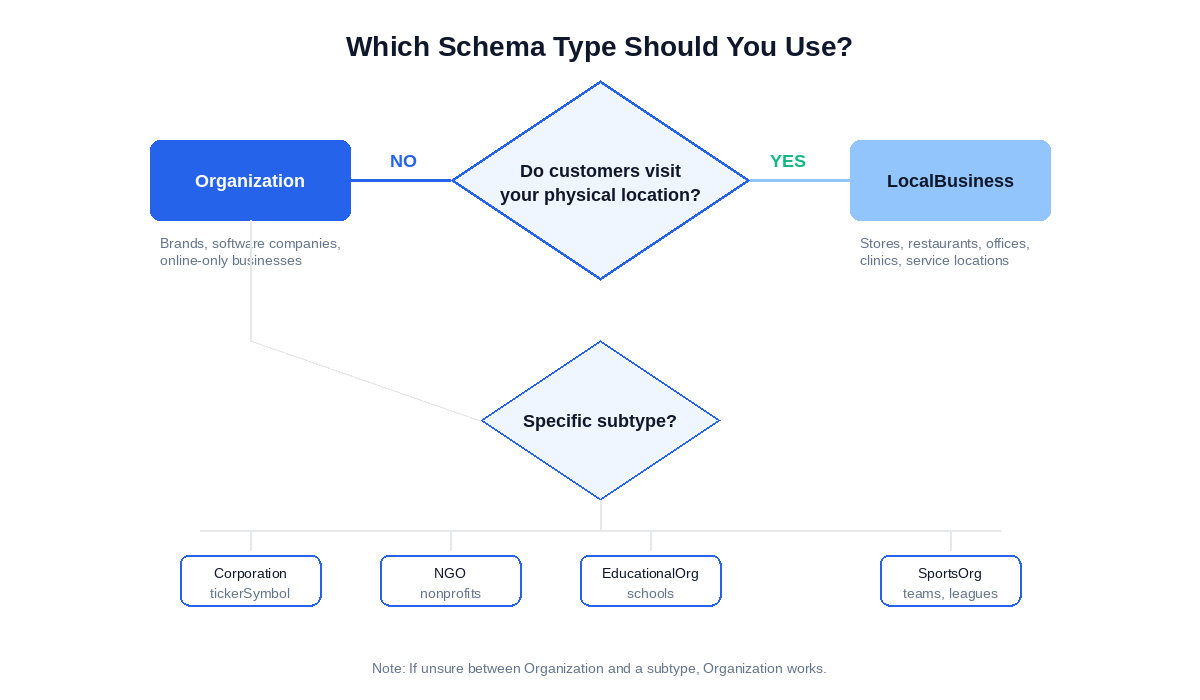
One decision first: Organization or LocalBusiness? If customers visit your physical location – a store, restaurant, office, clinic – you need LocalBusiness, not Organization. LocalBusiness inherits everything Organization has, then adds address, opening hours, and geo coordinates. Wrong type means wasted markup.
Which Organization Type Should You Use?
Organization is the parent type. Use it for brands, companies, and entities without a physical location that customers visit.
Schema.org defines several subtypes. Each adds properties specific to that category:
- Corporation – publicly traded companies. Adds
tickerSymbolfor stock exchange listings. - EducationalOrganization – schools, universities, training providers. Subtypes include School, CollegeOrUniversity, Preschool.
- GovernmentOrganization – government agencies at any level.
- NGO – non-governmental organizations. Nonprofit is a related type for tax-exempt entities.
- SportsOrganization – teams, leagues, sports clubs. Subtypes include SportsTeam.
The LocalBusiness schema (coming soon) guide covers when to use that type instead. The short version: if your business has a storefront, office, or any location customers physically visit, LocalBusiness is correct. It inherits from both Organization and Place, so you get all Organization properties plus address, openingHours, and geo coordinates.
Don’t overthink subtype selection. Google’s Organization documentation focuses on the base Organization type. Using Corporation instead of Organization doesn’t unlock special features in search results. Pick the most accurate type for your entity, but if you’re unsure between Organization and a subtype, Organization works.
Organization inherits from Thing in the Schema.org type hierarchy. That means properties like name, url, and description come from Thing. Organization adds the properties that matter for brands: logo, sameAs, contactPoint, and the identifier set that connects you to the Knowledge Graph.
What Core Properties Does Organization Schema Require?
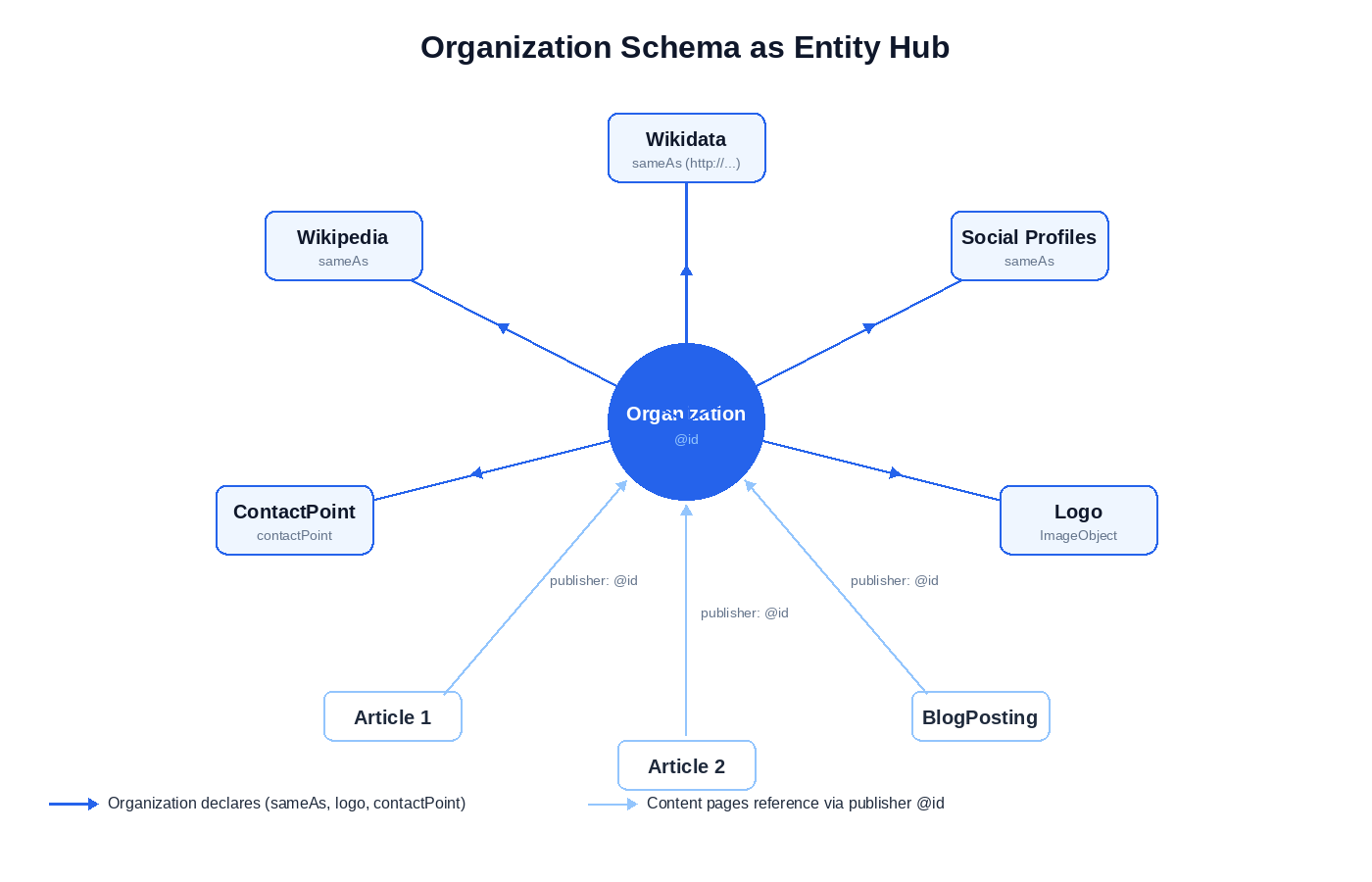
Six property groups define a complete Organization implementation. The identifier set establishes who you are. Logo tells Google what to display. sameAs connects you to the Knowledge Graph. contactPoint makes your support channels machine-readable. Corporate structure properties handle parent-child relationships. And the publisher pattern lets you reference your Organization across every article on your site.
The Identifier Set: @id, name, and url
Three properties form the foundation. Every other property builds on these.
{
  "@context": "https://schema.org",
  "@type": "Organization",
  "@id": "https://example.com/#organization",
  "name": "Example Corporation",
  "url": "https://example.com"
}
@id is the internal node identifier. It lets you reference this Organization from other schema blocks – like Article’s publisher property – without duplicating the entire block. Convention: use your homepage URL with a fragment identifier. The #organization fragment is arbitrary but widely adopted.
name is your official business name. Match your legal name or primary brand name exactly. Don’t stuff keywords here.
url is your homepage. One canonical URL. No trailing slash variations, no www/non-www inconsistency.
The difference matters: @id is for machines resolving graph references. url is for humans clicking through to your site. They often point to the same domain, but they serve different purposes in the schema graph.
Logo Schema Markup
Google accepts logo as a URL string. ImageObject is better.
The string version works:
"logo": "https://example.com/logo.png"
But ImageObject gives Google explicit dimensions and enables additional properties like caption:
"logo": {
  "@type": "ImageObject",
  "url": "https://example.com/logo.png",
  "width": 600,
  "height": 600
}
Google’s logo documentation specifies requirements:
- Minimum 112×112 pixels
- The image must be crawlable – no robots.txt blocking, no authentication
- Supported formats: JPEG, PNG, GIF, SVG, WebP
- Square logos work best for Knowledge Panel (the information box Google displays for recognized entities) display
The logo property is specifically what Google uses to populate Knowledge Panel logos. Get this wrong and your Knowledge Panel shows a generic icon or pulls an image you didn’t choose.
ImageObject also allows additional properties that strengthen your entity graph:
"logo": {
  "@type": "ImageObject",
  "url": "https://example.com/logo.png",
  "contentUrl": "https://example.com/logo.png",
  "width": 600,
  "height": 600,
  "caption": "Example Corporation official logo"
}
The contentUrl property explicitly identifies the image file URL. caption describes what the logo depicts. Neither is required, but both add clarity for systems parsing your markup.
Common failure: pointing to a 16×16 favicon. Another: linking to a logo behind authentication that Googlebot can’t crawl. Test your logo URL in an incognito browser. If you can’t see it without logging in, neither can Google.
The sameAs Schema Property
sameAs is how you connect your Organization to Google’s Knowledge Graph.
This property takes an array of URLs pointing to authoritative profiles that represent the same entity. Not related entities. The same entity. In Semantic Web terms, sameAs declares equivalence – your Organization and your Wikidata entry aren’t “related.” They’re the same thing, described in two places.
What to include:
- Your Wikipedia page, if you have one
- Your Wikidata entry – critical for entity disambiguation
- Official social profiles: LinkedIn company page, X/Twitter, Facebook, YouTube channel
- Government registry entries if applicable (SEC EDGAR for public companies, state corporation records)
To find your organization’s Wikidata QID, search for your organization at wikidata.org. The QID appears in the URL and page header (e.g., Q312 for Apple Inc.). If your organization doesn’t have a Wikidata entry yet, you’ll need to create one before your sameAs can reference it.
"sameAs": [
  "https://en.wikipedia.org/wiki/Example_Corporation",
  "http://www.wikidata.org/entity/Q123456",
  "https://www.linkedin.com/company/example-corp",
  "https://x.com/examplecorp",
  "https://www.facebook.com/examplecorp",
  "https://www.youtube.com/@examplecorp"
]
Wikidata URI format matters. This is a common advanced mistake:
- Correct:
http://www.wikidata.org/entity/Q312– useshttp, uses/entity/ - Wrong:
https://www.wikidata.org/wiki/Q312– the/wiki/path is for browsers, not Linked Data
The http vs https distinction is intentional. Wikidata’s canonical Linked Data URIs use http. The browser-friendly URLs use https. For sameAs, use the Linked Data format. Using the https browser version can create duplicate entity nodes in strictly-typed systems that treat the two URIs as different entities.
One more critical point: never use a Wikipedia or Wikidata URL in your @id field. @id identifies your schema node on your domain. Wikipedia and Wikidata URLs belong only in sameAs. Mixing these up breaks the graph structure.
contactPoint Structured Data
contactPoint takes a ContactPoint object or an array of them. This is how customer service numbers can appear directly in search results and Knowledge Panels.
Required properties: @type, telephone (or email, or url), and contactType.
"contactPoint": {
  "@type": "ContactPoint",
  "telephone": "+1-800-555-0123",
  "contactType": "customer service"
}
The contactType values that matter:
- customer service (or customer support)
- technical support
- sales
- billing support
For multiple contact channels, use an array:
"contactPoint": [
  {
    "@type": "ContactPoint",
    "telephone": "+1-800-555-0123",
    "contactType": "customer service",
    "contactOption": "TollFree",
    "areaServed": "US",
    "availableLanguage": ["en", "es"]
  },
  {
    "@type": "ContactPoint",
    "telephone": "+1-800-555-0124",
    "contactType": "technical support"
  }
]
Optional properties add useful context. contactOption can specify TollFree or HearingImpairedSupported. areaServed limits the geographic scope. availableLanguage lists supported languages – use ISO 639-1 codes ("en", "es") rather than full language names for better machine readability.
Don’t overdo it. If you have one phone number that handles everything, one contactPoint is fine. Multiple entries only make sense when you actually route calls differently by department.
Some brands add potentialAction to enable direct actions from search:
"potentialAction": {
  "@type": "ReserveAction",
  "target": "https://example.com/reservations"
}
While valid in the Schema.org vocabulary, potentialAction on a global Organization node doesn’t trigger Google Search features. Google’s documentation for brand entities focuses on identity and contact properties. Use potentialAction on WebSite schema (for Sitelinks Searchbox) or LocalBusiness (where reservations and ordering are supported).
Corporate Structure: parentOrganization and subOrganization
Conglomerates, holding companies, and multi-brand corporations need to express parent-child relationships. Two properties handle this.
parentOrganization points up to the owning entity. If your company is a subsidiary, declare the parent:
{
  "@context": "https://schema.org",
  "@type": "Organization",
  "@id": "https://google.com/#organization",
  "name": "Google LLC",
  "parentOrganization": {
    "@type": "Organization",
    "@id": "https://abc.xyz/#organization",
    "name": "Alphabet Inc.",
    "sameAs": "https://en.wikipedia.org/wiki/Alphabet_Inc."
  }
}
subOrganization points down to subsidiaries. The parent company’s schema would list its child entities.
memberOf handles a different relationship. If your organization belongs to an industry association or professional body, use memberOf rather than parentOrganization. parentOrganization implies ownership. memberOf implies affiliation.
Cross-domain @id references create a complication. When you link to a parent organization on a different domain, you’re referencing an @id you don’t control. Best practice:
- Include the
@idif you’re confident the parent maintains Organization schema with that identifier - Always include
nameas a fallback so the relationship is clear even if the@iddoesn’t resolve - Add
sameAson the nested Organization pointing to the parent’s Wikipedia or Wikidata entry
parentOrganization doesn’t pass PageRank like a backlink. The value is entity association. When a subsidiary links to a trusted parent entity via @id, Google can cluster the smaller entity’s trust signals with the parent’s established reputation. This supports the Trust and Authority components of E-E-A-T – useful for new brands owned by established conglomerates.
Publisher Schema Markup
When you add Article or BlogPosting schema to content pages, the publisher property should reference your Organization. Not duplicate it.
The @id reference pattern:
{
  "@context": "https://schema.org",
  "@type": "Article",
  "headline": "How to Implement Organization Schema",
  "author": {
    "@type": "Person",
    "@id": "https://example.com/#jaan-koppel",
    "name": "Jaan Koppel"
  },
  "publisher": {
    "@type": "Organization",
    "@id": "https://example.com/#organization"
  },
  "datePublished": "2026-03-15"
}
Google resolves the @id and pulls in the full Organization data you defined on your homepage. This keeps Article schema clean and prevents the mismatches that happen when you duplicate Organization details across hundreds of pages.
The E-E-A-T connection is direct. Publisher is one of the signals Google evaluates for Experience, Expertise, Authoritativeness, and Trustworthiness. A well-defined Organization with verified sameAs links strengthens E-E-A-T signals for all content you publish under that entity.
The full Organization block lives on your homepage. Article pages need only the @id reference. One definition, many references.
The Complete Organization Schema JSON-LD Example
The description property provides a brief summary of your organization. It’s inherited from Thing and optional, but useful for giving Google context about what your organization does.
The complete organization schema JSON-LD example combining all properties:
{
  "@context": "https://schema.org",
  "@type": "Organization",
  "@id": "https://example.com/#organization",
  "name": "Example Corporation",
  "url": "https://example.com",
  "logo": {
    "@type": "ImageObject",
    "url": "https://example.com/logo.png",
    "width": 600,
    "height": 600
  },
  "description": "Example Corporation provides enterprise software solutions for data management.",
  "sameAs": [
    "https://en.wikipedia.org/wiki/Example_Corporation",
    "http://www.wikidata.org/entity/Q123456",
    "https://www.linkedin.com/company/example-corp",
    "https://x.com/examplecorp",
    "https://www.facebook.com/examplecorp"
  ],
  "contactPoint": [
    {
      "@type": "ContactPoint",
      "telephone": "+1-800-555-0123",
      "contactType": "customer service",
      "contactOption": "TollFree",
      "areaServed": "US"
    },
    {
      "@type": "ContactPoint",
      "telephone": "+1-800-555-0124",
      "contactType": "technical support"
    }
  ]
}
Copy this. Replace the values. Test in the Rich Results Test.
One piece remains: what this markup actually does – and doesn’t do – for Knowledge Panel visibility.
Does Organization Schema Help You Get a Knowledge Panel?
Not directly. No.
Organization schema doesn’t create a Knowledge Panel. It confirms and enriches an entity Google already recognizes in its Knowledge Graph. The distinction matters because many practitioners implement perfect schema and expect a Knowledge Panel to appear. It won’t – not from schema alone.
The prerequisite: Google’s Knowledge Graph must already contain an entry for your organization. That entry comes from external signals, not from your own website’s markup. Schema can’t create the entity. It can only describe an entity that exists.
The signal chain works like this:
- Third-party coverage establishes the entity. Press mentions, Wikipedia articles, government records, industry databases. Google needs independent sources confirming your organization exists as a distinct, notable thing.
- A Wikidata entry codifies the entity. Wikidata assigns your organization a stable identifier (QID) that persists across language versions and links to other knowledge bases. This is the anchor point.
- Your sameAs property connects your site to that Wikidata entry. The
http://www.wikidata.org/entity/QXXXXXXURI in yoursameAsarray tells Google: this Organization schema describes the same entity as that Wikidata node. - Organization schema on your site confirms the connection. Now Google has a closed loop – external sources establish the entity, Wikidata identifies it, and your schema claims it.
What Organization schema actually contributes once that loop exists:
- Confirms the official URL. Google knows which domain belongs to this entity.
- Specifies the canonical logo. This is how you control what appears in the Knowledge Panel – without it, Google picks an image.
- Provides verified contact information through
contactPoint. - Strengthens the association between your domain and the Knowledge Graph entity, which helps disambiguation when other organizations share similar names.
If you don’t have a Knowledge Panel yet, schema is necessary but not sufficient. You need external entity signals first. The Semantic SEO guide covers entity-building strategy – how to establish your organization as a recognized entity before schema can do its work.
One practical test: search your organization name in Google. If a Knowledge Panel appears, your entity exists in the Knowledge Graph. If not, you’re building entity signals, not just implementing schema.
Schema comes last, not first.
Validation confirms your schema is correct. But testing Organization schema works differently than testing types with dedicated rich results.
How Do You Validate Organization Schema Without a Rich Result?
Google Search Console has Enhancement reports for FAQPage, Product, Article, and other schema types. Organization isn’t one of them.
You won’t find an “Organization” section in your GSC Enhancements tab. Google doesn’t report Organization schema errors or warnings the way it reports issues with structured data types that generate rich results. This creates a monitoring gap you need to fill manually.
The Validation Workflow
Three tools handle validation. Use them in sequence.
1. Rich Results Test
Start at the Rich Results Test. Enter your homepage URL. Look for “Organization” in the detected items list.
The test distinguishes between errors and warnings. Errors mean something is broken – missing required properties, invalid JSON syntax, inaccessible URLs. Warnings mean recommended properties are missing but the markup is functional.
Organization schema rarely throws errors if you followed the implementation patterns above. But run the test anyway. Typos happen. URL paths change. Logo files get moved.
2. Schema Markup Validator
The Schema Markup Validator checks against the full Schema.org specification. It catches issues the Rich Results Test might not flag – deprecated properties, incorrect value types, properties used on the wrong schema type.
This validator doesn’t care whether Google supports a property for rich results. It validates against schema.org’s vocabulary definition. Useful for catching mistakes that are technically wrong even if Google currently ignores them.
3. Manual Spot-Checks
After deployment, test again. After any CMS update, test again. After changing your logo, your social profiles, or your contact information – test again.
No automated monitoring exists for Organization schema. You build the habit or you miss the breakage.
Monitoring Without an Enhancement Report
Since GSC won’t alert you to Organization schema issues, build alternative monitoring into your workflow:
URL Inspection Tool. Run your homepage through URL Inspection in GSC. Check that the page is indexed under “Page indexing.” This won’t show Organization-specific data, but it confirms Google can access and parse the page where your schema lives.
Crawl Stats. In GSC under Settings > Crawl Stats, monitor that your homepage is crawled regularly. If crawl frequency drops, your Organization schema updates won’t reach Google. The homepage should be among your most frequently crawled pages.
Manual revalidation schedule. Set a calendar reminder. Monthly Rich Results Test runs catch drift – broken logo URLs, changed social profile paths, removed Wikipedia pages. More often after major site changes.
What “Valid” Actually Means
Organization markup doesn’t generate a standalone rich result. No stars, no FAQ accordions, no product prices in the SERP. Valid Organization schema means:
- No JSON syntax errors
- Required properties (
@type,name) present - Logo URL returns 200, not 404 or a redirect chain
sameAsURLs resolve to real pages – check these manually because broken LinkedIn URLs are common after company page restructures
Validation confirms Google can parse your markup. It doesn’t guarantee any visible change in search results. The value is entity clarity, not rich results.
For sites with Organization schema on multiple pages, Screaming Frog can audit structured data across an entire crawl. That’s covered in our Screaming Frog structured data guide (coming soon).
Valid schema is the minimum. Avoiding implementation mistakes is what separates working markup from wasted effort.
What Mistakes Break Organization Schema?
Nine errors show up repeatedly in audits. Most are easy to fix once you know what to look for.
1. Logo as URL string instead of ImageObject
This works:
"logo": "https://example.com/logo.png"
ImageObject gives Google explicit dimensions and enables additional properties like caption:
"logo": {
  "@type": "ImageObject",
  "url": "https://example.com/logo.png",
  "width": 600,
  "height": 600
}
The string shortcut works. ImageObject is more precise.
2. Missing @id
Without @id, you can’t reference this Organization from Article or BlogPosting schema. You end up duplicating the entire Organization block on every page. Or worse – having mismatched versions across your site where one page has the old logo and another has updated contact info.
Always include @id. Always use the same fragment identifier site-wide.
3. The “Unspecified Type” error
When nesting an Organization inside Article schema for the publisher property, developers sometimes forget to include @type.
Wrong:
"publisher": {
  "@id": "https://example.com/#organization",
  "name": "Example Corp"
}
Google’s parser treats untyped nodes differently from explicitly typed nodes. An Organization without "@type": "Organization" may not be recognized as an Organization at all.
Right – include the type for defensive schema:
"publisher": {
  "@type": "Organization",
  "@id": "https://example.com/#organization"
}
Or reference by @id alone when the full definition exists elsewhere and you’re confident both pages will be crawled:
"publisher": { "@id": "https://example.com/#organization" }
Both work. The middle ground – @id plus some properties but no @type – causes problems.
4. sameAs pointing to broken profiles
Social profiles change. Companies rebrand their LinkedIn URLs. X handles get updated. Old Facebook pages get merged. If your sameAs array points to URLs that 404, you’re declaring equivalence to nothing.
Audit your sameAs array annually. Click every URL.
5. Wrong Wikidata URI format
Correct:
http://www.wikidata.org/entity/Q312
Wrong:
https://www.wikidata.org/wiki/Q312
The /wiki/ path with https is for browsers. The /entity/ path with http is the canonical Linked Data URI. Entity resolution systems expect the Linked Data format. Use it.
6. Using Wikipedia URL in @id
@id should always be your own domain with a fragment identifier:
"@id": "https://yourdomain.com/#organization"
Wikipedia and Wikidata URLs belong in sameAs only. They identify external resources that describe the same entity. They don’t identify your schema node. Putting a Wikipedia URL in @id breaks the graph structure – you’re claiming Wikipedia’s article is your organization’s canonical identifier.
7. Duplicate Organization blocks across pages
Define Organization once on your homepage. Reference it via @id everywhere else.
Multiple full definitions create inconsistency. Someone updates the logo on the homepage but forgets the About page. The contact number changes in one place but not another. Six months later, Google has parsed three different versions of your Organization and you have no idea which one it’s using.
Define once. Reference everywhere.
8. Using Organization when LocalBusiness is correct
If customers visit your physical location – a store, office, restaurant, clinic – you need LocalBusiness schema (coming soon), not Organization.
LocalBusiness inherits all Organization properties. It adds address, openingHours, geo coordinates, and other location-specific data. Using Organization for a business with a physical location means missing properties that matter for local search.
9. Expecting a Knowledge Panel from schema alone
Schema confirms an entity Google already recognizes. It doesn’t create the entity.
If you implement perfect Organization schema and no Knowledge Panel appears, schema isn’t the problem. You need external entity signals – Wikipedia, press coverage, Wikidata entry, industry database listings. Schema comes last.
With these mistakes addressed, the FAQ covers what practitioners ask most.
Frequently Asked Questions
Where should I put Organization schema?
Deploy on your homepage in the <head> or <body> – both work. That’s the canonical location for site-wide entity information. You can also include it on your About page. For other pages, use @id references rather than duplicating the full block. Google Tag Manager injection also works, though inline JSON-LD is more reliable for ensuring Googlebot parses it on first crawl.
Does Organization schema guarantee a Knowledge Panel?
No. Organization schema confirms an entity Google already recognizes – it doesn’t create the entity. If you don’t have a Knowledge Panel, you need external entity signals (Wikipedia, press coverage, Wikidata) before schema will contribute.
Should I use Organization or LocalBusiness?
Use LocalBusiness if customers visit your physical location. LocalBusiness inherits all Organization properties and adds address, opening hours, and geo coordinates. Use Organization for brands, companies, and entities without a customer-facing location.
What’s the difference between @id and sameAs?
@id is the internal identifier for this node in your schema graph – it lets other schema blocks reference this Organization. sameAs declares that this entity is equivalent to external entities (your Wikipedia page, your Wikidata entry, your social profiles). One is internal plumbing. The other connects you to the broader web of entities.
Do I need Organization schema on every page?
No. Define the full Organization block on your homepage. On other pages, reference it using the @id. For example, your Article schema’s publisher property can simply be { "@type": "Organization", "@id": "https://example.com/#organization" } – no need to repeat the full Organization block.
Where This Fits
Organization schema is one component of a complete structured data implementation. For sites with physical locations, see LocalBusiness schema (coming soon) next. For connecting Organization to your content, the Article schema guide (coming soon) covers the publisher pattern in full detail.