
Google encounters the string “Mercury” on your page. Five Knowledge Graph entities share that surface form – the planet, the element, the Roman god, the car brand, the record label. Google picks one. If it picks wrong, your page gets indexed against the wrong concept. Nothing in Search Console flags this. No error, no warning, no notification.
That silent failure is surface form ambiguity – the same text string mapping to multiple distinct entities in a knowledge base. Entity disambiguation is the resolution process. It’s how Google decides which entity you mean.
This article covers the signals you control, the schema architecture that makes disambiguation explicit, and how to verify the result using Google’s own APIs. Our semantic SEO guide introduces disambiguation as one signal in a broader strategy. This is the full implementation.
If you need the foundations on what entities are and why Google builds a graph around them, see [What Is Entity SEO? (coming soon)].
What Is Entity Disambiguation?
Entity disambiguation resolves an ambiguous surface form to a specific, unique entry in a knowledge base. The surface form is the raw text string. “Apple” is a surface form. It maps to Apple Inc. (Q312), Apple Records (Q213660), and apple the fruit (Q89). Disambiguation picks the right one.
The NLP discipline behind this is Word Sense Disambiguation (WSD) – the computational problem of determining which meaning of a polysemous term applies in a given context. Google’s language models (BERT and successors) perform WSD at both query time and document time. The operational term in NLP research is entity linking: detect a mention, generate candidate entities, rank them, link the mention to the best match. Entity linking SEO is applying that understanding to how you write and mark up content.
Most SEO content covers only one side of this. The document side – helping Google understand your page. But Google also disambiguates the query itself.
When a user searches “Mercury,” Google determines which entity cluster the user most likely means. It uses query context, search history, and the dominant co-occurring entities across pages already ranking for that term. If every top result for “Mercury planet” mentions orbital period, Mariner 10, and NASA, those co-occurring entities define the disambiguation target for that SERP. Your page needs to match that entity cluster to appear in it – regardless of how good your schema is.
Document disambiguation gets you indexed correctly. Query disambiguation determines which disambiguated SERP you’re eligible for. You need both.
The proof that disambiguation succeeded is a single identifier: the Knowledge Graph ID, or kgmid. Every resolved entity in Google’s Knowledge Graph has one. Two formats exist. The /m/ prefix
comes from Freebase, where MID stands for Machine ID – the legacy identifier format from that graph. These IDs are static but Google is
progressively mapping them to newer /g/ prefix IDs. When Google’s Cloud NLP API returns a mid field for an
entity on your page, that entity resolved to a Knowledge Graph node. When the API returns an entity with no mid, Google
recognized the text as an entity but couldn’t connect it to its graph. Present in your content. Absent from Google’s structured
understanding.
One practical note on the /m/ to /g/ shift: don’t assume an old Freebase ID is still the canonical
identifier. The Knowledge Graph Search API is the only reliable way to find
the current kgmid for an entity before your page is indexed. Verify it there before you build your schema around it.
That gives you the vocabulary. The next question is which signals drive the resolution – and which ones you actually control.
What Signals Does Google Use to Disambiguate Entities?
Five signals feed entity disambiguation. Three operate at the page level. One operates at the site level. One operates at the query level – and most SEO content ignores it entirely.
You control all five.
Co-Occurring Entities in Your Content
The strongest disambiguation signal is the other entities on your page.
“Mercury” alone is ambiguous. “Mercury” alongside “orbital period,” “Mariner 10,” and “NASA” isn’t. The unambiguous entities surrounding the ambiguous surface form force resolution. Google’s NLP models don’t evaluate “Mercury” in isolation – they evaluate it in the context of every other entity they extract from the same passage and the same page.
This works at the document level: co-occurring entities tell Google which “Mercury” your page is about. But it also works at the query level – and that’s the part most guides skip.
When Google disambiguates the query “Mercury planet,” it builds an entity cluster from the pages already ranking for that term. If every top result mentions orbital period, atmosphere composition, and Messenger spacecraft, those co-occurring entities define the disambiguation target for that SERP. Your page needs to match that entity cluster to be eligible. Strong schema pointing to Mercury (Q308) won’t overcome a page that lacks the co-occurring entities Google expects for the planet-disambiguated SERP.
The semantic keywords that surround an ambiguous entity name are disambiguation inputs at both levels. Research the entity cluster for your target SERP, not just the primary keyword.
Consistent Entity Context Across Your Site
Disambiguation doesn’t reset on every page. Your site’s topical footprint creates a prior.
If your site covers astronomy across 20 pages – the solar system, planetary geology, space missions – a new page mentioning “Mercury” gets a site-level contextual boost toward the planet. Google has already extracted astronomy entities from your other pages. The new page inherits that topical association before its own content signals even get evaluated. The same depth described in our guide to building topical authority strengthens entity resolution across every page in the cluster.
Internal link anchor text reinforces this at the link level. Linking to your Mercury page with the anchor “Mercury planet” provides an explicit disambiguation cue that “Mercury” alone doesn’t. Every internal link is an opportunity to disambiguate – the anchor text tells Google which entity the target page is about, not just that a relationship exists.
The inverse is also true. If your site mixes topics with overlapping surface forms – “Python” appearing on both programming tutorials and herpetology pages – you’re creating disambiguation conflicts at the site level. Topic clusters exist partly to prevent this.
Schema, Hyperlinks, and Knowledge Base References
Three technical signals operate at different layers. Each one reinforces disambiguation through a different mechanism.
Schema about with a Wikidata URI as the @id eliminates ambiguity in a single declaration.
You’re telling Google, in machine-readable code, exactly which Knowledge Graph node your content maps to. No inference required. The full
implementation – including the @id vs. sameAs architecture and the mainEntityOfPage hierarchy – is
the next section.
Hyperlinks to the correct Wikipedia or Wikidata entry reinforce disambiguation in the HTML layer. A link to
https://en.wikipedia.org/wiki/Mercury_(planet) in your body text gives Google an explicit signal that sits outside the JSON-LD.
It’s a content-level declaration. Simpler than schema. Still effective.
sameAs arrays connect your entity to its canonical entries across knowledge bases and verified profiles.
They tell Google: “this entity on my site is the same as this known entity in your graph.”
One layer alone is weak. Schema declares the entity in code. Hyperlinks confirm it in the content. Co-occurring entities provide the contextual environment. All three together make misresolution unlikely – and give you redundancy if any single signal fails to parse.
The signals tell Google which entity you mean. The next question is how to encode that declaration in your schema markup – with the correct architecture, not just the correct properties.
How Do You Implement Entity Disambiguation in Schema?
Schema is where disambiguation becomes explicit. Content signals and hyperlinks tell Google which entity you probably mean. Schema markup tells Google which entity you definitely mean – in machine-readable code, with a direct pointer to the Knowledge Graph node.
Every JSON-LD example in this section uses @graph architecture: a single <script> block containing an
array of connected nodes. The @graph structure shows how your Article relates to your Organization through the entity you’re
disambiguating. Fragment identifiers like #article and #organization in @id values create
addressable nodes within the graph – they’re internal references for cross-linking nodes, not URLs that resolve in a browser. Flat,
disconnected JSON-LD blocks lose those relationships.
The @id vs. sameAs Architecture
Most guides treat @id and sameAs as interchangeable. They aren’t.
sameAs is a reference to an external page about the entity. It says: “go look at this URL to learn more about
what I’m describing.” @id is the globally unique identifier for the entity node itself within the data graph. It
says: “this node is that thing.”
The distinction matters for disambiguation. When you nest a Thing inside the
about property, the @id should be the Wikidata URI. That anchors the node. sameAs then points to the
Wikipedia URL as a human-readable equivalent.
{
  "@context": "https://schema.org",
  "@graph": [
    {
      "@type": "Article",
      "@id": "https://example.com/mercury-planet-guide/#article",
      "headline": "Mercury: The Closest Planet to the Sun",
      "about": {
        "@type": "Thing",
        "@id": "http://www.wikidata.org/entity/Q308",
        "name": "Mercury",
        "sameAs": "https://en.wikipedia.org/wiki/Mercury_(planet)"
      }
    }
  ]
}
The @id on the about entity is http://www.wikidata.org/entity/Q308 – the canonical Linked Data
URI for Mercury the planet. Not https://. Not /wiki/. The http:// protocol and /entity/
path are Wikidata’s canonical Linked Data URIs. This is Wikidata
URI mapping in practice: you’re connecting your page’s topic to a stable, machine-readable identifier that Google’s Knowledge Graph
already references.
The sameAs points to the human-readable Wikipedia article. Both serve disambiguation. But @id is the
structural anchor – it’s what makes the node addressable across your entire JSON-LD graph, and it’s what a Knowledge Graph consumer
resolves first.
mainEntityOfPage, about, and mentions – The Hierarchy
Three properties. Three different jobs. Mixing them up is one of the most common senior-level schema mistakes.
mainEntityOfPage declares the primary node for this
URL. For an Article, it typically references the page URL or the Article’s own @id. It answers: what is the main thing
described at this address?
about declares the subject entities the content covers. An Article’s about points to the
concepts the article discusses – represented as Thing nodes with Wikidata @id values. It answers: what topics
does this page address?
mentions declares secondary entities that appear in the content but aren’t the primary subject. It
answers: what other entities does this page reference for context?
All three in a single @graph block:
{
  "@context": "https://schema.org",
  "@graph": [
    {
      "@type": "Article",
      "@id": "https://example.com/entity-disambiguation-seo/#article",
      "headline": "Entity Disambiguation in SEO: The Implementation Guide",
      "mainEntityOfPage": {
        "@id": "https://example.com/entity-disambiguation-seo/"
      },
      "author": {
        "@id": "https://example.com/#organization"
      },
      "publisher": {
        "@id": "https://example.com/#organization"
      },
      "about": {
        "@type": "Thing",
        "@id": "http://www.wikidata.org/entity/Q17012245",
        "name": "Entity linking",
        "sameAs": "https://en.wikipedia.org/wiki/Entity_linking"
      },
      "mentions": [
        {
          "@type": "Thing",
          "@id": "http://www.wikidata.org/entity/Q48522",
          "name": "Word-sense disambiguation",
          "sameAs": "https://en.wikipedia.org/wiki/Word-sense_disambiguation"
        },
        {
          "@type": "Thing",
          "@id": "http://www.wikidata.org/entity/Q648625",
          "name": "Google Knowledge Graph",
          "sameAs": "https://en.wikipedia.org/wiki/Google_Knowledge_Graph"
        },
        {
          "@type": "Thing",
          "@id": "http://www.wikidata.org/entity/Q2013",
          "name": "Wikidata",
          "sameAs": "https://en.wikipedia.org/wiki/Wikidata"
        }
      ]
    },
    {
      "@type": "Organization",
      "@id": "https://example.com/#organization",
      "name": "Example Corp",
      "url": "https://example.com"
    }
  ]
}
The about entity uses its Wikidata URI as @id, disambiguating the article’s primary topic to a specific
Knowledge Graph node. The mentions array declares three secondary entities – each with a Wikidata @id and a
sameAs pointing to the Wikipedia article. Note the distinction: sameAs is an identity property that reinforces
disambiguation. It’s not the same as a url property, which would imply the entity has a navigable homepage. The
mentions entities provide context. They aren’t what the page is about. They’re what the page references.
The @graph structure connects the Article to the Organization through @id references. One script block.
Multiple nodes. Explicit relationships between them. That’s why flat JSON-LD blobs aren’t enough for disambiguation – they declare
entities without showing how those entities relate to each other.
sameAs Schema Implementation for Entity Identity
sameAs tells Google: “this entity on my site is the same as this known entity elsewhere.” The sameAs schema implementation connects your Organization, Person, or described entity to its
canonical entries across knowledge bases and verified profiles.
For your Organization or Person entity, the sameAs array is the primary identity signal:
{
  "@type": "Organization",
  "@id": "https://example.com/#organization",
  "name": "Example Corp",
  "url": "https://example.com",
  "sameAs": [
    "http://www.wikidata.org/entity/Q123456789",
    "https://en.wikipedia.org/wiki/Example_Corp",
    "https://www.linkedin.com/company/example-corp",
    "https://x.com/examplecorp"
  ]
}
Each entry points to a verified, canonical presence for that entity. The Wikidata entry and Wikipedia page carry the most weight for disambiguation – they connect directly to the knowledge base Google’s graph draws from. Social profiles reinforce identity by adding additional corroboration points.
One step before you deploy: query the Knowledge Graph Search API for your own brand name. If Google already associates your
organization with a specific kgmid, confirm it maps to the same Wikidata item you’re referencing in your sameAs array. If
Google’s existing Knowledge Graph entry for your brand points to a different identifier than your Wikidata item, you’re creating a new
disambiguation conflict – your schema says one thing, Google’s graph says another.
For about and mentions entities, the pattern is different. The Wikidata URI goes in the @id
(the structural anchor). The Wikipedia URL goes in sameAs (the human-readable reference). For your own Organization or
Person, the Wikidata URI can appear in both – as the @id if you want to anchor your entity to that node, or in the
sameAs array if your @id uses your own domain-based URI scheme. Either works. Consistency across your site matters
more than which pattern you pick.
Our JSON-LD tutorial covers the foundational syntax, nesting rules,
and @id cross-referencing in detail. This section covers the disambiguation-specific patterns – the properties and
architecture choices that determine whether Google resolves your entities correctly.
The schema is on your page. The next step is confirming Google actually resolved it the way you intended.
How Do You Verify Google Resolved the Right Entity?
Schema declares your intent. Validation confirms the result. Most practitioners stop at the Rich Results Test – which checks syntax, not disambiguation. A page can pass every validation check and still have its primary entity resolved to the wrong Knowledge Graph node.
Two Google APIs close that gap. Use one before you write. Use the other after you publish. Both require a Google Cloud project with each respective API enabled and an API key generated – a one-time setup in the Google Cloud Console.
Query the Knowledge Graph Search API Before You Write
Before you write a single paragraph or mark up a single entity, confirm the target entity exists in Google’s Knowledge Graph and find its current kgmid.
The Knowledge Graph Search API takes an entity name and returns every matching entry in Google’s graph. For an ambiguous name, you’ll get multiple candidates – each with a different identifier, type, and description.
curl
"https://kgsearch.googleapis.com/v1/entities:search?query=Mercury&key=YOUR_API_KEY&limit=5"
The response returns an itemListElement array. Each result includes a @type, a name, a
description, and – critically – a @id field containing the kgmid. A truncated response for “Mercury”:
{
  "itemListElement": [
    {
      "result": {
        "@id": "kg:/m/04gzd",
        "name": "Mercury",
        "@type": ["Planet"],
        "description": "Planet"
      },
      "resultScore": 1405.82
    },
    {
      "result": {
        "@id": "kg:/m/0vbk",
        "name": "Mercury",
        "@type": ["Thing"],
        "description": "Chemical element"
      },
      "resultScore": 336.24
    },
    {
      "result": {
        "@id": "kg:/m/0hn10",
        "name": "Mercury",
        "@type": ["Thing"],
        "description": "Roman deity"
      },
      "resultScore": 213.05
    }
  ]
}
Three entities. Same surface form. Different kgmids, different types, different scores. The resultScore reflects Google’s
default ranking of candidates – roughly, how likely a search for that string maps to each entity. Pick the one that matches your content.
Record its kgmid. That’s the identifier you’ll verify against after publication.
This is the only reliable way to find the current kgmid before your page is indexed. Google doesn’t expose it elsewhere at the
pre-indexing stage. And if you’re working with older Freebase /m/ IDs, this API returns the current mapping – so you can
confirm whether the ID you’ve been using is still canonical.
Run Your Content Through the Cloud NLP API After You Publish
The Cloud Natural Language API takes your page text and returns every entity
Google’s model extracts. Three fields matter for disambiguation: mid, wikipedia_url, and salience.
curl -X POST \
  "https://language.googleapis.com/v1/documents:analyzeEntities?key=YOUR_API_KEY" \
  -H "Content-Type: application/json" \
  -d '{
    "document": {
      "type": "PLAIN_TEXT",
      "content": "Mercury is the smallest planet in the solar system and the closest to the Sun. Its orbital period is 88 days."
    },
    "encodingType": "UTF8"
  }'
When validating full pages, strip HTML tags before sending the content string. The API extracts entities from everything it receives – including navigation elements, footer text, and CSS class names in raw HTML. Send plain text only, or you’ll get noise entities that distort your salience scores.
A truncated response:
{
  "entities": [
    {
      "name": "Mercury",
      "type": "LOCATION",
      "metadata": {
        "mid": "/m/04gzd",
        "wikipedia_url": "https://en.wikipedia.org/wiki/Mercury_(planet)"
      },
      "salience": 0.72
    },
    {
      "name": "Sun",
      "type": "LOCATION",
      "metadata": {
        "mid": "/m/0dp01",
        "wikipedia_url": "https://en.wikipedia.org/wiki/Sun"
      },
      "salience": 0.16
    }
  ]
}
The mid check. Does the mid match the kgmid you found in the Knowledge Graph Search API?
Does the wikipedia_url point to the right article? If both match, disambiguation succeeded. Google resolved the string
“Mercury” to Mercury the planet. Done.
The salience check. This is the metric most practitioners miss. An entity can be correctly disambiguated – right
mid, right Wikipedia link – and still carry a salience score of 0.01. That tells Google the entity is present on
the page but the page isn’t about it.
Salience runs from 0 to 1. All entity salience scores on a page sum to approximately 1.0. That makes salience relative – entities compete for share. If your target entity scores 0.72, it dominates the page. If it scores 0.03, it’s background noise. Google resolved it correctly. Google just doesn’t think the page is primarily about it.
The fix for low salience is different from the fix for wrong disambiguation. Don’t add more schema. Add more substance – depth, co-occurring entities, and specificity around the target entity.
Three diagnostics, three different problems:
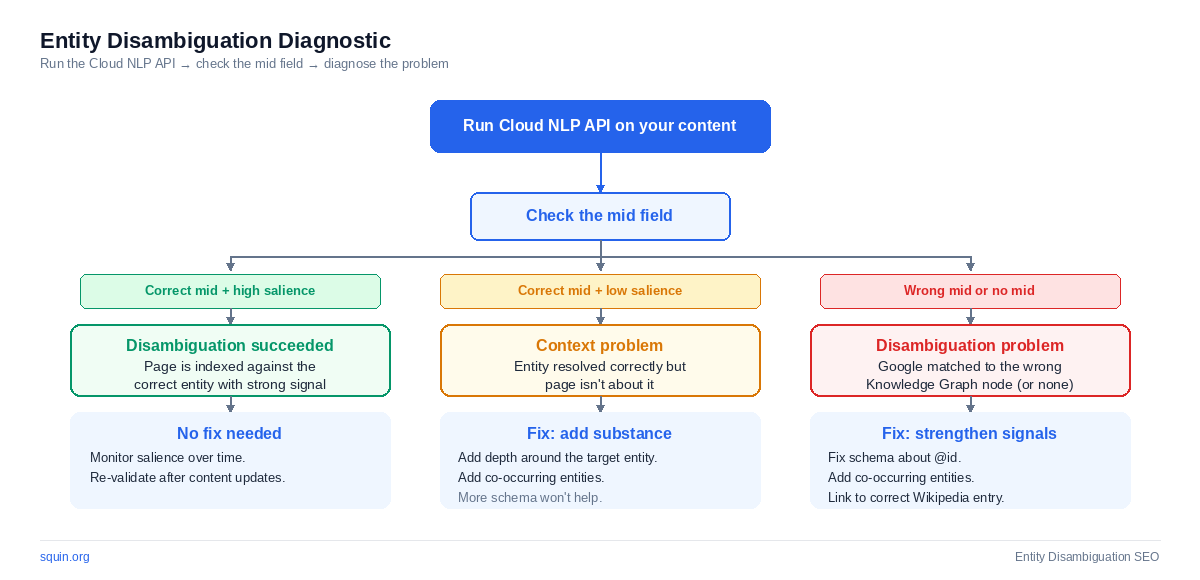
- Correct
mid+ low salience = context problem. The entity resolved correctly but your content doesn’t prioritize it. Add depth around the entity. More schema won’t help. - Wrong
mid= disambiguation problem. Google matched the surface form to the wrong Knowledge Graph node. Strengthen your co-occurring entities, fix your schemaabout@id, and add a hyperlink to the correct Wikipedia article. - No
midat all = Knowledge Graph gap. Google recognizes the text as an entity but can’t connect it to any node in its graph. The entity either doesn’t have a Knowledge Graph entry, or your content doesn’t provide enough signal for Google to make the connection.
Third-Party NLP as a Cross-Reference
Third-party NLP engines provide a clean-room test: are your entity signals universally recognizable, or are they specific to Google’s model?
InLinks runs a proprietary NLP model and builds an entity graph across your entire site – not just one page. Diffbot runs its own entity extraction engine against an independent knowledge graph of over 10 billion entities. Running the same content through a non-Google engine and comparing entity lists helps you spot cases where Google’s model might disagree with your intent.
Don’t use third-party tools as replacements for Google’s API. Use them as cross-references. If all three engines resolve the same entity, your disambiguation signals are strong. If they disagree, investigate which signal is causing the split – it’s usually a co-occurring entity that one model weighs differently than the others.
Verification confirms your implementation works. The next section covers the mistakes that cause most disambiguation failures.
Common Entity Disambiguation Mistakes
Using the surface form without co-occurring entity context is the most frequent failure. “Mercury” alone is ambiguous across five Knowledge Graph entries. “Mercury” alongside “orbital period” and “NASA Messenger mission” forces resolution to the planet. If you name an entity without surrounding it with unambiguous related entities, you’re asking Google to guess. Google guesses wrong often enough to matter.
Schema about with a sameAs but no @id on the entity node. This is common in guides and
tutorials that treat the two properties as equivalent. The sameAs points Google to a page about the entity – an
external reference. The @id with a Wikidata URI anchors the entity as a node in the data graph. Without the @id
, your disambiguation signal works. It’s just weaker than it needs to be.
Confusing mainEntityOfPage with about. The difference is subtle enough that most validators won’t catch a
swap. mainEntityOfPage declares what the URL itself represents – for an Article, that’s typically the Article node or the
page URL. about declares the subject entities the content covers – the topics. An Article’s mainEntityOfPage is
the Article. Its about is entity linking or Mercury the planet or whatever concept the article discusses. Swap them and your
schema is syntactically valid but semantically wrong. Google processes it without errors. It just processes it incorrectly.
Inconsistent entity references across pages in the same topic cluster. One page calls it “the Knowledge Graph.” Another says “Google’s knowledge base.” A third just says “the graph.” Each variation weakens the surface form signal at the site level. Pick one term. Use it consistently. Consistency across your cluster reinforces the entity signal that helps Google disambiguate every page in it.
Over-relying on schema without content depth. Schema declares entities. Content proves you cover them. A page with perfect about
and sameAs pointing to the right Wikidata node but only 200 words of thin content won’t rank – and it shouldn’t.
Google’s NLP models confirm what your schema declares. If the text doesn’t support the declaration, the markup loses its effect. Add
substance, not more properties.
Never validating after implementation. The Rich Results Test confirms your JSON-LD is syntactically correct and that Google supports the types you’ve used. It doesn’t tell you whether Google resolved the right entity. It doesn’t tell you whether your target entity carries sufficient salience. The Cloud NLP API does both. Syntax validation and entity validation are separate steps. Most practitioners do the first and skip the second.
Frequently Asked Questions
What is entity disambiguation?
Entity disambiguation resolves an ambiguous surface form — a text string that could match multiple entities — to a specific entry in a knowledge base. When Google encounters “Apple” on your page, disambiguation determines whether you mean Apple Inc., Apple Records, or apple the fruit, and connects your content to the correct Knowledge Graph node.
How do you find a Knowledge Graph ID for an entity?
Query the Knowledge Graph Search API with the entity name. The API returns matching entities, each with a unique kgmid. You can also find kgmids by viewing the page source of a Google Knowledge Panel and searching for /g/ or /m/ identifiers. The API is the more reliable method — it returns results before your page is indexed.
Does sameAs schema help with disambiguation?
Yes. sameAs connects your entity to its canonical entries in Wikidata, Wikipedia, and official profiles. For stronger disambiguation, use the Wikidata URI as the @id on the entity node inside your about property and use sameAs for the Wikipedia URL. The @id anchors the entity in the data graph. The sameAs references a page about it.
What’s the difference between entity disambiguation and entity linking?
They describe the same process. Entity disambiguation emphasizes resolving ambiguity. Entity linking emphasizes connecting the mention to a knowledge base node. In NLP literature, entity linking is the standard term. In SEO, entity disambiguation is more common. Both refer to the same NLP task.
Where This Fits
This article covers one piece of the semantic SEO framework: making your entities unambiguous to Google’s systems.
Next steps: if your entity signals are clear but topic coverage is thin, see building topical authority. If your JSON-LD needs work beyond disambiguation patterns, start with the JSON-LD tutorial.