
Google NLP API SEO work comes down to one question: which entities does Google’s own NLP stack extract from your page, and with what salience? The Cloud Natural Language API answers that in a JSON response – complete with entity types, Knowledge Graph MIDs (Machine Identifiers), and Wikipedia URLs. This guide covers the full practitioner workflow: authenticating, calling analyzeEntities, reading salience correctly, extracting MIDs into sameAs schema, running the API across a sitemap, and validating your published pages. Pillar context on semantic SEO and how Google’s NLP processes content lives elsewhere.
What does the Google NLP API give you that other entity tools don’t?
Start with Knowledge Graph MIDs. Every entity the API resolves to Google’s Knowledge Graph – Google’s internal entity database – returns a metadata.mid field in the format /m/xxxxx or /g/xxxxx. The free Google Cloud Natural Language API demo strips these from its output. Without the MID, you know Google recognized an entity on your page. With it, you know which Knowledge Graph record it matched – the difference between “Google saw someone named Tim Cook” and “Google resolved that mention to the Apple CEO’s canonical entity, with an identifier you can drop straight into sameAs.”
Salience comes second, scored against your document specifically. The API returns a prominence value for every extracted entity, weighted by position and frequency in the text you submit. Wikidata doesn’t know your document exists. A SPARQL query won’t tell you your target entity is buried under four unrelated ones scoring higher in the draft you just finished.
The third is deterministic output. Large language models extract entities too, often well, but ask the same one twice and you’ll get slightly different answers – paraphrased, reordered, occasionally hallucinated. The Cloud NLP API returns versioned, reproducible JSON. For entity maps you’ll validate against Rich Results Test output, that reproducibility matters.
What this guide doesn’t cover: the other natural language processing methods the API exposes – syntax analysis, content classification, AutoML custom models. For on-page entity work, analyzeEntities and analyzeEntitySentiment are the only methods that earn their keep.
One more scope cut worth naming up front. Current documentation doesn’t connect API output to AI Overview citations. This guide stays inside what you can verify.
With scope settled, the next step is authentication and a working call.
How do you make your first analyzeEntities call and read the response?
Two steps before you see output: authenticate, then send one request. Before either, enable the Cloud Natural Language API in your GCP Console under APIs & Services → Library. Without that toggle, every call will return a 403 regardless of your credentials.
Authentication: API keys, with a note on service accounts
For local scripts and one-off audits, use an API key. Generate one from the Google Cloud Console under APIs & Services → Credentials. When you create it, click Restrict key and lock it to the Cloud Natural Language API only. Add an IP restriction if you’re calling from a fixed machine. Never commit the key to git – set it as an environment variable, read it at runtime.
If you’re running this inside CI, on a Cloud Run service, or anywhere on GCP infrastructure, use a service account instead. See Google’s authentication documentation for the setup. One warning if you’ve used other GCP services locally: if GOOGLE_APPLICATION_CREDENTIALS is already set in your environment, it takes precedence over the api_key parameter and produces confusing auth errors. Unset it for API key workflows, or switch to service account auth explicitly.
Pricing matters before you start batching. The first 5,000 units per feature per month are free. After that, entity analysis runs $1.00 per 1,000 units, where one unit equals up to 1,000 Unicode characters per request, rounded up. See the pricing page for current rates. A 2,000-word page is roughly 12 units. Most audits of individual pages stay inside the free tier.
The first call (curl, then Python)
Here’s the minimal smoke test. Four lines, proves the key works:
curl -X POST \
  -H "Content-Type: application/json" \
  -d '{"document":{"type":"PLAIN_TEXT","content":"Tim Cook announced the new iPhone at Apple Park."},"encodingType":"UTF8"}' \
  "https://language.googleapis.com/v1/documents:analyzeEntities?key=$GCP_API_KEY"
If that returns JSON with an entities array, you’re done with setup. Everything else in this guide runs in Python.
Install the client library:
pip install google-cloud-language
Then the equivalent call, which becomes the runtime for every example that follows. The PLAIN_TEXT document type treats input literally. Use HTML when passing rendered markup – the API strips tags server-side and adjusts character offsets accordingly.
import os
from google.cloud import language_v1

client = language_v1.LanguageServiceClient(
    client_options={"api_key": os.environ["GCP_API_KEY"]}
)

text = "Tim Cook announced the new iPhone at Apple Park."

document = language_v1.Document(
    content=text,
    type_=language_v1.Document.Type.PLAIN_TEXT,
)

response = client.analyze_entities(
    request={"document": document, "encoding_type": language_v1.EncodingType.UTF8}
)

for entity in response.entities:
    print(f"{entity.name} | {entity.type_.name} | {entity.salience:.3f} | {dict(entity.metadata)}")
Run that and you’ll see something close to this:
Tim Cook     | PERSON       | 0.412 | {'mid': '/m/0d7sb6', 'wikipedia_url': 'https://en.wikipedia.org/wiki/Tim_Cook'}
Apple Park   | LOCATION     | 0.318 | {'mid': '/g/11bw8v9q0v', 'wikipedia_url': 'https://en.wikipedia.org/wiki/Apple_Park'}
iPhone       | CONSUMER_GOOD| 0.270 | {'mid': '/m/027hwn4', 'wikipedia_url': 'https://en.wikipedia.org/wiki/IPhone'}
Exact salience values and MIDs shift as Google updates its models, so your numbers won’t match exactly. The shape of the response is what matters.
What every field in the response means
Each entity in the response carries the same structure. Six fields do the work.
name – the surface form of the entity as it appears in your text. This is not canonical. “Tim Cook,” “Cook,” and “Apple’s CEO” can all resolve to the same underlying entity while returning different name values across mentions.
type – one of PERSON, LOCATION, ORGANIZATION, EVENT, WORK_OF_ART, CONSUMER_GOOD, OTHER, or UNKNOWN. The API also returns typed data that’s easy to miss: NUMBER, PRICE, DATE, ADDRESS, and PHONE_NUMBER. These show up on commerce and local pages whether you want them or not. The full list is in the Entity reference.
salience – a value between 0.0 and 1.0 indicating prominence of this entity inside the document you submitted. Treated properly in the next section. Treated wrong by almost every tutorial.
mentions[] – an array of every occurrence of this entity in your text. Each mention has a text.content value, a text.beginOffset (character position), and a mention.type of PROPER or COMMON. “Tim Cook” is PROPER. “the CEO” referring to Tim Cook is COMMON. For audit work, PROPER mentions are usually what you care about.
metadata.mid – the Knowledge Graph Machine Identifier, when the API resolves your entity to a Knowledge Graph record. Extracting and using MIDs is covered in depth below.
metadata.wikipedia_url – the canonical English Wikipedia URL for the entity, when one exists. For niche entities, new products, and long-tail topics, this field is often empty. Absence isn’t failure – it’s a signal you’re writing about something Google’s Knowledge Graph hasn’t fully indexed yet.
What the API is doing under the hood is named-entity recognition at production scale, using models trained on a corpus substantially larger than anything you’ll assemble yourself. The exposed contract – stable field names, typed responses, documented analyzeEntities method – is what makes it useful for reproducible audits rather than one-off curiosity.
With the response parsed, the next question is how to read salience without drawing the wrong conclusions from it.
How do you read salience scores without misinterpreting them?
Every other guide tells you higher salience is better. That’s the wrong mental model, and it leads to the wrong fixes.
Salience is what the API calls its estimate of how central an entity is to the document you submitted. It’s a number between 0.0 and 1.0, and it carries four properties most tutorials skip. Get these right and salience becomes a diagnostic tool. Miss them and you’ll spend afternoons chasing numbers that don’t affect your rankings.
What the salience math actually does
Four things to internalize before you act on a salience value.
It’s bounded, not normalized. Values are bounded between 0.0 and 1.0, with higher meaning more prominent in the specific text you submitted. Scores exist only in the context of the document you sent – not normalized against any external corpus.
It’s position-weighted. Entities appearing in the first paragraph of your text score measurably higher than identical entities appearing only in the last paragraph. Move the same sentence from the introduction to the conclusion and the salience value drops. This is why running the API against raw HTML that leads with a navigation menu will score your navigation items as surprisingly prominent entities.
It’s document-scoped, not corpus-scoped. A salience of 0.15 on a 500-word page is not comparable to 0.15 on a 3,000-word page. The short page has fewer entities competing for the weight, so a given score represents different absolute coverage. You can’t benchmark salience across pages by comparing raw numbers – you’d be comparing ratios with different denominators.
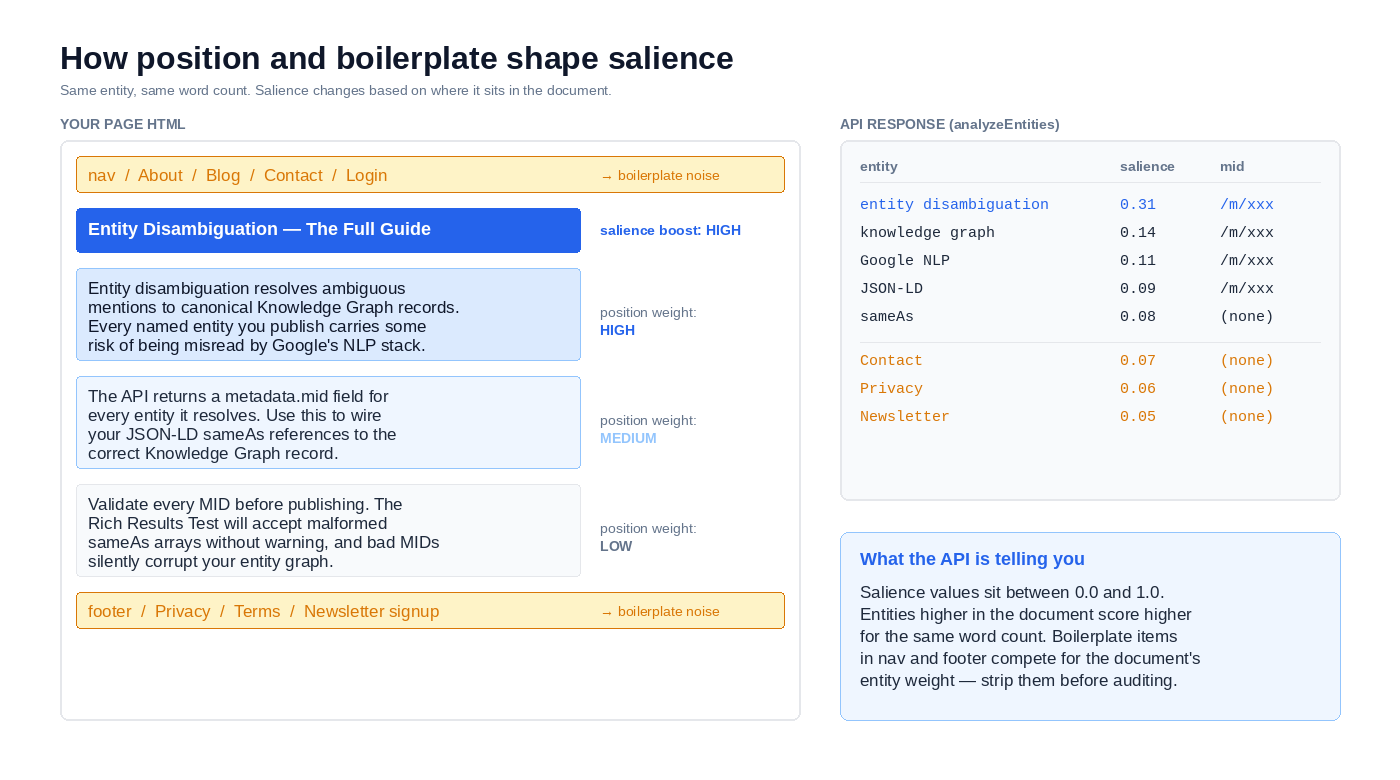
It’s not Google’s ranking weight. This is the one that traps people. Salience reflects the API’s estimate of prominence inside the passage you submitted. It says nothing about how Google Search weighs the entity for ranking purposes, nothing about Knowledge Graph authority, nothing about topical relevance against external signals. Whether the models powering the NLP API match those used in Search ranking isn’t publicly documented. Treating salience as a ranking signal proxy is a category error.
What “good” salience looks like (and why that question is usually wrong)
The first question most practitioners ask is “what salience should I aim for?” There isn’t a target number. There’s a target shape.
Four checks matter.
- Does your target entity appear in the response at all?
- Is it in the top three to five entities by salience?
- Does its
metadata.midresolve to the correct Knowledge Graph record? - Are competing or off-topic entities displacing it from the top of the list?
If your article is about the Tim Berners-Lee WorldWideWeb browser and the API’s top five are Tim Berners-Lee, CERN, HTML, NeXT, and WorldWideWeb – you’re fine. The individual salience values barely matter. If the top five are instead Tim Berners-Lee, the W3C, JavaScript, Mozilla, and your author bio, you have a composition problem that no salience boost will fix.
Here’s what that looks like concretely. Say you run two drafts of the same article through analyzeEntities:
Draft A - "What Is Entity Disambiguation"
  entity disambiguation  | 0.31 | [MID]
  named entity           | 0.18 | [MID]
  Knowledge Graph        | 0.14 | [MID]
  schema.org             | 0.09 | [MID]
  Google Search          | 0.08 | [MID]

Draft B - same article, boilerplate-heavy version
  entity disambiguation  | 0.19 | [MID]
  named entity           | 0.11 | [MID]
  newsletter             | 0.10 | (no mid)
  Knowledge Graph        | 0.09 | [MID]
  subscription           | 0.08 | (no mid)

Note: MIDs shown as placeholders. Verify against your own API output.
Draft A has the target entity at 0.31. Draft B has it at 0.19. The obvious read is that Draft A is the better page. That’s correct, but the fix for Draft B isn’t “boost salience for entity disambiguation.” It’s “strip the newsletter sidebar and subscription CTA from whatever HTML you sent the API.” The composition is the problem. Salience just told you that.
This is the most common misuse of the API. Writers see a low target-entity salience and rewrite the intro to cram the target term into every sentence. The API returns a higher number, the writer ships, and nothing improves. What actually moved the number was keyword repetition, not entity prominence – and Google’s ranking systems aren’t reading the Cloud NLP API response of your page anyway.
The productive fixes look different. Remove competing entities that shouldn’t be on the page at all. Strip boilerplate before submitting text to the API. Clarify ambiguous mentions that might resolve to the wrong MID. Pull in related entities that support the target’s topical context. None of these chase the salience number directly, but all of them tend to move it in the right direction as a side effect.
Once you’re reading salience as diagnostic rather than score, the MID field becomes the next lever – and the one with the most direct path to structured data.
How do you extract MIDs, act on entity sentiment, and feed both into sameAs?
Salience tells you which entities are on your page. MIDs tell you which specific Knowledge Graph records Google matched them to. The second is what you act on.
Reading and validating the MID
Every resolved entity in the response carries a metadata.mid field. Two formats exist, and both are valid:
/m/xxxxx– inherited from Freebase, which Google acquired in 2010 and retired as a public product in 2015. These MIDs persist inside the Knowledge Graph and are still returned by the API today./g/xxxxx– the newer format for entities added after the Freebase-to-Knowledge-Graph migration. Functionally equivalent for schema use.
Extracting them from a response is three lines:
for entity in response.entities:
    mid = entity.metadata.get("mid")
    if mid:
        print(f"{entity.name} -> {mid}")
Absent MIDs are common. Niche brands, new products, and most non-English entities return no mid field at all. That’s not an error – it’s the API telling you the entity isn’t in the Knowledge Graph yet. Route those into a disambiguation queue (a list of entities needing manual review before inclusion in your schema) rather than discarding them.
Before you drop a MID into production schema, validate that it points to the entity you think it does. Two ways.
The fastest check is the kgmid query parameter on Google Search:
https://www.google.com/search?kgmid=/m/0d7sb6
If the knowledge panel that loads is the entity you meant, the MID is correct. If a different entity loads – or a disambiguation page appears – the API resolved your surface text to the wrong record, and shipping that MID in sameAs will send the wrong signal.
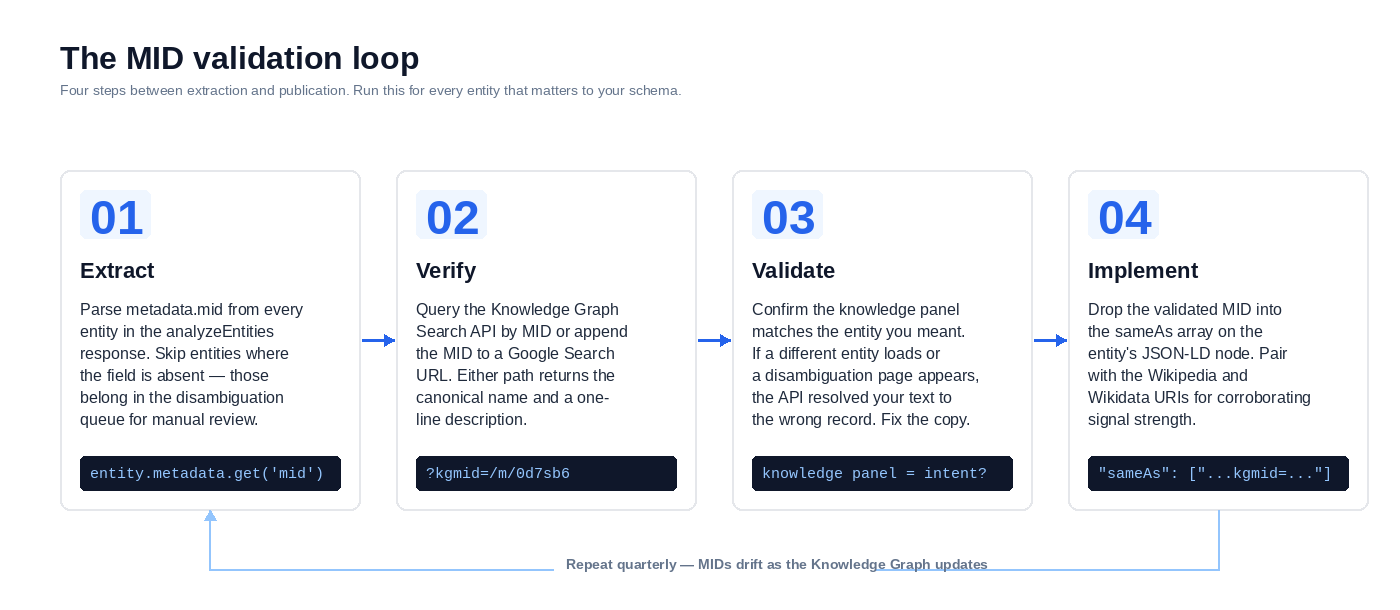
The programmatic check is the Knowledge Graph Search API. One setup note: this is a separate API from the Cloud Natural Language API. You need to enable it in the same GCP Console → APIs & Services → Library. And the restricted NLP API key from earlier won’t work – either create a second key with Knowledge Graph API enabled, or unrestrict an existing key to cover both services. Query by MID:
import os
import requests

api_key = os.environ["KG_API_KEY"]
mid = "/m/0d7sb6"

url = "https://kgsearch.googleapis.com/v1/entities:search"
params = {"ids": mid, "key": api_key, "limit": 1}

result = requests.get(url, params=params).json()
element = result["itemListElement"][0]["result"]
print(element["name"], "-", element.get("description", ""))
Returns the canonical name and a one-line description. If they match intent, the MID is safe to use. Full theoretical grounding on why this step matters is in the entity disambiguation in SEO guide.
Adding MIDs to your JSON-LD sameAs array
Schema.org defines sameAs as a URL linking to a reference page that unambiguously indicates the item’s identity. Google treats multiple entries in sameAs as corroborating signals – the more authoritative external references you provide for an entity, the stronger the disambiguation claim.
For MIDs, the canonical reference URL is the Knowledge Graph search URL itself:
{
  "@context": "https://schema.org",
  "@type": "Organization",
  "name": "Apple Inc.",
  "url": "https://www.apple.com",
  "sameAs": [
    "https://www.google.com/search?kgmid=/m/0k8z",
    "https://en.wikipedia.org/wiki/Apple_Inc.",
    "https://www.wikidata.org/wiki/Q312"
  ]
}
Three references, three different knowledge systems, one entity. Google’s Knowledge Graph by MID, Wikipedia for human-readable corroboration, Wikidata for machine-readable structured data. Including all three is the strongest pattern – each compensates where the others are weak. The Wikipedia URL helps for entities with thin Knowledge Graph records. The Wikidata URI carries machine-readable properties the other two don’t expose.
For a complete Organization implementation with logo, contactPoint, and publisher linkage, see the Organization schema guide. The MID pattern above drops directly into that structure.
Validate every JSON-LD block in Google’s Rich Results Test before publishing. An Organization node with a malformed sameAs array won’t fail the test – it’ll pass quietly and do nothing.
When entity sentiment actually changes what you ship
Two sentiment analysis methods exist in the API. They’re not interchangeable.
analyzeSentiment returns one document-level sentiment score. For SEO, this is almost always noise. Your article’s overall tone rarely moves ranking decisions, and no Google documentation ties document sentiment to ranking signals.
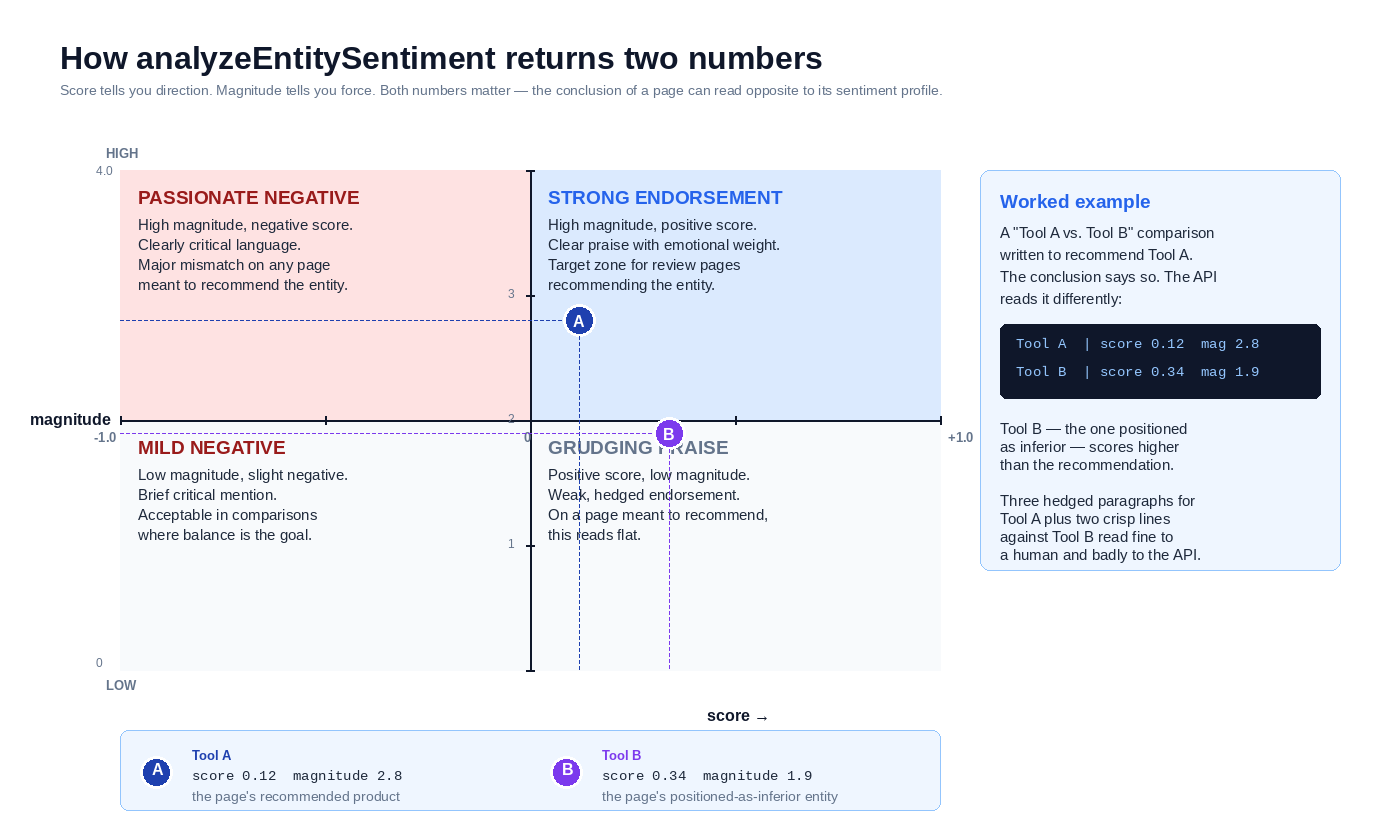
analyzeEntitySentiment is different. It returns a sentiment score and magnitude for each entity in the text – so on a page mentioning Product A and Product B, you see how the API reads your tone toward each one separately.
Two numbers per entity:
scoreranges from -1.0 (strongly negative) to 1.0 (strongly positive). Neutral is 0.0.magnitudeis an unbounded positive number reflecting the strength of emotional content. A 500-word passionate rant and a two-sentence complaint might both score -0.8, but the rant’s magnitude will be substantially higher.
Where this matters:
- Product review pages, where per-entity sentiment affects whether Google classifies your content as a genuine review versus a neutral overview
- Versus and comparison content, where your stated conclusion should match the sentiment profile the API reads
- Brand mention audits on pages discussing multiple competitors, to confirm your framing reads the way you intended
Where it doesn’t: informational content, definitional pages, how-to guides. If your page is explaining how something works, per-entity sentiment isn’t a signal you should be engineering around.
One scenario that shows up often. A “Tool A vs. Tool B” affiliate comparison is written to recommend Tool A. The conclusion says so. Run analyzeEntitySentiment against the full text and you might find:
Tool A  | score: 0.12  magnitude: 2.8
Tool B  | score: 0.34  magnitude: 1.9
Your recommended product scores lower than the one you positioned as inferior. The writer spent three paragraphs hedging Tool A’s weaknesses before praising it, then dispatched Tool B with two sharp sentences of grudging credit. The prose reads fine to a human. The API reads Tool B as the more favored entity.
This is the check. Run it on any page where your editorial stance needs to match the text’s actual sentiment profile, not just its conclusion. On every other page type, skip it.
With entities identified, MIDs validated, and sentiment checked where relevant, the next question is operational: running this across hundreds of URLs without hitting rate limits or blowing your cost budget.
How do you run the API across a full sitemap?
Auditing one page teaches you the response format. Auditing a site tells you where your entity strategy actually is.
The pattern is four steps in sequence: parse the sitemap, fetch each URL, extract main content, POST to analyzeEntities, and write the results to a flat CSV you can pivot. Install the content extractor first:
pip install readability-lxml google-cloud-language requests
Then the working script:
import csv
import os
import time
from xml.etree import ElementTree

import requests
from google.api_core import retry
from google.cloud import language_v1
# from readability-lxml package, not readability or python-readability
from readability import Document

SITEMAP = "https://example.com/sitemap.xml"
OUTPUT_CSV = "entity_audit.csv"
NS = {"sm": "http://www.sitemaps.org/schemas/sitemap/0.9"}
HEADERS = {"User-Agent": "YourSite-EntityAudit/1.0"}

client = language_v1.LanguageServiceClient(
    client_options={"api_key": os.environ["GCP_API_KEY"]}
)

def fetch_xml(url):
    response = requests.get(url, timeout=30, headers=HEADERS)
    response.raise_for_status()
    return ElementTree.fromstring(response.text)

def get_urls(sitemap_url):
    """Handles both flat sitemaps and sitemap indexes."""
    root = fetch_xml(sitemap_url)
    tag = root.tag.split("}", 1)[-1]
    if tag == "sitemapindex":
        urls = []
        for loc in root.findall(".//sm:loc", NS):
            urls.extend(get_urls(loc.text))
        return urls
    return [loc.text for loc in root.findall(".//sm:loc", NS)]

def extract_main_content(html):
    doc = Document(html)
    return doc.summary(html_partial=True)

@retry.Retry(initial=1.0, maximum=60.0, multiplier=2.0, deadline=300.0)
def analyze(text):
    # 10,000 char ceiling keeps per-URL cost capped at ~10 units.
    # Raise deliberately if you need deeper coverage and know the cost.
    document = language_v1.Document(
        content=text[:10000],
        type_=language_v1.Document.Type.HTML,
    )
    return client.analyze_entities(
        request={"document": document, "encoding_type": language_v1.EncodingType.UTF8}
    )

try:
    urls = get_urls(SITEMAP)
except Exception as exc:
    print(f"Could not read sitemap {SITEMAP}: {exc}")
    raise SystemExit(1)

with open(OUTPUT_CSV, "w", newline="") as f:
    writer = csv.writer(f)
    writer.writerow(["url", "entity_name", "entity_type", "salience", "mid", "wikipedia_url"])

    for url in urls:
        try:
            response = requests.get(url, timeout=30, headers=HEADERS)
            response.raise_for_status()
            content = extract_main_content(response.text)
            entities = analyze(content)
            for e in entities.entities:
                writer.writerow([
                    url, e.name, e.type_.name, round(e.salience, 4),
                    e.metadata.get("mid", ""), e.metadata.get("wikipedia_url", ""),
                ])
            time.sleep(0.1)
        except Exception as exc:
            print(f"FAILED {url}: {exc}")
Four things worth calling out in the script. The get_urls function recurses into sitemap indexes – most enterprise sites split URLs across nested sitemaps rather than one flat file. The readability-lxml library strips navigation, footers, and sidebars before you send text to the API (if your CMS uses a custom template readability doesn’t handle well, swap the extractor for a BeautifulSoup selector targeting your article container). The @retry decorator handles transient errors with exponential backoff. And the time.sleep(0.1) keeps you inside the default quota of 600 requests per minute – check current limits on your project’s quotas page before running at scale.
On cost: analyzeEntities charges per 1,000 Unicode characters of text (one unit, rounded up). At the 10,000-character ceiling set in the script, each URL costs at most 10 units. A 500-URL site runs 5,000 units – exactly at the free tier. An 8,000-URL site costs roughly $80 at list price. The ceiling protects you from accidentally burning budget on pages with massive boilerplate-heavy HTML; raise it when you deliberately need more coverage.
What to actually do with the CSV
The flat output shape is what makes this useful. Three pivots answer three questions.
Pivot by entity to surface coverage gaps. Count the number of distinct URLs where each target entity appears. If you’re publishing a semantic SEO site and “Knowledge Graph” appears on 4 URLs while “entity disambiguation” appears on 23, you have a balance problem worth examining.
Pivot by URL to flag pages with no dominant entity. Sort by the highest salience value per URL. Pages where the top entity scores below 0.15 are usually over-broad – they’re covering too many topics to register as authoritative on any single one.
Filter rows with missing MIDs to build a disambiguation queue. Every entity_name without a mid is either a niche entity Google hasn’t canonicalized or a surface form that failed to resolve. Both are worth manually reviewing against the Knowledge Graph Search API before your next content cycle.
Once you’ve run the audit and acted on the results, the last loop to close is validation – confirming the pages you publish actually return the entities you designed them around.
How do you validate your published pages return the entities you targeted?
A page that tests well in draft can still ship with the wrong entity profile. Boilerplate creeps in during the CMS render. Related-posts widgets inject off-topic entities. The validation loop catches this.
Two runs per page. One before publish, one after.
Pre-publish check. Paste your final draft body into analyzeEntities directly – no HTML wrapper, no navigation, just the main content you wrote. Confirm three things: your target entity appears in the top five by salience, its metadata.mid matches the Wikidata QID in your internal entity map, and no unexpected entities are outranking it. If any of those fail, edit before publishing.
Post-publish check. Once the page is indexed (confirm via URL Inspection in Google Search Console), re-run the API against the live URL – fetching the page as the crawler sees it, passing the rendered HTML through the same content extractor you used in the batch script. Diff the entity list against your pre-publish run. If the top five changed, something in the template is interfering. Usually it’s a related-posts block, a floating newsletter signup, or a sidebar that rendered heavier on the live page than in preview.
The rendered-HTML distinction is where most validation attempts fail silently. The API scores whatever text you feed it. Feed it raw HTML with navigation and footer intact and every page in your site will return “Privacy Policy” and “Contact Us” as high-salience entities. Feed it clean extracted main content and you get the signal you actually wanted. If your pre-publish run used clean text and your post-publish run used raw HTML, the diff is measuring extraction differences, not content drift.
This loop is what turns everything in the previous sections from a one-time audit into an operational habit. The techniques above tell you how to read the API. The validation loop is what keeps your published pages matching the entity profiles you designed them around. That’s cheap. Post-publish edits aren’t.
Even with the loop in place, there are specific mistakes that will break the signal – most of them silent, some of them expensive. Those are next.
What are the common mistakes when using the Google NLP API for SEO?
Six specific failure modes. Each one costs you either accuracy, budget, or trust in your own output.
Submitting raw HTML instead of extracted main content. The API scores every entity it finds in the text you send, including the ones in your navigation menu, cookie banner, newsletter signup, and footer. A site-wide “Privacy Policy” link will show up as a high-salience entity on every single page if you pass unprocessed HTML. Strip boilerplate first – use readability-lxml, a custom CSS selector, or your CMS’s main content API. This is the single highest-impact fix in this list.
Interpreting salience as absolute. A target entity scoring 0.04 on a 3,000-word page can represent the same practical coverage as 0.15 on a 500-word page. Different denominator, same signal. Comparing raw salience values across pages of different lengths will send you chasing numbers that don’t mean what you think they mean. Compare ranks within a response instead – top 3, top 5, top 10.
Treating missing MIDs as errors. When metadata.mid is absent, the API is telling you Google’s Knowledge Graph doesn’t have a canonical record for that entity yet. Niche brands, newly-launched products, and most non-English entities routinely return no MID. That’s data worth acting on – route those entities into a disambiguation queue and build a sameAs strategy using Wikipedia or Wikidata references instead of dropping them.
Ignoring language detection. The API auto-detects language when you don’t specify one, and on multilingual sites the detection can flip between runs on the same page. Results shift. Entity coverage looks inconsistent for reasons that have nothing to do with your content. Set document.language explicitly – "en", "es", "de" – to get reproducible output.
Using analyzeSentiment for SEO decisions. Document-level sentiment rarely maps to anything a ranking system cares about, and no Google documentation connects document sentiment to ranking signals. The endpoint exists and it’s easy to call, so writers assume it must be useful. For SEO work it almost never is. If you need sentiment at all, use analyzeEntitySentiment and only on the page types covered earlier – product reviews, comparison content, brand audits.
Caching MIDs forever. Google’s Knowledge Graph changes. Entities get merged, IDs get deprecated, new records replace old ones. A MID you validated 18 months ago may now point to a different entity or return nothing at all. For any entity that matters to your schema, re-validate quarterly. Build this into your audit cadence, not a one-time cleanup task.
Frequently asked questions
Is the Google Cloud Natural Language API free?
The first 5,000 units per feature per month are free, then entity analysis costs $1.00 per 1,000 units after that. The web demo is free without limits, but it hides MIDs from the output and doesn’t support batch processing. Single-page research fits the demo. Audits at scale need the API.
What is a good entity salience score for SEO?
That’s the wrong question. Salience is relative to the document you submitted, not to Google’s ranking system – there’s no universal target number. What matters is whether your target entity appears in the top three to five results by salience, whether competing entities are displacing it, and whether its metadata.mid resolves to the correct Knowledge Graph record. The salience section above covers the diagnostic pattern.
Does Google use its NLP API for ranking?
No. The Cloud Natural Language API is a commercial product. Whether the models powering it match those used in Search ranking isn’t publicly documented. What the API gives you is a close proxy for how Google’s NLP stack identifies entities in text. It’s diagnostic data, not a direct ranking signal.
How do you extract entities from a webpage without coding?
The Cloud Natural Language API demo accepts pasted text and displays extracted entities directly in the browser. You won’t see MIDs, you can’t process multiple pages at once, and you can’t script any of it. Good enough for one-off research. Anything reproducible needs the API.
Where this fits
The Google NLP API gives you a deterministic read on which entities live on your page. Pair that with the theoretical framing in the semantic SEO pillar and the disambiguation workflow covered earlier, and you have the full loop: identify, disambiguate, validate.