
By the end of this article you’ll have a queryable Neo4j graph populated from Wikidata, multilingual entity labels, n-hop semantic neighborhood traversal, and a custom RDF ontology connected to published JSON-LD. The pillar on semantic SEO covers why entities matter and how Google’s Knowledge Graph processes them – read that first if you want the broader framing. If you haven’t built a foundational entity map before, start with our beginner’s guide. This article assumes you’ve already done that work.
You’ll need a running Neo4j instance – Neo4j Desktop, Docker, or an Aura cloud instance – and Python 3.9+ with pip install requests neo4j pyvis for the scripts that follow.
Should You Use Neo4j or an RDF Triplestore?
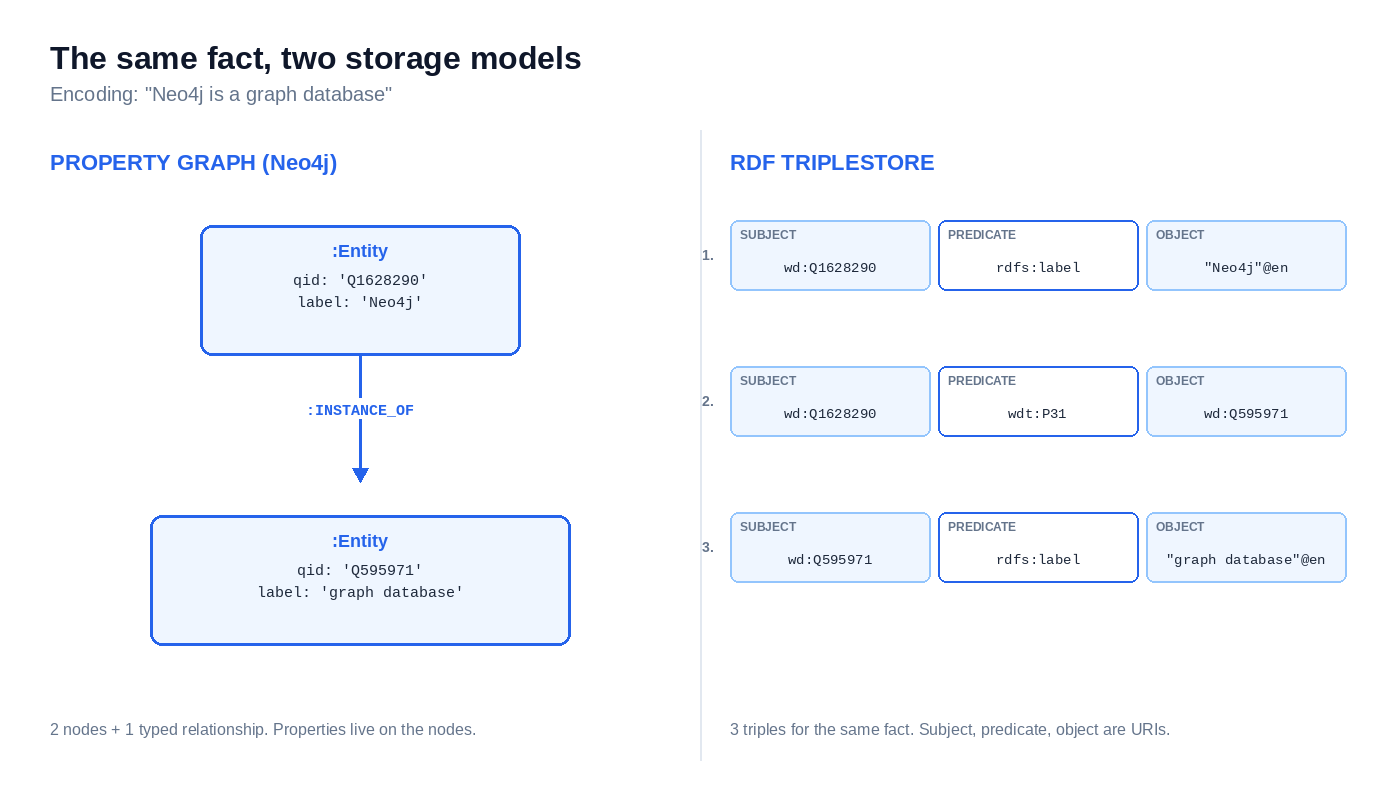
An entity map is a knowledge graph – a graph of entities connected by typed relationships. Two storage models compete for that work: property graphs and RDF triplestores. The choice decides everything downstream – query syntax, tooling, visualization, performance characteristics.
Neo4j is the dominant property graph database. Each entity is a node. Properties attach directly to that node as key-value pairs. Relationships are first-class objects with their own properties. You query with Cypher.
An RDF triplestore stores data as subject-predicate-object atoms. RDF is the W3C standard for that data model. A single entity becomes dozens of triples. Apache Jena, Blazegraph, and GraphDB are the common engines. You query with SPARQL.
Same data, different shape. The fact “Neo4j is a graph database” is one node with one INSTANCE_OF relationship in property-graph terms. In RDF it’s a single triple with a globally unique URI for each component.
Neo4j wins for most SEO entity-mapping work:
- Cypher traversal performance on small-to-medium graphs is fast, and the syntax matches how you actually think about entity neighborhoods.
- The Python ecosystem is mature. Drivers, visualization libraries, and APOC procedures cover the work you’ll do.
- Visualization is built into Neo4j Browser – you see your graph the moment you load it.
- Operations stay manageable. A small team can run Neo4j Desktop or Aura without a dedicated graph engineer.
RDF triplestores win in narrower cases. If your organization already runs a published OWL ontology, switching to a property graph throws away that investment. If you need SPARQL federation – querying multiple external endpoints in a single query, the way Wikidata’s query service interconnects with other Linked Data endpoints – RDF is the only path. Regulated industries with semantic web compliance requirements often have no choice but RDF.
The rest of this article uses Neo4j. The custom ontology section comes back to RDF concepts because OWL and RDF Schema still define how you formally extend Schema.org – but the storage layer stays Neo4j throughout.
The next section walks the full build – Cypher schema, SPARQL seed query, Python ingestion.
How Do You Build the Entity Map in Neo4j?
The build splits into three steps. Decide the schema. Pull the seed data from Wikidata. Ingest into Neo4j with idempotent Cypher. Each step is short – the whole pipeline fits in one Python file.
Modeling nodes and relationships before you write code
Two node labels do most of the work. :Entity for canonical things – companies, products, people, concepts that map to a specific Wikidata item. :Concept is optional for category-like nodes that aren’t instances of anything but exist as taxonomic anchors.
Relationship types are verbs in SCREAMING_SNAKE_CASE: INSTANCE_OF, SUBCLASS_OF, SAME_AS, PART_OF. Match Wikidata’s property semantics where you can – INSTANCE_OF mirrors P31, SUBCLASS_OF mirrors P279 – so the relationship type itself documents what it means.
Every :Entity node carries four properties at minimum: qid, label, description, wikipedia_url. The QID – Wikidata’s stable numeric identifier (e.g., Q1628290 for Neo4j) – is the canonical anchor. URL slugs change. Page titles drift. Brand names get rewritten. QIDs don’t, which is why entity disambiguation treats them as the anchor identifier.
Set the uniqueness constraint before you load anything:
CREATE CONSTRAINT entity_qid_unique IF NOT EXISTS
FOR (e:Entity) REQUIRE e.qid IS UNIQUE
This syntax requires Neo4j 4.4 or later. Older versions use CREATE CONSTRAINT ... ASSERT e.qid IS UNIQUE. Skip this step and every re-run of the ingestion script duplicates your nodes – hard to undo cleanly once the graph has real data. The constraint also creates an index on qid automatically, which makes every MERGE lookup later in the pipeline O(1) instead of a scan.
Pulling seed entities from Wikidata via SPARQL
Wikidata exposes a public SPARQL endpoint at https://query.wikidata.org/sparql. SPARQL is the query language for RDF data – it lets you ask for entities matching specific patterns of properties and values.
This query takes one seed QID and returns its direct instance of (P31) and subclass of (P279) neighbors, plus labels, descriptions, and English Wikipedia URLs for both endpoints:
SELECT ?entity ?entityLabel ?entityDescription ?entityWiki
       ?relationType ?neighbor ?neighborLabel ?neighborDescription ?neighborWiki
WHERE {
  VALUES ?entity { wd:Q1628290 }

  {
    ?entity wdt:P31 ?neighbor .
    BIND("INSTANCE_OF" AS ?relationType)
  } UNION {
    ?entity wdt:P279 ?neighbor .
    BIND("SUBCLASS_OF" AS ?relationType)
  }

  OPTIONAL {
    ?entityWiki schema:about ?entity ;
                schema:isPartOf <https://en.wikipedia.org/> .
  }
  OPTIONAL {
    ?neighborWiki schema:about ?neighbor ;
                  schema:isPartOf <https://en.wikipedia.org/> .
  }

  SERVICE wikibase:label { bd:serviceParam wikibase:language "en". }
}
The wikibase:label service auto-binds any ?xLabel and ?xDescription variable in the SELECT clause to that entity’s rdfs:label and schema:description. You don’t write the join – the service does it. The OPTIONAL blocks for Wikipedia URLs are genuinely optional; some neighbor entities don’t have English Wikipedia articles, and the query returns null for those instead of dropping the row.
Replace wd:Q1628290 with whichever seed QID you’re starting from. Test the query first in the Wikidata Query Service web UI – if the results look right there, the API call returns the same JSON.
Ingesting into Neo4j with Python and Cypher
Two libraries handle the rest. requests for the SPARQL call. neo4j for the graph driver. Set your Neo4j password as an environment variable (export NEO4J_PASSWORD=...) before running the script.
import os
import re
import requests
from neo4j import GraphDatabase

WIKIDATA_ENDPOINT = "https://query.wikidata.org/sparql"
NEO4J_URI = "bolt://localhost:7687"
NEO4J_AUTH = ("neo4j", os.environ["NEO4J_PASSWORD"])

QID_PATTERN = re.compile(r"^Q\d+$")

SPARQL_QUERY = """
SELECT ?entity ?entityLabel ?entityDescription ?entityWiki
       ?relationType ?neighbor ?neighborLabel ?neighborDescription ?neighborWiki
WHERE {
  VALUES ?entity { wd:Q1628290 }

  {
    ?entity wdt:P31 ?neighbor .
    BIND("INSTANCE_OF" AS ?relationType)
  } UNION {
    ?entity wdt:P279 ?neighbor .
    BIND("SUBCLASS_OF" AS ?relationType)
  }

  OPTIONAL {
    ?entityWiki schema:about ?entity ;
                schema:isPartOf <https://en.wikipedia.org/> .
  }
  OPTIONAL {
    ?neighborWiki schema:about ?neighbor ;
                  schema:isPartOf <https://en.wikipedia.org/> .
  }

  SERVICE wikibase:label { bd:serviceParam wikibase:language "en". }
}
"""

ALLOWED_RELS = {"INSTANCE_OF", "SUBCLASS_OF"}


def qid_from_uri(uri):
    qid = uri.rsplit("/", 1)[-1]
    if not QID_PATTERN.match(qid):
        raise ValueError(f"Invalid QID format: {qid}")
    return qid


def fetch_wikidata():
    response = requests.get(
        WIKIDATA_ENDPOINT,
        params={"query": SPARQL_QUERY},
        headers={
            "Accept": "application/sparql-results+json",
            "User-Agent": "squin-entity-mapper/1.0 (https://squin.org)",
        },
    )
    response.raise_for_status()
    return response.json()["results"]["bindings"]


def cypher_for(rel_type):
    if rel_type not in ALLOWED_RELS:
        raise ValueError(f"Unsupported relation: {rel_type}")
    return f"""
    MERGE (e:Entity {{qid: $entity_qid}})
      ON CREATE SET e.label = $entity_label,
                    e.description = $entity_description,
                    e.wikipedia_url = $entity_wiki
    MERGE (n:Entity {{qid: $neighbor_qid}})
      ON CREATE SET n.label = $neighbor_label,
                    n.description = $neighbor_description,
                    n.wikipedia_url = $neighbor_wiki
    MERGE (e)-[:{rel_type}]->(n)
    """


def ingest(driver, rows):
    with driver.session() as session:
        for row in rows:
            params = {
                "entity_qid": qid_from_uri(row["entity"]["value"]),
                "entity_label": row.get("entityLabel", {}).get("value"),
                "entity_description": row.get("entityDescription", {}).get("value"),
                "entity_wiki": row.get("entityWiki", {}).get("value"),
                "neighbor_qid": qid_from_uri(row["neighbor"]["value"]),
                "neighbor_label": row.get("neighborLabel", {}).get("value"),
                "neighbor_description": row.get("neighborDescription", {}).get("value"),
                "neighbor_wiki": row.get("neighborWiki", {}).get("value"),
            }
            session.run(cypher_for(row["relationType"]["value"]), **params)


def main():
    driver = GraphDatabase.driver(NEO4J_URI, auth=NEO4J_AUTH)
    try:
        rows = fetch_wikidata()
        ingest(driver, rows)
    finally:
        driver.close()


if __name__ == "__main__":
    main()
Three design choices matter. Every node uses MERGE, not CREATE – MERGE finds an existing node by the matching property or creates one if none exists. Run the script three times and the graph stays the same shape. The relationship is also MERGEd so duplicate edges between the same two entities never accumulate.
The cypher_for function whitelists allowed relationship types before string-formatting them into the query, and qid_from_uri validates the parsed identifier against ^Q\d+$ before passing it to Cypher. Cypher can’t parameterize relationship types directly, and Wikidata URIs occasionally return formats you didn’t expect. Both checks guard against malformed input that would otherwise create relationships or nodes you didn’t intend.
The custom User-Agent header isn’t optional. Wikidata’s Query Service blocks generic python-requests/2.x strings under their access policy and requires identifiable agents with contact info. Replace the value with something that identifies your project and a contact path.
One nuance about MERGE ... ON CREATE SET. Properties only get written when the node is first created. If Wikidata updates a label later, re-running the script won’t pick up the change. For a static seed import this is fine. For a graph you want to keep in sync with Wikidata, add ON MATCH SET clauses with the same properties so updates propagate.
What you have now is a graph populated with one seed entity and its direct taxonomic neighbors. To run the multi-hop queries that follow, extend it: wrap the ingestion in a loop that pulls each new :Entity QID out of Neo4j and feeds it back into the SPARQL query, controlled by a depth limit (3–4 typically). The mechanics are straightforward once the single-seed pipeline runs. The graph at this point is also monolingual – every label and description came back in English. The next section fixes that.
How Do You Handle Multilingual Entity Mapping?
Wikidata’s QID is language-agnostic. Q1628290 means Neo4j whether you query from English, German, or Japanese Wikipedia. The rdfs:label property carries language-tagged strings – "Neo4j"@en, "Neo4j"@de – and sameAs URIs point to language-specific Wikipedia pages. One identifier, hundreds of surface forms.
That mechanic does all the work in multilingual entity mapping. Most international SEO tooling treats translations as separate entities, but they’re the same entity with different labels.
The modeling decision comes first. Two approaches work in Neo4j:
- Map properties on a single node. Store
label_en,label_de,label_esas direct properties on the:Entitynode. Reads stay fast, Cypher stays simple, indexes behave normally. Adding a new language means one more property. - Separate
:Labelnodes connected viaHAS_LABEL. This option gives you flexibility – querying “all Spanish labels in the graph” becomes one MATCH. The cost is that every label lookup turns into a join, and the schema gets noisy as the graph grows.
Option one wins for SEO entity work. You rarely query labels independently of the entity that owns them.
The SPARQL query for a multi-language fetch isolates each language in its own OPTIONAL block:
SELECT ?entity ?label_en ?label_de ?label_es ?wiki_en ?wiki_de ?wiki_es
WHERE {
  VALUES ?entity { wd:Q1628290 }

  OPTIONAL { ?entity rdfs:label ?label_en . FILTER(LANG(?label_en) = "en") }
  OPTIONAL { ?entity rdfs:label ?label_de . FILTER(LANG(?label_de) = "de") }
  OPTIONAL { ?entity rdfs:label ?label_es . FILTER(LANG(?label_es) = "es") }

  OPTIONAL {
    ?wiki_en schema:about ?entity ;
             schema:isPartOf <https://en.wikipedia.org/> .
  }
  OPTIONAL {
    ?wiki_de schema:about ?entity ;
             schema:isPartOf <https://de.wikipedia.org/> .
  }
  OPTIONAL {
    ?wiki_es schema:about ?entity ;
             schema:isPartOf <https://es.wikipedia.org/> .
  }
}
Languages without a label or Wikipedia article return null instead of dropping the row. Add or remove OPTIONAL blocks to match the locales you actually serve.
The FILTER+OPTIONAL pattern is fine for single-entity queries like the one above. For batch queries pulling many entities at once, the wikibase:label service with comma-separated language fallback is faster – but it returns one preferred label per entity rather than parallel columns.
The Cypher write uses one MERGE with parameterized properties. Run it from your Python script with one parameter per $variable, bound to the corresponding column of each SPARQL result row:
MERGE (e:Entity {qid: $qid})
  ON CREATE SET e.label_en = $label_en,
                e.label_de = $label_de,
                e.label_es = $label_es,
                e.wiki_en = $wiki_en,
                e.wiki_de = $wiki_de,
                e.wiki_es = $wiki_es
For label retrieval with fallback – return the German label, or English when German is missing – Cypher’s coalesce() walks the chain in order:
MATCH (e:Entity {qid: 'Q1628290'})
RETURN coalesce(e.label_de, e.label_en) AS preferred_label
This pattern matters in three contexts. International SEO programs serving entity-aware content across regions need a single canonical entity per concept regardless of which language renders. hreflang-paired language versions of a page should both resolve to the same canonical entity through sameAs. Multi-region brand entity work depends on surface names varying by locale while the underlying entity stays singular.
Cross-lingual disambiguation introduces a problem the modeling decision alone doesn’t solve. The same string in different languages can map to different QIDs – “Java” in English software content resolves to the programming language, but in Indonesian geographic content it resolves to the island, and the disambiguation logic has to handle that boundary correctly across locales. The full disambiguation methodology lives in entity disambiguation. Treat it as a prerequisite before scaling multilingual mapping past two or three languages.
Your graph now spans multiple languages. The next question is what surrounds each entity in it.
What Is Semantic Neighborhood Mapping and How Do You Run It?
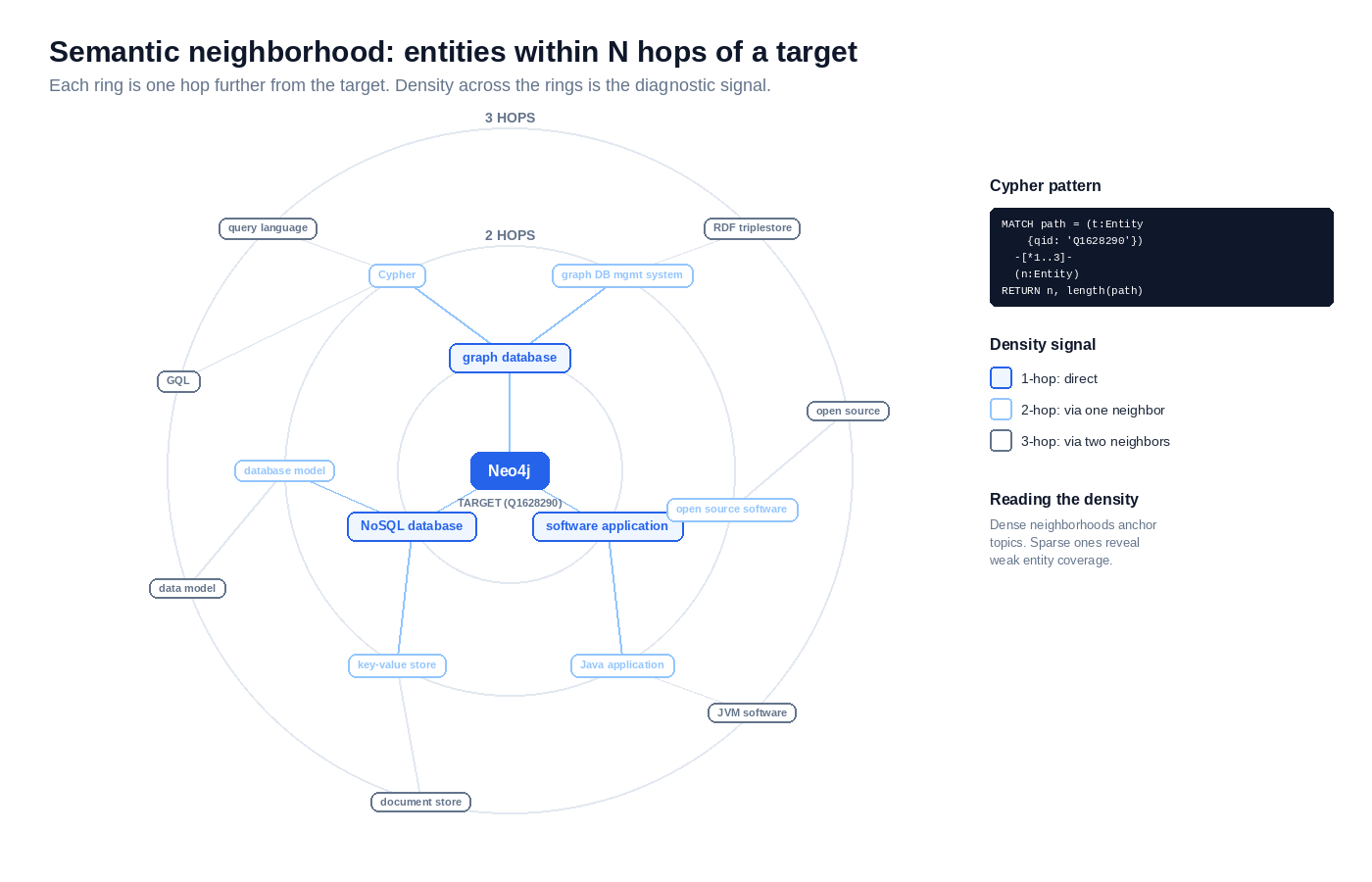
A semantic neighborhood is the set of entities reachable from a target entity within N hops in your graph. Dense neighborhoods – many entities connected by short paths – show that the target sits at the center of well-supported context. Sparse neighborhoods show the opposite. The target connects to too few peers to anchor a topic, or stands disconnected from anything that reinforces it.
For SEO planning at the architectural level, neighborhood density is the diagnostic signal. A page targeting an entity with a thin neighborhood is harder to rank than a page targeting an entity at the center of a dense one. The graph tells you which case you’re in before you write a line of content.
Querying 1-hop neighborhoods
The 1-hop query returns every entity directly connected to your target by any relationship:
MATCH (target:Entity {qid: 'Q1628290'})-[r]-(neighbor:Entity)
RETURN target.label_en AS target,
       type(r) AS relationship,
       neighbor.label_en AS neighbor,
       neighbor.qid AS neighbor_qid
The undirected pattern -[r]- catches relationships in both directions. Switch to -[r]-> to limit results to outgoing edges only. Each result row represents one direct relationship. For Q1628290 (Neo4j), the rows reflect what your seed import pulled from Wikidata’s P31 (INSTANCE_OF) and P279 (SUBCLASS_OF) statements – typically the entity’s parent class and any subclass relationships it carries.
This query is the right baseline. It runs fast on graphs of any reasonable size because each match follows exactly one edge.
Traversing n-hop neighborhoods with variable-length paths
The n-hop query uses Cypher’s variable-length path syntax to chain relationships:
MATCH path = (target:Entity {qid: 'Q1628290'})-[*1..3]-(neighbor:Entity)
WHERE target <> neighbor
RETURN neighbor.label_en AS neighbor,
       neighbor.qid AS neighbor_qid,
       length(path) AS hops
ORDER BY hops, neighbor_qid
The [*1..3] bounds traversal between 1 and 3 hops. Bounded depth is critical. An unbounded traversal across any non-trivial graph returns the universe of connected entities, either timing out or filling memory before the query completes.
Depth 3 is the practical ceiling for SEO entity maps without filtering. A small, curated graph at depth 3 might return a few hundred neighbors. The same query against a graph populated from broad Wikidata imports can return tens of thousands. Add WHERE clauses filtering by relationship type or neighbor properties when the result set gets unwieldy.
The n-hop result exposes second-order connections that a 1-hop query never surfaces. A path returning Neo4j → NoSQL database → document-oriented database tells you Neo4j relates to document databases through a shared parent class – semantic context the direct query misses.
Weighting relationships by semantic strength
Not every relationship type carries equal weight. INSTANCE_OF and SUBCLASS_OF encode formal class hierarchy and are the strongest taxonomic signals available. PART_OF and LOCATED_IN describe structural relationships of mid strength. MENTIONED_WITH and RELATED_TO are weaker – they capture co-occurrence rather than formal structure.
Weighted ranking computes a neighborhood score that respects those differences:
import os
from neo4j import GraphDatabase

WEIGHTS = {
    "INSTANCE_OF": 1.0,
    "SUBCLASS_OF": 1.0,
    "PART_OF": 0.7,
    "LOCATED_IN": 0.6,
    "MENTIONED_WITH": 0.3,
    "RELATED_TO": 0.3,
}

QUERY = """
MATCH (target:Entity {qid: $qid})-[r]-(neighbor:Entity)
RETURN type(r) AS rel_type, neighbor.qid AS qid, neighbor.label_en AS label
"""


def ranked_neighbors(driver, qid):
    with driver.session() as session:
        rows = session.run(QUERY, qid=qid)
        scores = {}
        labels = {}
        for row in rows:
            n_qid = row["qid"]
            weight = WEIGHTS.get(row["rel_type"], 0.1)
            scores[n_qid] = scores.get(n_qid, 0) + weight
            labels[n_qid] = row["label"]
        return sorted(
            ((q, labels[q], scores[q]) for q in scores),
            key=lambda x: x[2],
            reverse=True,
        )


if __name__ == "__main__":
    driver = GraphDatabase.driver(
        "bolt://localhost:7687",
        auth=("neo4j", os.environ["NEO4J_PASSWORD"]),
    )
    try:
        for qid, label, score in ranked_neighbors(driver, "Q1628290"):
            print(f"{score:.2f}  {qid}  {label}")
    finally:
        driver.close()
The script aggregates scores across multiple relationships to the same neighbor. An entity connected by both INSTANCE_OF and PART_OF ranks higher than one connected by a single weak edge. Aggregate neighborhood density measured this way is one operational definition of topical authority. The next section addresses what to do when the entity you need to model has no fitting type in standard schema.org vocabulary.
When Schema.org Runs Out, How Do You Build a Custom RDF Ontology?
Schema.org covers most things you’ll ever need to mark up. The vocabulary defines over 800 types and around 1,400 properties spanning organizations, products, events, creative works, medical entities, and more. Reaching for a custom ontology before exhausting the standard vocabulary is the most common modeling mistake in this space.
The gaps are real. Industry-specific equipment without a fitting type. Regional concepts that don’t translate cleanly. Relationships between entities Schema.org doesn’t model. When you’ve checked the existing types and none fit, an extension is the right move.
When you actually need a custom type
Three patterns justify a custom type. None of them apply often.
The first is industry-specific equipment that no existing type captures. Specialized medical instruments, niche manufacturing tooling, scientific apparatus – Schema.org has Product and MedicalDevice, but the descendant types thin out fast. If your content is about a specific category of object that needs structured properties Schema.org doesn’t define, an extension carries those properties.
The second is regional or cultural concepts. Schema.org’s vocabulary skews toward English-speaking and Western contexts. Concepts that are central in one cultural frame but unmapped in the standard vocabulary sometimes need their own type rather than a forced fit into an existing one.
The third is relationships, not types. Schema.org’s properties cover most common entity relationships – member, parentOrganization, sponsor, author. Where a relationship is genuinely novel and central to your content, a custom property may be cleaner than overloading an existing one.
Before any of this, work through the Schema.org’s vocabulary structure coverage of inheritance and type discovery. Most “missing” types live deep in the hierarchy under names you didn’t think to search.
Defining the type with RDF and OWL
A custom type lives at a URI you control. Mint a namespace under your own domain – for Squin, https://squin.org/ns#. Every custom type and property gets a URI in that namespace.
OWL is the W3C standard for defining classes and properties formally. RDF Schema defines the basics; OWL extends it with stronger logical constraints. For SEO extension work, RDF Schema usually suffices, but OWL gives you the vocabulary to declare cardinality, inverse relationships, and class equivalences when needed.
The type extends schema:Thing – the root of Schema.org’s class hierarchy. Every type in the standard vocabulary inherits from Thing, and your custom type does the same. This is what tells parsers your type is part of the Schema.org-compatible web of data, not a free-floating class.
Here’s a Turtle definition for a fictional squin:GraphDatabaseTool type with one custom property:
@prefix schema: <https://schema.org/> .
@prefix rdfs: <http://www.w3.org/2000/01/rdf-schema#> .
@prefix owl: <http://www.w3.org/2002/07/owl#> .
@prefix xsd: <http://www.w3.org/2001/XMLSchema#> .
@prefix squin: <https://squin.org/ns#> .

squin:GraphDatabaseTool a owl:Class ;
    rdfs:subClassOf schema:SoftwareApplication ;
    rdfs:label "Graph Database Tool"@en ;
    rdfs:comment "A software application designed for storing and querying graph-structured data."@en .

squin:queryLanguage a owl:DatatypeProperty ;
    rdfs:domain squin:GraphDatabaseTool ;
    rdfs:range xsd:string ;
    rdfs:label "query language"@en ;
    rdfs:comment "The query language supported by the graph database tool."@en .
Two design choices here. The class subclasses schema:SoftwareApplication rather than schema:Thing directly – pick the most specific Schema.org parent that fits, not the root. Inheriting closer to your concept inherits more useful semantics for free. The queryLanguage property declares its domain (the class it applies to) and range (an XSD string datatype, since OWL DatatypeProperty ranges must be XSD types rather than Schema.org classes). Both make the ontology machine-readable.
Connecting the custom type to published JSON-LD
The published JSON-LD on a page declares both namespaces in @context and uses types from both. Multi-type the node with the standard Schema.org parent first, custom type second:
{
  "@context": {
    "schema": "https://schema.org/",
    "squin": "https://squin.org/ns#"
  },
  "@type": ["SoftwareApplication", "squin:GraphDatabaseTool"],
  "@id": "https://squin.org/tools/neo4j",
  "schema:name": "Neo4j",
  "schema:description": "A native graph database management system.",
  "schema:applicationCategory": "DatabaseApplication",
  "schema:operatingSystem": "Cross-platform",
  "squin:queryLanguage": "Cypher",
  "schema:sameAs": "http://www.wikidata.org/entity/Q1628290"
}
Multi-typing keeps the standard parsers happy. Google’s rich result parser sees a SoftwareApplication and processes the standard properties normally. Consumers that resolve your namespace see both types and can use the custom property. Single-typing the node as squin:GraphDatabaseTool only would strip the page of SoftwareApplication rich result eligibility – Google’s parser doesn’t know what your custom type is.
Standard Schema.org properties (schema:name, schema:description, schema:sameAs) sit alongside your custom property (squin:queryLanguage) in the same node. Parsers that recognize Schema.org consume the standard properties. Parsers that resolve your namespace consume the custom property. The rest is ignored gracefully.
Google’s structured data documentation confirms that only documented Schema.org types drive rich result eligibility. Custom vocabulary outside Schema.org doesn’t trigger rich results, but it doesn’t penalize the page either – Google’s parser ignores what it doesn’t recognize. Your custom type still serves a purpose: it makes your data machine-readable for any consumer that resolves the namespace, including your own internal tooling and any downstream system you publish data to.
For full JSON-LD syntax – @context resolution, @graph structures, @id patterns – see the JSON-LD implementation guide. The patterns there apply identically whether your @type is standard Schema.org or a custom extension.
You’ve built the graph, made it multilingual, traversed it, and extended it. The last question is whether the result is correct.
How Do You Validate and Visualize Your Entity Map?
Validation runs in three layers. Structural checks confirm the graph is internally consistent. Referential checks confirm every external URI resolves. Semantic checks confirm Google sees the same entity you do.
Three validation checks
Structural checks run as Cypher queries against the graph itself. Three checks catch most data quality problems:
// Orphan nodes - entities with no relationships at all
MATCH (e:Entity)
WHERE NOT (e)--()
RETURN e.qid AS qid, e.label_en AS label

// Unintended self-loops - an entity related to itself
MATCH (e:Entity)-[r]->(e)
RETURN e.qid AS qid, type(r) AS relationship

// Duplicate QIDs - should be impossible with the uniqueness constraint, run anyway
MATCH (e:Entity)
WITH e.qid AS qid, count(*) AS occurrences
WHERE occurrences > 1
RETURN qid, occurrences
The duplicate check is a sanity test. If the constraint is set correctly, it returns zero rows. If it ever returns rows, the constraint failed somewhere.
Referential checks confirm external links resolve. A QID that no longer exists on Wikidata or a Wikipedia URL that 404s breaks the entity’s connection to the open data web:
import os
import requests
from neo4j import GraphDatabase

driver = GraphDatabase.driver(
    "bolt://localhost:7687",
    auth=("neo4j", os.environ["NEO4J_PASSWORD"]),
)


def check_url(url):
    try:
        response = requests.head(url, allow_redirects=True, timeout=10)
        return response.status_code == 200
    except requests.RequestException:
        return False


try:
    with driver.session() as session:
        rows = session.run("MATCH (e:Entity) RETURN e.qid AS qid, e.wikipedia_url AS url")
        for row in rows:
            qid_url = f"https://www.wikidata.org/wiki/{row['qid']}"
            wiki_ok = check_url(row["url"]) if row["url"] else None
            qid_ok = check_url(qid_url)
            if not qid_ok or wiki_ok is False:
                print(f"{row['qid']}: qid={qid_ok}, wiki={wiki_ok}")
finally:
    driver.close()
requests.head() is faster than GET and respects the same redirects. Run this against Wikidata and Wikipedia directly – both allow programmatic access without rate concerns at modest volumes.
Semantic validation is the highest-confidence check. Querying Google’s Knowledge Graph Search API confirms Google resolves your sameAs URI to the same entity you intended. A mismatch means Google sees a different entity at that URI, or no entity at all – both are disambiguation failures that need fixing in the underlying schema. The Knowledge Graph API guide (coming soon) covers the implementation. The authoritative reference is Google’s Knowledge Graph Search API documentation.
Visualizing entity relationships in Python
The Neo4j Browser visualizes graphs natively, but exportable visualizations need code. Two libraries handle most cases.
pyvis produces interactive HTML graphs. Open the file in a browser, drag nodes around, hover for properties:
import os
from neo4j import GraphDatabase
from pyvis.network import Network

driver = GraphDatabase.driver(
    "bolt://localhost:7687",
    auth=("neo4j", os.environ["NEO4J_PASSWORD"]),
)
net = Network(height="800px", width="100%", directed=True)

try:
    with driver.session() as session:
        rows = session.run("""
            MATCH (a:Entity)-[r]->(b:Entity)
            RETURN a.qid AS a_qid, a.label_en AS a_label,
                   b.qid AS b_qid, b.label_en AS b_label,
                   type(r) AS rel
        """)
        for row in rows:
            net.add_node(row["a_qid"], label=row["a_label"])
            net.add_node(row["b_qid"], label=row["b_label"])
            net.add_edge(row["a_qid"], row["b_qid"], title=row["rel"])

    net.write_html("entity_map.html")
finally:
    driver.close()
For static documentation diagrams – anything that needs to print or embed in a slide – NetworkX with matplotlib produces cleaner exportable graphics. The trade-off is that matplotlib output is static. Pick based on whether the audience needs to interact with the graph or just see it.
The graph is built, validated, and visible. What’s left is the failure modes that break first builds.
Common Mistakes in Advanced Entity Mapping
These five failures break most entity maps.
Collapsing distinct entities to one QID. Apple Inc. (Q312) and apple the fruit (Q89) are the obvious example, and nobody actually merges those. The real damage happens at subtler boundaries. Product lines that share a brand name. Software versions that share a name across major releases. Brand subsidiaries that look like the parent. Each is a separate QID. Each gets its own node. Treating them as the same entity poisons every neighborhood query that touches them.
Treating language variants as separate entities. The German Wikipedia page for Neo4j and the English Wikipedia page both resolve to Q1628290. One QID, one node, multiple language-tagged labels. Creating Neo4j_de and Neo4j_en as distinct nodes is the most common modeling error in multilingual mapping. Every aggregate query then double-counts the entity, every traversal duplicates paths, and the disambiguation work you did upstream gets thrown away.
Wikipedia URL drift. Article titles change. Editors rename pages. Storing the Wikipedia article title or URL slug as your canonical identifier means your map breaks silently every time that happens. Store the QID. Treat the Wikipedia URL as a derived property – useful, but rebuildable.
Over-engineering an ontology when Schema.org already has the type. Search the full type hierarchy before declaring a new namespace. Use Schema.org’s type list page directly rather than guessing – most “missing” types live under names you wouldn’t search for. MedicalDevice. EducationalOccupationalProgram. MusicComposition. The hierarchy is deeper than it looks.
Skipping the uniqueness constraint on qid. Without CREATE CONSTRAINT entity_qid_unique, every re-run of your ingestion doubles the node count. By the third run the graph is unusable. Set it before the first import, not after.
Frequently Asked Questions
Why use Neo4j instead of a spreadsheet for entity mapping?
Spreadsheets force you to flatten relationships into rows. A query like “all entities within 3 hops of Q1628290” is one line of Cypher. The same question in Excel demands self-joins that collapse under their own weight by depth 2. Graphs are the right data structure for graph questions.
How do you keep the Neo4j entity map in sync with Wikidata as it changes?
Schedule a periodic Python job – daily or weekly works for most cases – that re-runs the SPARQL seed queries and uses Cypher MERGE with ON MATCH SET clauses to upsert changed properties. For higher-frequency syncing, Wikidata publishes a recent changes API and an EventStreams feed (stream.wikimedia.org) that surface entity-level changes in near real time.
When should you build a custom ontology instead of using Schema.org?
Only when Schema.org has no type that fits, even loosely. The cost of a custom ontology is real – Google’s parsers don’t recognize it for rich results, downstream consumers have to resolve your namespace, and interoperability with other systems narrows. Exhaust the standard vocabulary first.
How does this entity map relate to Google’s Knowledge Graph?
Your map is private and built for your SEO work. Google’s Knowledge Graph is Google’s, populated by signals you don’t control directly. The connection point is the sameAs property in your published JSON-LD. A sameAs URI pointing to a Wikidata QID tells Google which Knowledge Graph node your content corresponds to. That’s the handoff.
Where This Fits
The build sits inside the broader semantic SEO framework – entity-first thinking, executed at implementation depth. The disambiguation logic this article assumes throughout lives in entity disambiguation, and the operational read on neighborhood density continues in topical authority.